Category Archives: Research

Seoseok Bell – Brief Analysis

Seokseok Bell is a track in Dot Zip, an album of 22 generative music. The album’s purpose is to demo a uniquely electronic sound rendered with codes. Each track has a downloadable SuperCollider code that a listener can render and modify.  Listen to SeoSeok Bell at Bandcamp and download the SuperCollider code from here

The following paragraphs analyze the form, code, and musical aspirations in making Seokseok Bell. It teaches how to start and progress a composition from a single synthesized sound. The learning is most effective if the reader has a SuperCollider installed on their computer. Please watch a tutorial video on how to run SuperCollider codes written for Dot Zip.   

Program

Seoseok (서석) is a small town in the mountainous region of Korea. The sound of the bell in a chapel in the town reminds me of peace and love. The piece recreates (or interprets) the bell sound using an additive synthesis-like process and then presents it in an ambient-like style. 

Form

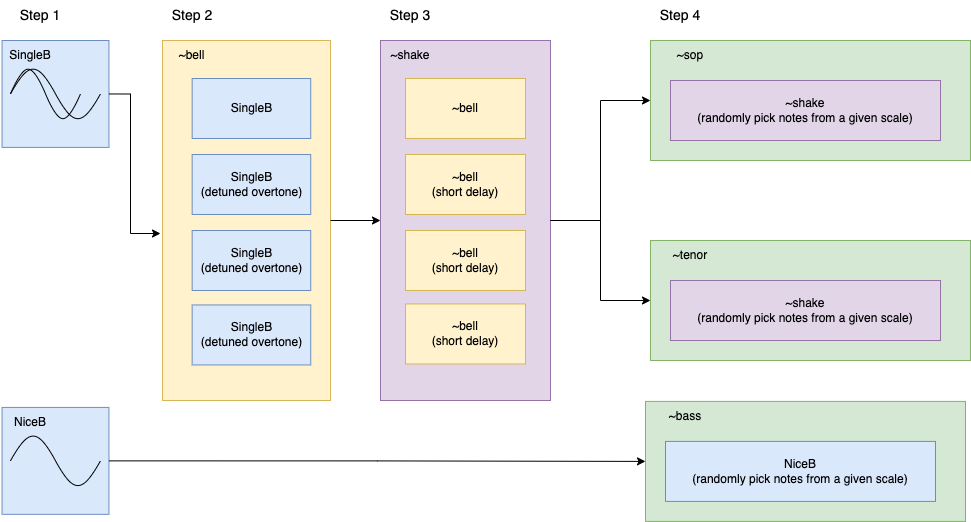
Seoseok Bell creates a bell-like tone by adding multiple sine waves. The bell tones and a simple bass line then make a three-part contrapuntal music. The resulting music has many variations due to the randomization in overtone frequencies, note sequence, and rhythms. The SuperCollider code SeoSeokBell_DotZip.scd does this through the following steps.

  • Step 1: Make two sine waves detuned to each other with a randomized frequency difference, creating a single tone with a pulse.
  • Step 2: Create an overtone series. The notes in the overtone series are randomly detuned.
  • Step 3: Play the sound multiple times with short, randomized time intervals.
  • Step 4: Generate soprano and tenor parts by randomly choosing a note in a scale. At the same time, generate a bass part with simpler overtones in tune.
Code

SeoSeokBell_DotZip.scd has the following sections. Watch a tutorial video on how to use the code.

  • SynthDef(“SingleB”): synthesizes sound described in Step 1
  • ~bell: makes sound described in Step 2
  • ~shake: make sound described in Step 3
  • ~sop, ~tenor,  and ~bass: make sound described in Step 4 
  • SynthDef(“NiceB”): synthesizes bass tone described in Step4
  • SystemClock.sched: schedules start and stop time of ~sop, ~tenor, and ~bass

SynthDef(“SingleB”) and SynthDef(“NiceB”)

The two SynthDefs use simple waveform generators (SinOsc.ar and LFPulse.ar) as audio sources. SynthDef(“SingleB”) uses a percussive amplitude envelope with randomized attack and release times. The envelope also includes a transient generated with LFNoise2.ar. The  SynthDef(“NiceB”) has an envelope on the filter frequency of RLPF.ar

~bell

In ~bell function, SynthDef(“SingleB”) is duplicated using Routine. The below formulas determine the frequencies of the duplicated Synths.

pitch=(freq*(count))*rrand(0.99,1.01);
pitch2 =pitch*(interval.midiratio)*rrand(0.99,1.02)*rrand(0.99,1.02);

Where argument count is increasing by 1 at every iteration of a .do loop

Once defined, ~bell function generates a sound using the following arguments:

~bell.(fumdamental frequency, amplitude, duration, pan position, interval value of overtones)

~shake

~shake duplicates function ~bell with a Routine with randomized .wait, creating a slight delay between the instances of Synths. Once defined, the ~shake function generates a sound using the following artumdnts:

~shake.(fumdamental frequency, amplitude, duration, interval value of overtones, delay time)

~sop, ~tenor, and ~bass

The three functions ~sop, ~tenor, and ~bass are Routines that play ~shake or Synth(“NiceB”)  with frequencies picked from the array ~scale or ~scalebass. The global variables ~bpm and ~beat determine the wait time. The three Routines receive .play and .stop messages according to the timings set by SystemClock.sched.

Uniquely Electronic

In electronic music, a sound design process is often the starting point of a composition. Seoseok Bell began as an exercise inspired by the Risset Bell. I wanted to create a bell sound using additive synthesis. However, such an exercise should not end as a sound design only. The composer or researcher should present the findings in a musical context

More Analysis and Tutorials

Game Controller Comparison For SuperCollider

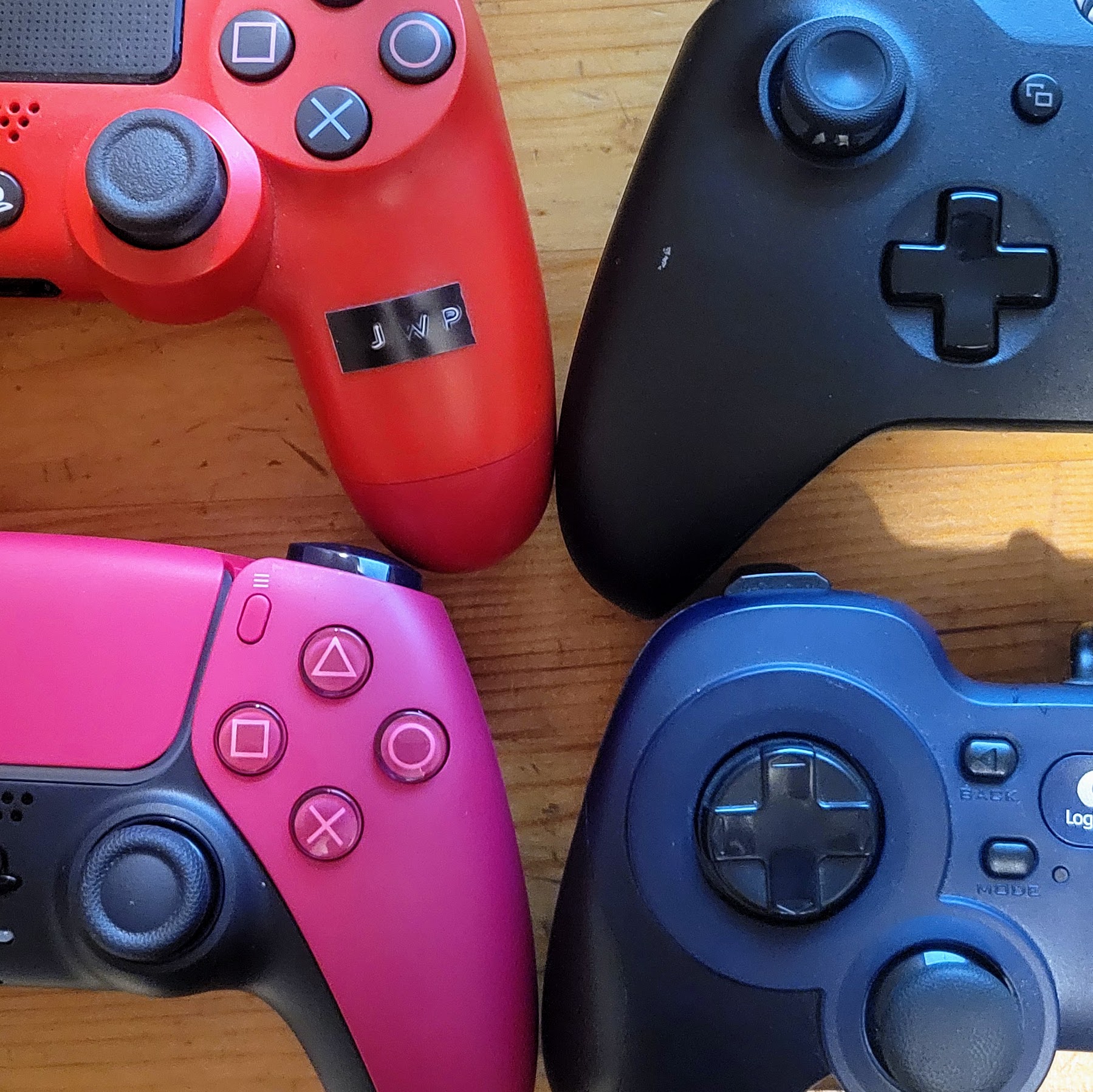
SuperCollider’s HID class lets users connect many types of game controllers without additional software installations. While establishing a connection between a human input device and SuperCollider is easy, decoding the mapping system requires time and effort. A user needs to press a button in the controller, monitor the ID number assigned to the specific button, and then document the result for further use. The good news is that once a user figures out and shares the mapping structure of a device, there is no need to repeat the discovery procedure until the next major OS update.

The chart below shows the control surface-to-SuperCollider mapping of four game controllers: DualShock 4 for PlayStation 4, DualSense for PlayStation 5, Logitech FS310, and Xbox Wireless Controller. It lists elements (ID numbers corresponding to a specific control surface in a device) and their value range for HIDFunc.element command. With the element numbers and ranges below, one can map the incoming data from a controller to various parameters available in SuperCollider.

Element Numbers and Range of Game Controllers

Sony DualShock (PS4)Sony DualSense (PS5)Logitech FA310 Mode DMicrosoft Xbox
BluetoothBluetoothUSBBluetooth
ID (1356, 2508)ID (1356, 3302)ID (1133,49686)ID (1118, 765)
Control Surface [sony | xbox]Element#, (value)Element#, (value)Element#, (value)Element#, (value)
Square | X0, (0 or 1)0, (0 or 1)0, (0 or 1)13, (0 or 1)
X | A1, (0 or 1)1, (0 or 1)1, (0 or 1)10, (0 or 1)
O | B2, (0 or 1)2, (0 or 1)2, (0 or 1)11, (0 or 1)
Triangle | Y3, (0 or 1)3, (0 or 1)3, (0 or 1)14, (0 or 1)
L1 | LB4, (0 or 1)4, (0 or 1)4, (0 or 1)16, (0 or 1)
R1 | RB5, (0 or 1)5, (0 or 1)5, (0 or 1)17, (0 or 1)
L2 | LT button6, (0 or 1)6, (0 or 1)6, (0 or 1)not found yet
R2 | RT button7, (0 or 1)7, (0 or 1)7, (0 or 1)not found yet
Share | Back8, (0 or 1)8, (0 or 1)8, (0 or 1)25, (0 or 1)
Options | Start9, (0 or 1)9, (0 or 1)9, (0 or 1)21, (0 or 1)
L3 | LSB button10, (0 or 1)10, (0 or 1)10, (0 or 1)not found yet
R3 | RSB button11, (0 or 1)11, (0 or 1)11, (0 or 1)not found yet
Logo12, (0 or 1)12, (0 or 1)not found yetnot found yet
Trackpad button13, (0 or 1)13, (0 or 1)N/AN/A
L3 | LSB x-axis14, (0 to 255)14, (0 to 255)13, (0 to 255)0, (0-65535)
L3 | LSB y-axis15, (0 to 255)15, (0 to 255)14, (0 to 255)1, (0-65535)
R3 | RSB x-axis16, (0 to 255)16, (0 to 255)15, (0 to 255)2, (0-65535)
R3 | RSB y-axis17, (0 to 255)17, (0 to 255)16, (0 to 255)3, (0-65535)
L2 | LT continuous19, (0 to 255)19, (0 to 255)not found yet26, (0-1023)
R2 | RT continuous20, (0 to 255)20, (0 to 255)not found yet27, (0-1023)
up18, (0)18, (0)17, (0)28, (1)
up+right18, (1)18, (1)17, (1)28, (2)
right18, (2)18, (2)17, (2)28, (3)
right+down18, (3)18, (3)17, (3)28, (4)
down18, (4)18, (4)17, (4)28, (5)
down+left18, (5)18, (5)17, (5)28, (6)
left18, (6)18, (6)17, (6)28, (7)
left+up18, (7)18, (7)17, (7)28, (8)
release18, (8)18, (8)17, (8)28, (0)

Link to Google Sheets version

Analysis of Element Numbers and Range

The number of available control surfaces, as well as their ranges, varies between the brands. However, all game controllers have three types of input methods. 

  • Button: sends 1 when pressed and 0 when released.
  • Directional Pad: assigns eight integers for eight directions and one integer for the release/unpressed state. The release state is mapped to value 8 in the Sony and Logitech controllers, while it is assigned to 0 in the Xbox controller.
  • Continuous Control: sends a range of numbers like a slider or a knob in a MIDI controller. All but the Xbox controller sends data ranging from 0-255. The Xbox controller has two types of ranges (0-65535 and 0-1023).

More expensive controllers have more features, such as motion sensors and microphone input, but the HID class does not detect them. The number of game controller features available for HID seems to depend on the hosting OS’s version. In 2018, HID received DualShock’s motion sensor and trackpad data when connected to a Macintosh with a USB cable (source). After a few OSX updates, I could not replicate the result in 2025. It is possible that additional input methods could be detected if an external app or extension is installed. I did not test the possibility as my goal is to avoid additional technical steps. 

Demo SuperCollider Patches

Readers can test, study, and modify the controller mapping structure with the .scd files provided in the link above. All four files, one for each model of the controller, have the same parts: 1. Controller initialization 2. Connection tester 3. Controller-to-sound example. The coding style is based on the example section of the HIDFunc manual.   

The Controller initialization section consists of arrays and functions that connect and monitor signals from the game controller. The most important commands in this section are HID.findAvailable, HID.open, and HIDFunc.element. These commands detect the available devices, connect the specific device with the device’s unique ID number, and determine what SuperCollider should do when a control surface is triggered. The rest are functions built to use those three commands efficiently. The users must evaluate the codes inside the first parenthesis labeled //1. Controller Initializations to make the second section of the codes work.

After the initialization, evaluate the codes inside the second parenthesis labeled //2. Test the Controller. It is important to evaluate one line of code at a time for better testing. When a ~whichsurface(element #) function is evaluated, an array containing an element number, control surface name, and value will appear on the post screen. For example, after establishing a connection with a DualSene controller using HID_DualSense_Demo.scd, evaluate the line ~whichsurface.(3). It will activate the triangle button of the controller. Pressing the triangle button will post [ 0, Triangle, 1 ], and releasing the button will post [ 3, Trianle, 0 ] on the Post window. Press command+period or select Menu-> Language-> Stop to stop receiving the messages from the controller. 

Note that arguments (|…args|) inside the HIDFunc element receive an array of numbers from the connected controller. The first number in the array, args[0], receives normalized data ranging from 0.0 to 1.0 as a float. The second number, args[1], receives raw data ranging from 0 to any number as an integer. The demo files use the integer, but users can use the float argument interchangeably. 

The last group of commands under //3. Audio Example maps the controller to a SynthDef’s parameter. The codes inside HIDFunc.element maps a button to change the volume of white noise and a continuous controller to change the panning. Modify the numbers inside the brackets [ ] at the end of the HIDFunc.element( ) to map different buttons and continuous controllers. Note that the method .linlin is used to map the range of 0 to 255 or 65535 to -1.0 to 1.0 in this example code.  

Summary and Application 

I share the mapping of four controllers so that others do not have to repeat the procedure and move faster to the creative phase. My previous sharing of the game controller mapping was in 2018, and it is available as a published document in The Journal Emille. The article is now outdated and only applicable to DualShock.  The current findings discussed here also have limitations: the mappings were tested in SuperCollider 13.0 running in Mac OSX Sequoia only. I was not successful in connecting the controllers to SuperCollider on Windows. I also did not figure out the mappings for Max or other programs.

Once connected via HID in SuperCollider, a game controller becomes an expressive instrument for laptop performance despite the above limitations. Performers can incorporate years, if not decades, of gaming muscle memories to play music. For demonstration, the links below are my two compositions for a game controller quartet. Interested music technologists can download SuperCollider patches and scores from the links below to play the music using the game controllers analyzed in this article. Previous experience in SuperCollider is not needed to play the piece.

PS Quartet No. 1

PS Quartet No. 2

Four Hit Combo (2024)

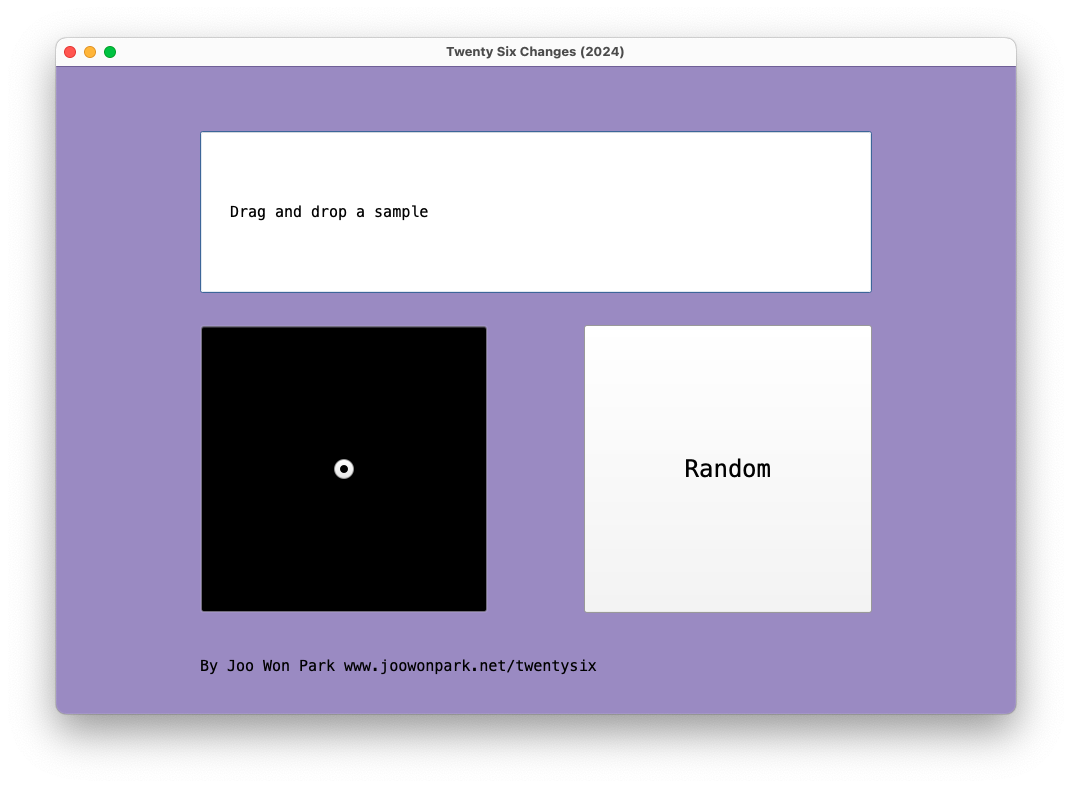
In Four Hit Combo, each laptop ensemble member uses four audio files to create twenty-six flavors. Musical patterns arise from repetitions (loops), and different combinations mark forms in music. The laptop ensemble members prepare their own samples before the performance, and they control loop start points and duration according to the score and the conductor’s cue. Because there are no specific audio files attached to the piece, each performance could give a unique sonic experience.

Instrument Needed

  1. Laptop: each performer needs a computer with SuperCollider installed
  2. Amp: connect the laptop to a sound reinforcement system. If the performance space is small, it is possible to use the laptop’s built-in speaker.

Pre-Performance Preparation

  1. Determine a conductor and at least three performers. If there are more than three performers, parts can be doubled
  2. Each performer prepares three audio files (wav, aif, or mp3). The first file should contain a voice. The second file should contain a pitched instrument sound. The third file should contain a percussion sound. All files should not be too short (less than a second) or too long (more than a minute). The [voice], [instrument], and [percussion] files should be different for all performers.
  3. While the voice, instrument, and percussion files are different for all performers, they should share one common sound file. This file will be used in the [finale].  
  4. The conductor prepares one audio about 10-30 seconds long. It could be any sound with noticeable changes. For example, a musical passage would work well, while an unchanged white noise would not. 
  5. Download FourHitCombo_Score.pdf, FourHitCombo_Performer.scd, and FourHitCombo_Conductor.scd from www.joowonpark.net/fourhitcombo
  6. Open the .scd files in SuperCollider. Follow the instructions on the.scd file to load the GUI screen.

Score Interpretation

  1. Proceed to the next measure only at the conductor’s cue. The conductor should give a cue to move on to the next measure every 10-20 seconds.
  2. In [voice], [instrument], [percussion], and [finale] rectangle, the performers drag-and-drop the audio file accordingly.
  3. In [random] square, performers press the random button in the GUI.
  4. In the square with a dot, quickly move the cursor in the 2D slider to the notated location.
  5. In the square with a dot and arrow, slowly move the cursor from the beginning point to the end point of the arrow. It is OK to finish moving the cursor before the conductor’s cue.
  6. In a measure with no symbol, leave the sound as is. Do not silence the sound.
  7. In measure 27, all performers freely improvise. Use any sounds except the commonly shared sound reserved for [finale]. 

Large Intestine 2013 vs 2024 – Brief Analysis

I am at the age where I can make a “How It Started vs. How It’s Going” analysis of my music. Comparing performance practice change over a decade or so is valuable for my growth, especially when the piece involves improvisation and no score. I can see where I came from, where I am now, and where I should go next. Large Intestine for no-input mixer and computer premiered in 2013, and I still present it in concerts. Watching the August 2013 version and the recent June 2024 version in sequence gives me a chance to contemplate my electronic performance practice. Did the technology and style change over 11 years? 

Technology

I took the “if it ain’t broke, don’t fix it” approach for Large Intestine in terms of the hardware and the software. The SuperCollider patch I coded 11 years ago is almost identical to the 2024 version. There were maintenance updates, such as replacing a deprecated UGen with a current one, but the signal-processing algorithm is untouched.  The hardware signal flow is also unchanged, although I upgraded the mixer for increased possibility and flexibility. 

I perform the piece by changing the mixer settings and SuperCollider patch. The SuperCollider patch consists of eight effect processors, and I turn on and off those effects in different combinations. It is much like playing a guitar with a pedal board. Over the past 11 years, I have bought a “new guitar” but am using the “same pedal.” The sonic possibilities remain the same, but how I play the instrument, the style in other words, has changed.  

Download and run the SuerColider patch for Large Intestine as a reference. You can test it using a mic or any other instrument.

Style

I observed the following differences in the 2013 and 2024 versions of Large Intestine

20132024
Mostly slow and gradual parameter changes Mostly fast and abrupt parameter changes
I discover things on stageI present previously experienced sounds
The mixer supports computer soundsThe computer supports mixer sounds
Long duration (10+ minutes)Short duration (less than 8 minutes)

When I was a no-input beginner, I could not make quick transitions and variations. In the 2013 version, I treated the mixer as one of many sound sources that could pass through signal processors. Like its umbrella project, 100 Strange Sounds, Large Intestine featured my SuperCollider capacity. The 2024 version shows that I reduced the dependency on the computer part. I also learned to say more within less time.

Gained confidence also changed the performance goal. I make a one-sentence goal when I am improvising solo. My goal for Large Intestine used to be “Let me figure out what no-input mixer can do on stage,” as it delighted me to discover the mixer’s unique sound and its augmentation by the computer. 11 years later, there are much less delightful discoveries in the piece. But I can now expect the sound I can create. The current  motto is, “Let me show you my favorite no-input mixer moments I learned previously on stage.” 

Evaluation

I am my work’s biggest supporter and critic, but that does not help my career development. The audience ultimately decides the longevity of the work. Large Intestine was fortunate to be liked by the audience on many occasions. It received some honors, such as being included in the SEAMUS CD series (2015), a peer-reviewed annual album released by the Society for Electroacoustic Music in the United States. There were multiple invitations to perform at different venues, and it became an integral part of my solo performance practice. The positive feedback from presentations motivated me to delve further into the no-input mixer world. I composed the following pieces based on the learnings from Large Intestine.

There are also clear limits to Large Intestine and my solo electroacoustic improvisation. I don’t expect other performers to play Large Intestine as it lacks score or instruction. The experience and joy I had with the piece are not transferable to other performers. This bothered me. I tackled this issue by teaching others how to play no-input mixers. I currently enjoy organizing no-input mixer workshops and no-input ensemble sessions. The mixer is a great introductory instrument for electronic music performance.

Dot Zip

https://joowonpark.net/dotzip/

Dot Zip consists of 22 short electronic compositions. The tracks feature a synthesis technique or a compositional structure best realizable with code-based audio programs. They are examples of what one does after learning an audio coding programs like MaxMSP and SuperCollider.

Dot Zip is a pedagogical project. Each track is an unedited render of a SuperCollider file. Download and try the .scd files from the link below.

A tutorial video on how to operate the SuperCollider files is also available:

More about each piece’s inspiration, techniques, and applications are on the way. Stay tuned!