In the Tool and Variations post, I explained a composition method for electronic music.
- Make an instrument
- Make variations using the instrument
- Organize the variations in a musical order
This method works only if I make ample variations with distinguishable yet similar traits. The production of such sounds involves structured, methodical repetition. Once I have a surplus of sounds, I use musical experience and training to select and sequence some of them.
I use four ways to produce variations from sound sources. The four are categorized by the quantity of inputs and the number of functions.
- One input with many functions
- Many inputs with one function
- Many inputs with many functions
- One input with one function
An input in the list above is a sound, an audio file, a sample, or any starting point sound. A function is a tool, a plug-in, a DSP patch, or any technique or idea that changes the input. An input processed by a function produces an output that is different yet similar to the input. The input->function->output relationship is fundamental in music technology. Borrowing terms from mathematics, the relationship is expressed with the symbol f(x), where x is an input, f is a function, and f(x) is an output.
| x | f | f(x) |
| Guitar | Distortion pedal | Distorted guitar sound |
| Voice | Granular patch | Granularized voice |
| 100 | + 200 | 300 |
The following sections provide a detailed explanation of the different methods for producing variations. Each section has diagrams, example music, and composition tips.
One Input With Many Functions
In this method, I limit the type of incoming sounds to one. I compensate for the lack of variety in the source with many plugins, SuperCollider patches, hardware processors, and other electronic transformations. The resulting outputs are different from the original, but listeners can hear that they are related to the source.

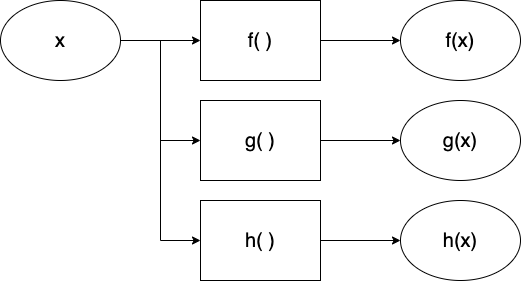
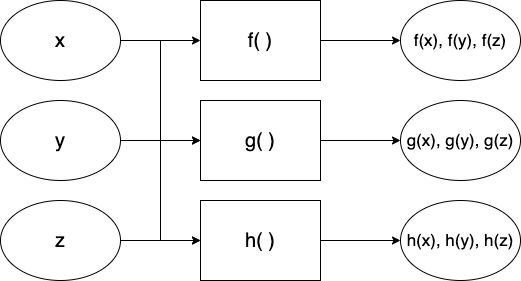
The one-input-many-functions model is often observed in interactive electronic music, if we think of an instrument as the input.
- x: an instrument
- f, g, h: effect processors that make a type of variation
- f(x): resulting sound
- g(x): resulting sound from another effect processor g
- h(x): resulting sound from another effect processor h
- i(x), j(x), k(x)…
In Armor+2 (2015) for clarinet and computer, a clarinetist plays on stage while the computer performer controls a SuperCollider patch off stage. All computer sounds except for one are a result of processing the clarinet sounds. The audience can hear that the computer parts are clarinet sounds with electronic timbral extensions – In other words, the computer parts sound like a clarinet, but they are not feasible without the help of electronics.
Many Inputs With One Function
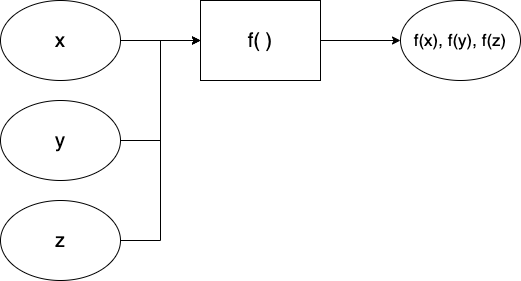
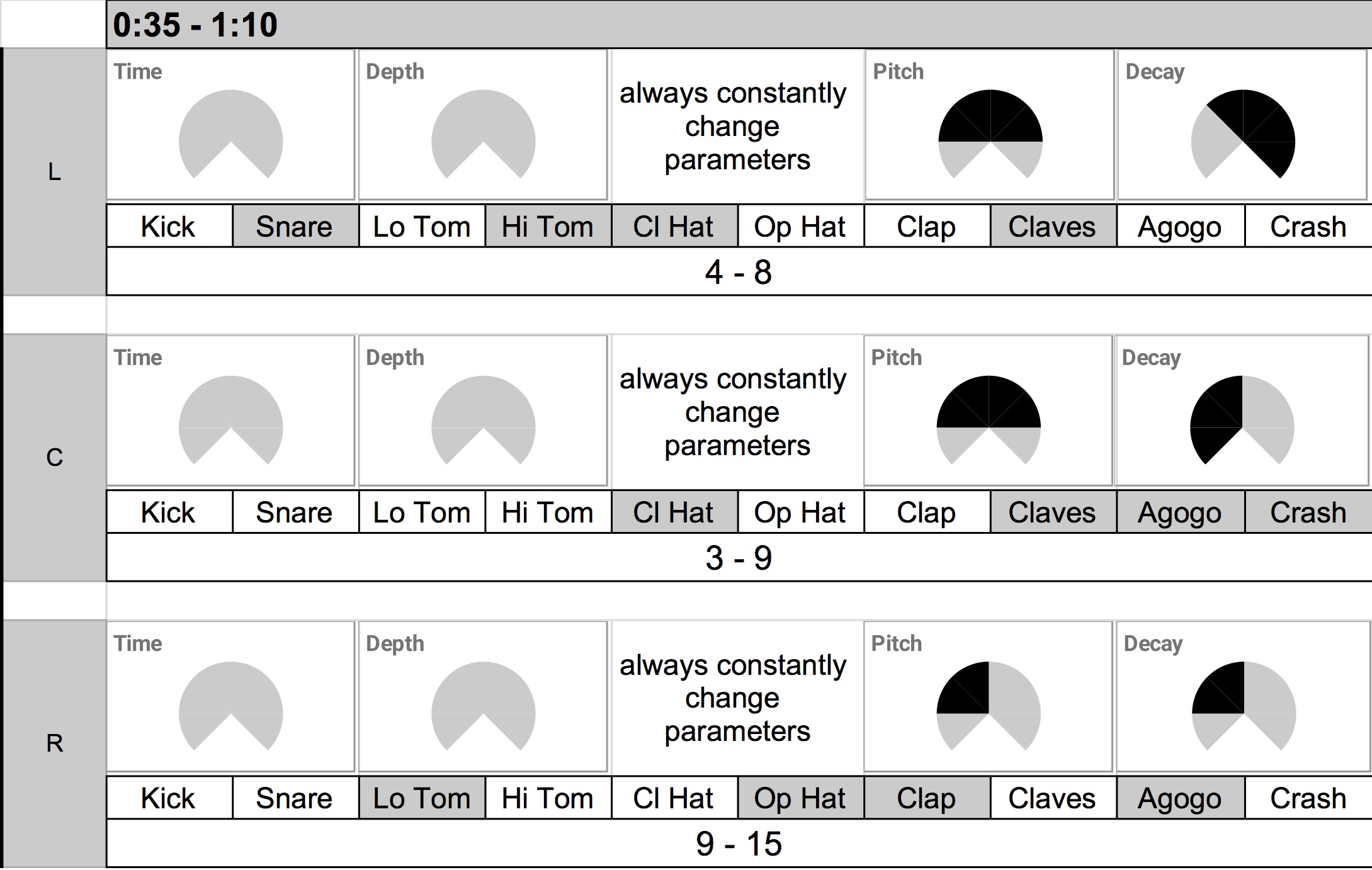
At 0:35-1:00 of Pierre Schaeffer’s Bilude (1979), recordings of everyday objects alternate with the piano part. They sound musically related to the piano part because the electronics were processed under the same rules – edit the audio in sync with the piano part. We can frame this in the context of the Input and Function.

- x, y, z: different types of inputs (audio recordings of paper, water, scissors, etc.)
- f: function (edit according to the rhythm of the piano part)
- f(x): resulting sound (paper sound in the rhythm of the piano part)
- f(y): resulting sound (water sound in the rhythm of the piano part)
- f(z): resulting sound (scissor sound in the rhythm of the piano part)
- f(a), f(b), f(c)…
Applying a common rule or function adds reasons for seemingly random sounds to coexist in an electronic music composition. A shared function forms a shared identity that audiences can listen to and follow.
The identity can be a musical rule, like the ones in Bilude’s, or a shared tool. In Piano Triplets (2020), an EP collaboration with Starkey, all tracks use the same signal processing algorithm. Starkey provided samples made with piano, Buchla, bouncing ball, and synths. I processed them with the ISJS patch made with SuperCollider. The results of processing these samples with various presets were distinct enough to make three tracks.
Many inputs With Many Functions
One does not have to choose between one of the two methods mentioned above. In many cases, composers use multiple inputs and multiple functions to generate a vast array of variations.

The maximalist approach could be good if the composer is in control of the available sources. In Bilude, the electronic part at the beginning consists of processed piano sounds, which fall under the One Input With Many Functions category. It is followed by the Many Inputs With One Function section, as explained in the previous section. Then the piece mixes two methods in the more rhythmically freer latter half.
I use many input and function approaches for improvisation. When spontaneity is necessary, it is better to prepare an excess of sounds and tools than to run out of techniques. My electronic improvisation setup cannot play traditional scales or rhythms, so I make it up by bringing in many sound sources and using a SuperCollider patch with 10+ effects.
One Input With One Function
Is processing one input with one function musically useful, then? Yes, if the input or the function is exceptional, and if finding its value takes time. Many tracks in Fan Art (2023) feature a digital instrument presented within a single compositional idea. The minimalist approach gives the audience time to focus on details and subtle changes. My job as a creator of such music is to design an instrument that is interesting enough and then present its various states efficiently. Below is a list of some tracks in Fan Art in the context of input-function-output.
| x | f | f(x) |
| Karplus string instrument | Harmonic progression of BWV 847 | 847 Twins |
| Organ-like instrument | Harmonic progression of Claire de Lune | End Credits |
| Loop | Rhythmic modulation of Samulnori | Ogum Walk |
One Input With One Function can also yield unexpected, delightful sounds with feedback.

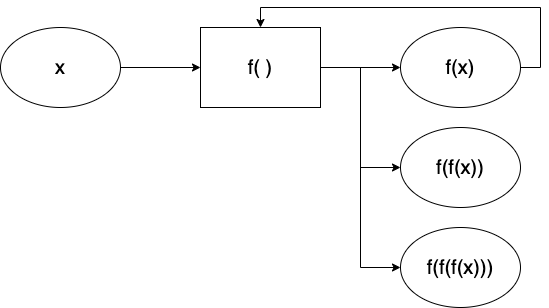
If a function f processes an input x, and the result f(x) is then processed again by the same function f, the newly iterated output is a new variation. The early and still excellent example is Alvin Lucier’s I Am Sitting In A Room (1969). The piece clearly states its input, function, and output at the beginning, yet the ending result is awestruck.
* Search for and read computer music composition methods and related articles by visiting my Zotero site: Academic Electronic Musician.