Teaching Materials For Electronic Music

Here are some electronic music examples you can listen to, play, and analyze for college-level music classes. They are introductory, free, and have specific purposes. Disclaimer: These materials are from my repertoire and projects, not references to DAWs or plugins. 

CML Suite – Arpeggios (2020)

Score: Download a PDF or go to page 9 of Google Slides Score

Description: Use the circle of fifths to play an electronic ensemble piece. The entire class can participate as long as each student has access to Chrome Music Lab

Recommended Use: 

  • Introductory exercise for electronic music ensemble classes
  • Interactive material for music theory classes when learning the circle of fifths
  • Audience participation piece for a concert


Dot Zip (2024)

Codes: Download a .zip file containing SuperCollider files

Description: 22 music examples and downloadable code for SuperCollider, a free audio coding app. There are no secret techniques. What you see in the code is what you are hearing.

Recommended Use:


Singaporean Crosswalk (2016)

Codes and Score: use the embedded link in the title

Description: Become a human surround sound system mimicking the nature and traffic signals in Singapore. SuperCollider must be installed on the performer’s computer (minimum of 4 performers), but previous experience in SuperCollider or electronic ensemble is not necessary.

Recommended Use:

  • Introductory repertoire for laptop ensemble: 20+ electronic ensembles have performed it in their concerts
  • Interactive material for music technology classes when learning surround sound and multichannel systems
  • Complementary example when learning about Alvin Lucier and classic electronic music repertoire.


Academic Electronic Musician (2026)

Project Page: Web link to Zotero Group Library. Works better on computers than mobile devices. Click on the Items icon in the subfolder when using mobile devices.

Description: A comprehensive example of an electronic musician’s creative practice. Use the tags and built-in search engines to research topics on composition, performance, and career development.

Recommended Use:


Is this useful and interesting? If so, please support by sharing, listening, and attending concerts.

I am also available for in-person workshops and virtual guest talks. Feel free to contact me via @joowonmusic


Control Click – Brief Analysis

Control Click is a sound installation I made in 2016. It’s also the title of my recent album. This article is a short analysis detailing how I made the piece in terms of composition and technology.

Program

Control Click is a sound installation for a place with multiple computers, such as a computer lab or a game room. Using freeware, a typical computer lab turns into a multichannel audiovisual instrument that plays algorithmically generated parts. It sounds like a dream sequence at an arcade.

Listen to the tracks and watch the video before reading the next sections.

Form

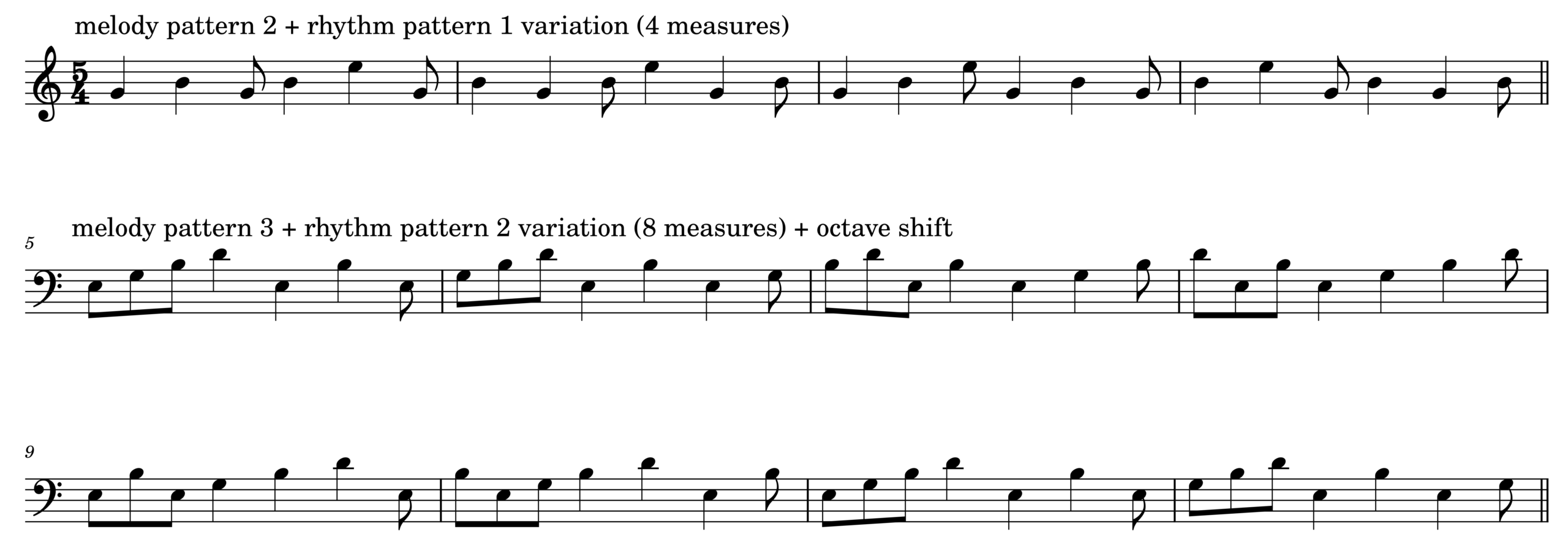
Control Click is an electronic octet in which every player (i.e., the computer) plays a melody on the same type of instrument.  The instrument gets a specific instruction to choose rhythm, melody, and timbre. First, each player randomly chooses a melody pattern. The chosen pattern is repeated until the next cue.

The choice of rhythm is separated from that of melody. At a cue, the computer chooses a group of rhythmic values, randomly shuffles the order of the notes, and then repeats the newly-formed rhythmic pattern 4 or 8 times. 

The sound is generated by combining a choice in melodic pattern and a choice in rhythmic pattern. The computer chooses another combination in the next cue. Below is one possible result of the algorithm described so far.

The cue is manually timed and recorded, like a placement of audio or MIDI data in a DAW. The cue also triggers changes in timbre, note duration, and octave transposition. The audio example below demonstrates the mentioned variations.

Finally, when 8 or more computers play and change instrument parameters in sync, the room with the computers can make sounds heard in the piece. Listen to 00:30-01:30 of the Bandcamp link for an example.

Code

The demo is formatted like the code examples in DotZip: there are three separate parts labeled SynthDef, Functions, and Performance. To read, modify, and evaluate the scd file, copy-paste-evaluate the code below in SuperCollider. You will hear sounds when evaluating the performance section after running the SynthDef and Functions sections.

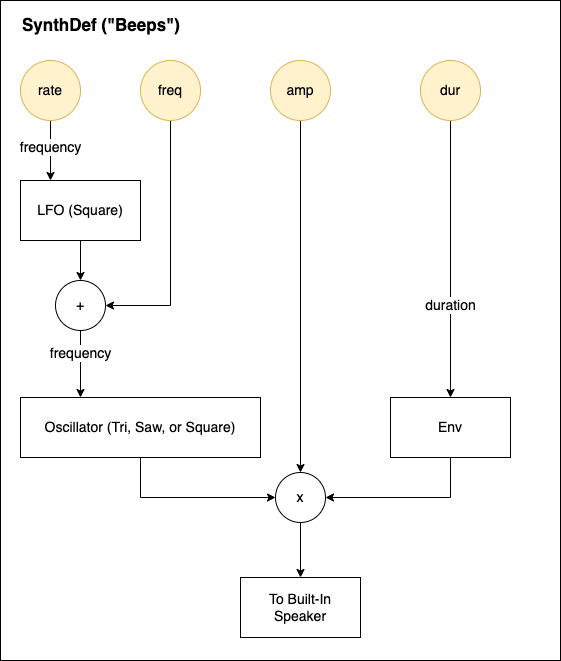
There are three SynthDefs in the linked scd file named Beep, Beep2, and Beep3. The design scheme is the same for all of them, but each uses different oscillators for timbral change. They are simple instruments with controllable frequency modulation rate and amplitude envelope durations.

//1. SynthDef
(

SynthDef("Beep", {
	arg freq =60, amp=0.5,dur=0.5,rate=4;
	var sound,lfo;

	lfo= LFPulse.ar(rate,0.5,mul:freq);
	sound = Saw.ar(freq+lfo);
	sound = sound*(XLine.ar(1,0.00001,dur,doneAction:2));

	Out.ar (0,sound.dup*amp);
}).load(s);

SynthDef("Beep2", {
	arg freq =60, amp=0.5,dur=0.5,rate=4;
	var sound,lfo;

	lfo= LFPulse.ar(rate,0.5,mul:freq);
	sound=LFTri.ar(freq+lfo);
	sound = sound*(XLine.ar(1,0.00001,dur,doneAction:2));

	Out.ar (0,sound.dup*amp);
}).load(s);

SynthDef("Beep3", {
	arg freq =60, amp=0.5,dur=0.5,rate=4;
	var sound,lfo;

	lfo= LFPulse.ar(rate,0.5,mul:freq);
	sound=Pulse.ar(freq+lfo);
	sound = sound*(XLine.ar(1,0.00001,dur,doneAction:2));

	Out.ar (0,sound.dup*amp);
}).load(s);


); //end of SynthDefs

The performance instruction is expressed using a Routine object in SuperCollider. 

//2. Functions
(
~key=63;
~sixteenth=0.2;
~dur=0.5;
~rate=18;
~octave=12*rrand(-2,2);
~rhythm=[[1,1,1,0.5,0.5,1],[1,1,0.5,0.5,0.5,0.5]].choose;
~motif=[[0,3,0,3,0],[3,7,3,7,12],[0,3,7,10,0,7]].choose;
~tempo=1;
~instru=["Beep","Beep2","Beep3"].choose.asString;

~melody=Routine({
	var rhythm;
	loop{
		//freq =60, amp=0.5,dur=0.5,rate=4;
		rhythm=~rhythm.scramble*~sixteenth;
		[4,8].choose.do{
			(rhythm.size).do{
				arg count;
				Synth(~instru,[\freq,(~key+~motif.wrapAt(count)+~octave).midicps,\amp,0.2,\dur,~dur,\rate,~rate]);
				(rhythm.at(count)*~tempo).wait;
			}//~rhythm.size.do
		}//[4,8].choose;
	}//loop

});
); //end of Functions

Once ~melody Routine runs and starts to make sound in the Performance section, one can vary the pattern and timbre by modifying and/or evaluating ~global variables.

//3.Performance
//Evaluate each line separately

~melody.reset;~melody.play;
~melody.stop;

(
~dur=rrand(0.3,3.4); // note duration in seconds
~rate=rrand(8,18); //vibrato rate in Hz
~octave=12*rrand(-2,2); //octave shift
~rhythm=[[1,1,1,0.5,0.5,1], [1,1,0.5,0.5,0.5,0.5,1]].choose; //choose a rhythm pattern 
~motif=[[0,3,0,3,7], [3,7,3,7,12], [0,3,7,10,0,7]].choose; //choose a note sequence
~tempo=[0.5,1,0.25,1.25].choose; //tempo (higher the number, slower the tempo)
~instru=["Beep","Beep2","Beep3"].choose.asString; //choose an instrument
)

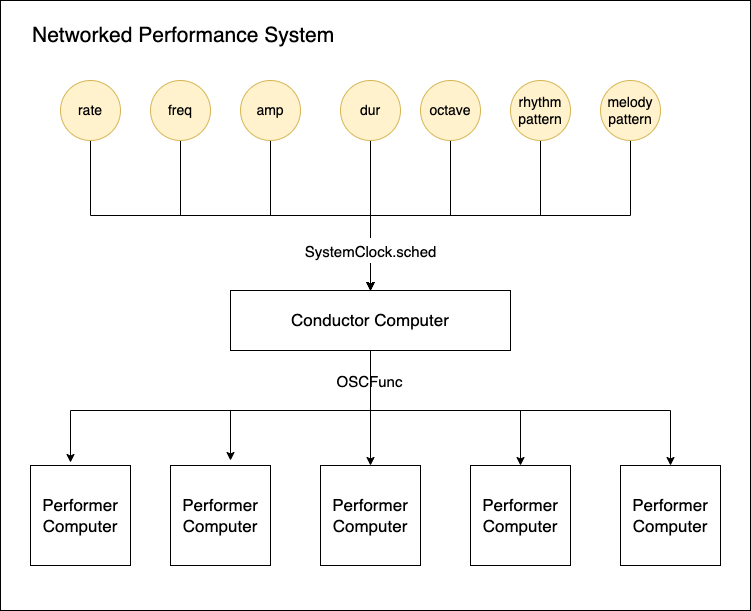
In the actual installation, each computer runs the above more SynthDefs for more variety. Instead of manually changing global variables, SystemClock.sched in SuperCollider creates a cue list of events and changes. The changes are generated by a central computer and sent to networked workstations using OSC.

Uniquely Electronic

I cannot think of a way to create a similar sound world to Control Click without using multiple computers. The recordings linked above are an approximation of the actual experience of the piece. The listeners are invited to walk around the computers that emit sounds and lights, which vary each time slightly due to the use of random numbers. Like many live electronic pieces, Control Click is best experienced live.

To learn more about Control Click, read the piece’s blog here. There are many versions of the piece.  To read more analysis of electroacoustic pieces, browse a keyword in Academic Electronic Musician.

Input And Function – Computer Music Composition Method

In the Tool and Variations post, I explained a composition method for electronic music.

  1. Make an instrument
  2. Make variations using the instrument
  3. Organize the variations in a musical order

This method works only if I make ample variations with distinguishable yet similar traits. The production of such sounds involves structured, methodical repetition. Once I have a surplus of sounds, I use musical experience and training to select and sequence some of them.

I use four ways to produce variations from sound sources. The four are categorized by the quantity of inputs and the number of functions.

  • One input with many functions
  • Many inputs with one function
  • Many inputs with many functions
  • One input with one function

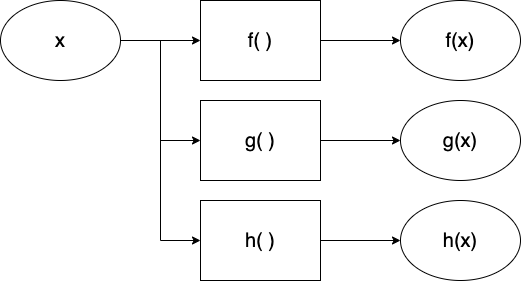
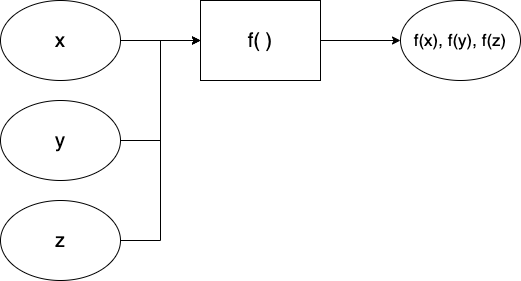
An input in the list above is a sound, an audio file, a sample, or any starting point sound. A function is a tool, a plug-in, a DSP patch, or any technique or idea that changes the input. An input processed by a function produces an output that is different yet similar to the input. The input->function->output relationship is fundamental in music technology. Borrowing terms from mathematics, the relationship is expressed with the symbol f(x), where x is an input, f is a function, and f(x) is an output.

xff(x)
GuitarDistortion pedalDistorted guitar sound
VoiceGranular patchGranularized voice
100+ 200300

The following sections provide a detailed explanation of the different methods for producing variations. Each section has diagrams, example music, and composition tips.

One Input With Many Functions

In this method, I limit the type of incoming sounds to one. I compensate for the lack of variety in the source with many plugins, SuperCollider patches, hardware processors, and other electronic transformations. The resulting outputs are different from the original, but listeners can hear that they are related to the source.

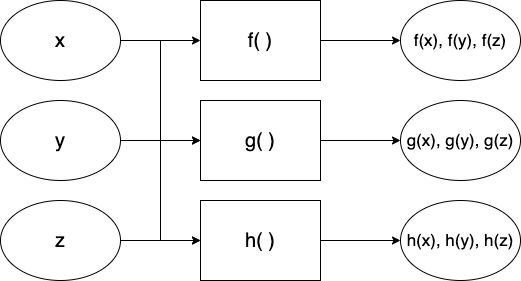
The one-input-many-functions model is often observed in interactive electronic music, if we think of an instrument as the input.

  • x: an instrument 
  • f, g, h: effect processors that make a type of variation
  • f(x): resulting sound
  • g(x): resulting sound from another effect processor g
  • h(x): resulting sound from another effect processor h 
  • i(x), j(x), k(x)…

In Armor+2 (2015) for clarinet and computer, a clarinetist plays on stage while the computer performer controls a SuperCollider patch off stage. All computer sounds except for one are a result of processing the clarinet sounds. The audience can hear that the computer parts are clarinet sounds with electronic timbral extensions – In other words, the computer parts sound like a clarinet, but they are not feasible without the help of electronics.

Many Inputs With One Function

At 0:35-1:00 of  Pierre Schaeffer’s Bilude (1979), recordings of everyday objects alternate with the piano part. They sound musically related to the piano part because the electronics were processed under the same rules – edit the audio in sync with the piano part. We can frame this in the context of the Input and Function.

  • x, y, z: different types of inputs (audio recordings of paper, water, scissors, etc.)
  • f: function (edit according to the rhythm of the piano part)
  • f(x): resulting sound (paper sound in the rhythm of the piano part)
  • f(y): resulting sound (water sound in the rhythm of the piano part)
  • f(z): resulting sound (scissor sound in the rhythm of the piano part)
  • f(a), f(b), f(c)…

Applying a common rule or function adds reasons for seemingly random sounds to coexist in an electronic music composition. A shared function forms a shared identity that audiences can listen to and follow.  

The identity can be a musical rule, like the ones in Bilude’s, or a shared tool.  In Piano Triplets (2020), an EP collaboration with Starkey, all tracks use the same signal processing algorithm.  Starkey provided samples made with piano, Buchla, bouncing ball, and synths. I processed them with the ISJS patch made with SuperCollider.  The results of processing these samples with various presets were distinct enough to make three tracks.

Many inputs With Many Functions

One does not have to choose between one of the two methods mentioned above. In many cases, composers use multiple inputs and multiple functions to generate a vast array of variations.

The maximalist approach could be good if the composer is in control of the available sources. In Bilude, the electronic part at the beginning consists of processed piano sounds, which fall under the One Input With Many Functions category. It is followed by the Many Inputs With One Function section, as explained in the previous section. Then the piece mixes two methods in the more rhythmically freer latter half.

I use many input and function approaches for improvisation. When spontaneity is necessary, it is better to prepare an excess of sounds and tools than to run out of techniques. My electronic improvisation setup cannot play traditional scales or rhythms, so I make it up by bringing in many sound sources and using a SuperCollider patch with 10+ effects. 

One Input With One Function

Is processing one input with one function musically useful, then? Yes, if the input or the function is exceptional, and if finding its value takes time. Many tracks in Fan Art (2023) feature a digital instrument presented within a single compositional idea. The minimalist approach gives the audience time to focus on details and subtle changes. My job as a creator of such music is to design an instrument that is interesting enough and then present its various states efficiently. Below is a list of some tracks in Fan Art in the context of input-function-output.

xff(x)
Karplus string instrumentHarmonic progression of BWV 847847 Twins
Organ-like instrumentHarmonic progression of Claire de LuneEnd Credits
LoopRhythmic modulation of SamulnoriOgum Walk

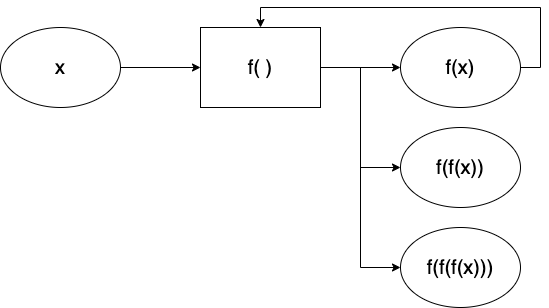
One Input With One Function can also yield unexpected, delightful sounds with feedback.

If a function f processes an input x, and the result f(x) is then processed again by the same function f, the newly iterated output is a new variation. The early and still excellent example is Alvin Lucier’s I Am Sitting In A Room (1969). The piece clearly states its input, function, and output at the beginning, yet the ending result is awestruck. 

* Search for and read computer music composition methods and related articles by visiting my Zotero site: Academic Electronic Musician.

Option Escape (2026)

Option Escape for laptop ensemble uses the computer’s text-to-speech functions. In 2026, the speech read by a computer still sounds artificial and quirky. The ensemble of those artificial voices can become a musical entity. To perform Option Escape, each performer should prepare a text file consisting of sentences, words, numbers, and codes. The performer should also choose a favorite voice and ready the hotkey (option+esc in Mac OSX) to start and stop the speech.

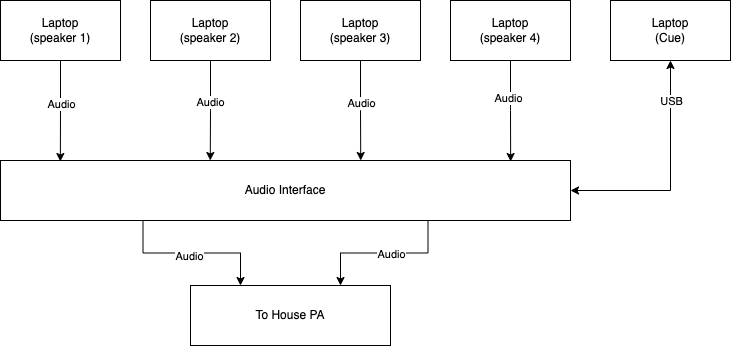
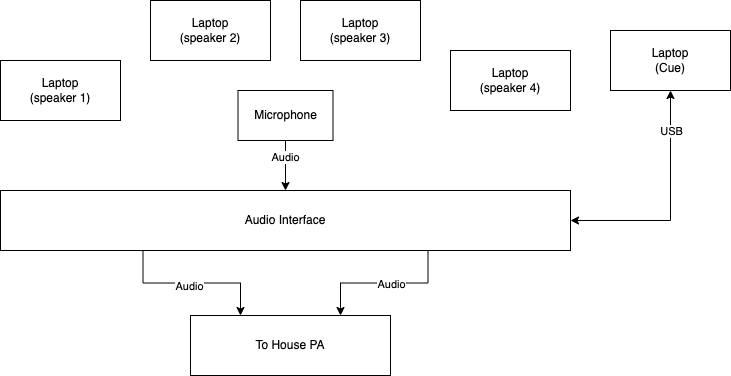
Hardware Setup

  • Minimum 5 computers with text-to-speech feature (Mac OSX preferred)
  • A multichannel audio interface OR an interface and a mic
  • Stereo PA system 
  • Audio cables to connect the laptops’ built-in outputs to the interface
  • Diagrams for two possible setups are shown below

Software Setup

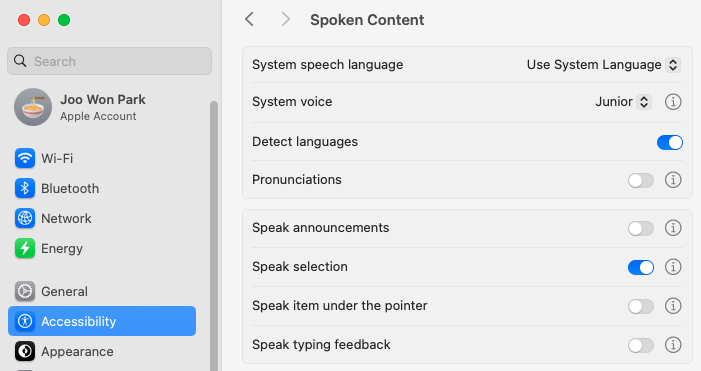
  • Performers, except for the Cue part, should change the computer settings to read the text with a computer-generated voice. In the current OSX, go to System Settings -> Accessibility. Enable Speak Selection. Change System Voice at will. See the above figure. 
  • Download SuperCollider files and score
  • The performer playing the Cue part runs optionesc.scd on SuperCollider.  

Score Interpretation

  • Speak 1/2/3/4 selects and text-to-speech the text in the prepared file according to the score. If the selected text ends before the next cue, repeat text-to-speech. 
    • Paragraph: Use two or more paragraphs.
    • Sentence: Use one sentence. 
    • 3 Words: Use three words.
    • Word: Use a word.
    • Vowel/ Number/ Symbol: Use a vowel, a number, or a symbol (test the symbols beforehand) 
    • Code: Use a computer code or a web address.
  • Speak 1/2/3/4 parts should prepare an original text file for a performance. Copy-paste the texts multiple times for a better performance. An example is included in the download (or click here).
  • The notehead indicates the text-to-speech reading speed. If the measure does not have a notehead, retain the previous reading speed.
    • Natural (no sharps or flats): read at normal speed
    • Flat (b): read at a slow speed
    • Double flat (bb): read at the slower speed
    • Sharp (#): read at a fast speed
    • Double sharp (x): read at the faster speed
  • In Cue 17, performers manually fade out the computer voice while speaking the paragraphs in their own voice. End at cue
  • One performer should operate the SuperCollider file as a cue player.
    • Open OptionEsc.scd
    • Select Menu -> Evaluate File
    • When the GUI appears, press the button according to the score
    • Cue the performers for the next section, if preferred
  • Performance Tips (for Mac OS 10.15 )
    • Place the left hand on the option and escape keys at all times. To quickly change the text, highlight the text, hold the Command key, and press the Escape key twice.
    • To read text faster or slower, double-click the rabbit or turtle quickly after the computer starts speaking.

Annecdote

The audio file below is a simulation I made while composing Option Escape. The listeners at the concert felt the low and high frequencies of the beats, but the mics in the concert hall could not capture the details of the SuperCollider part. If you are an ensemble director, please listen to the recording below for consideration of your next repertoire.

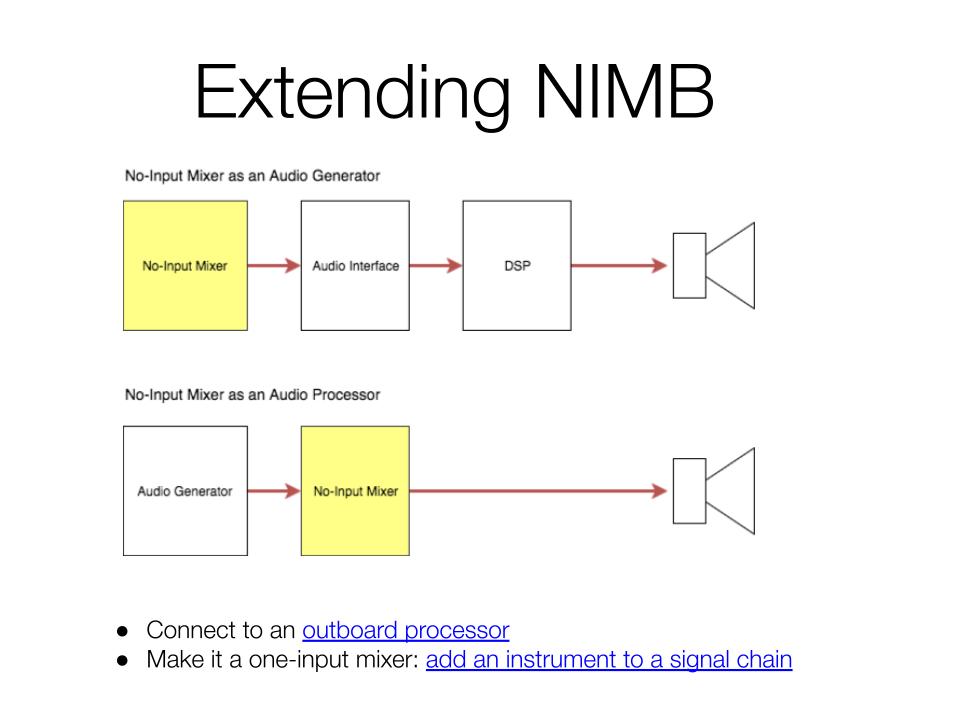
No-Input Mixer: Slides and Audio Examples

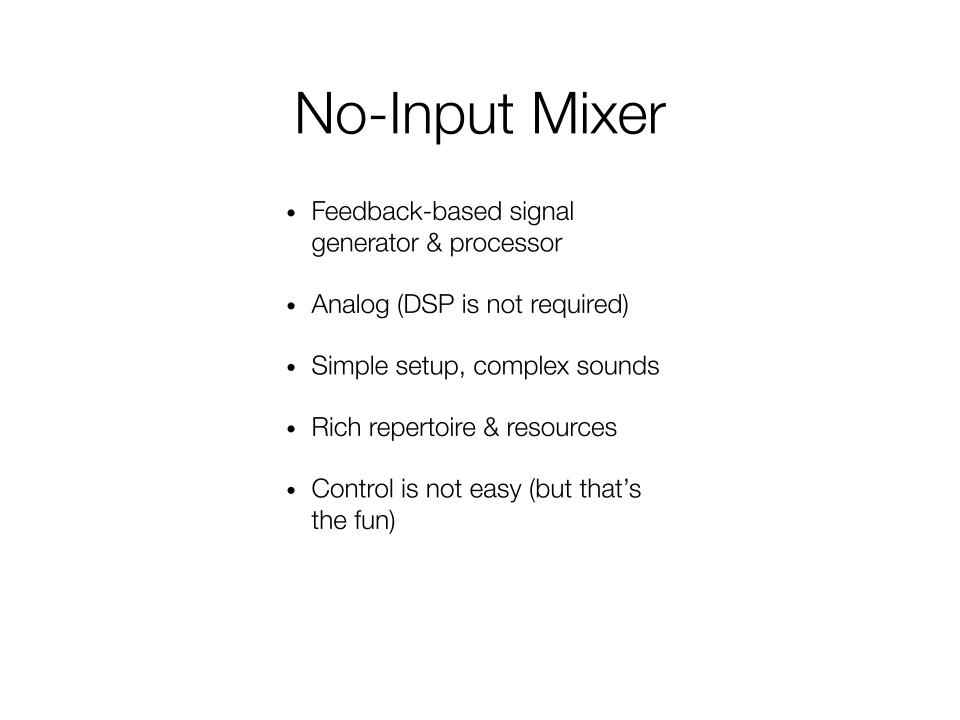
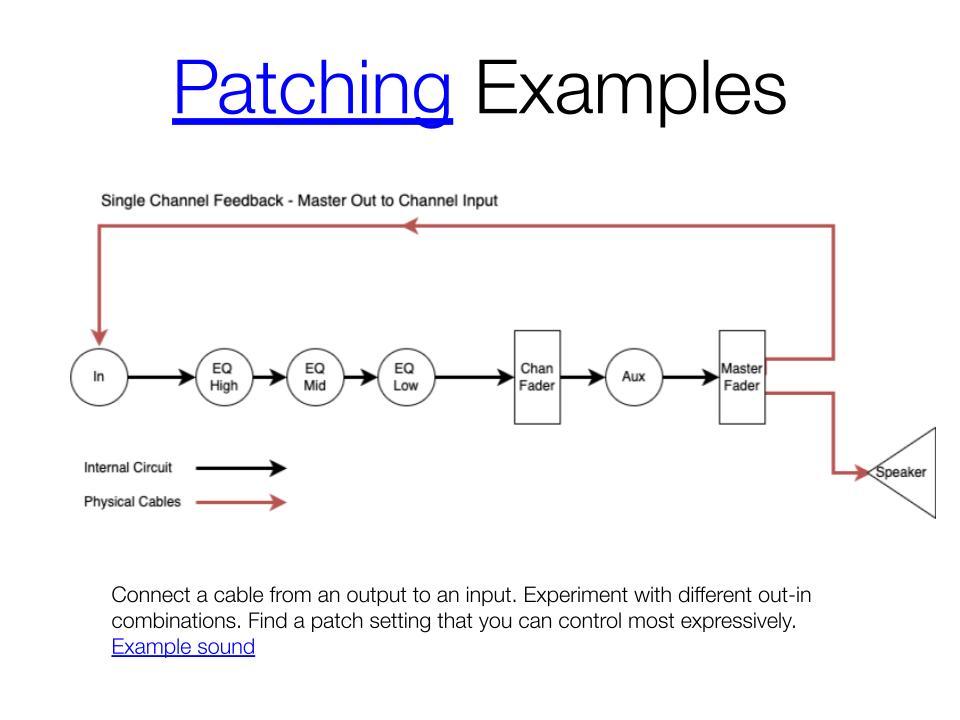
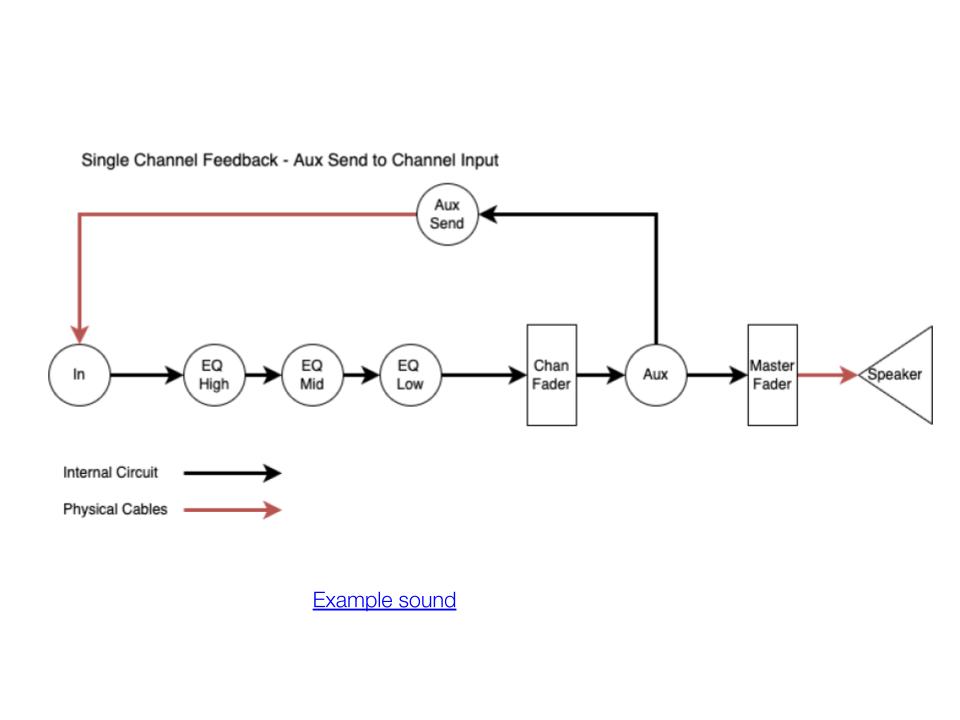
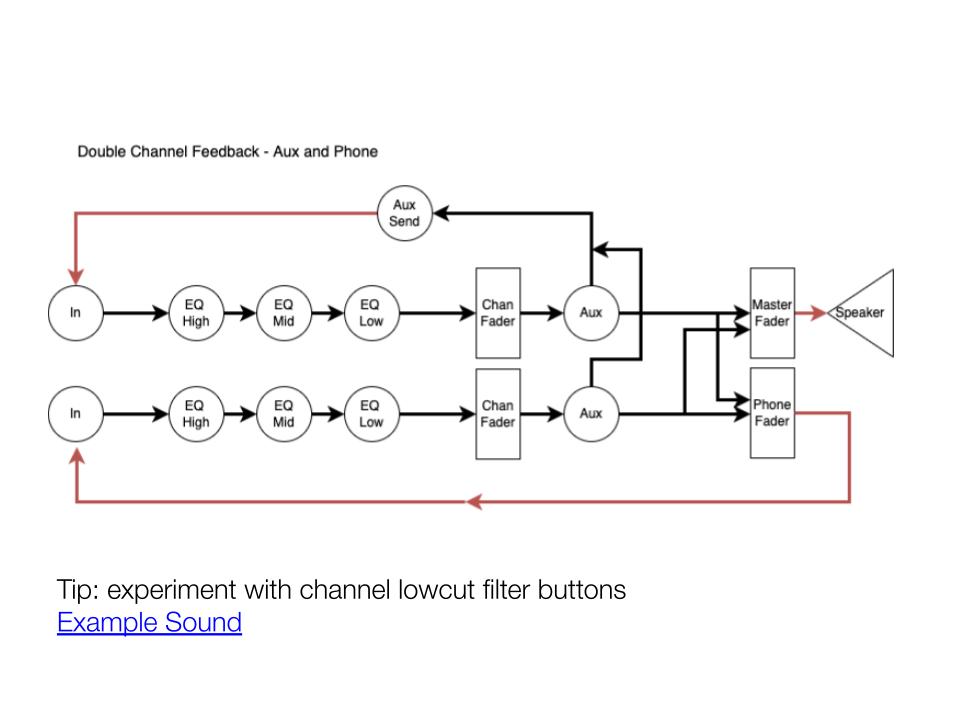
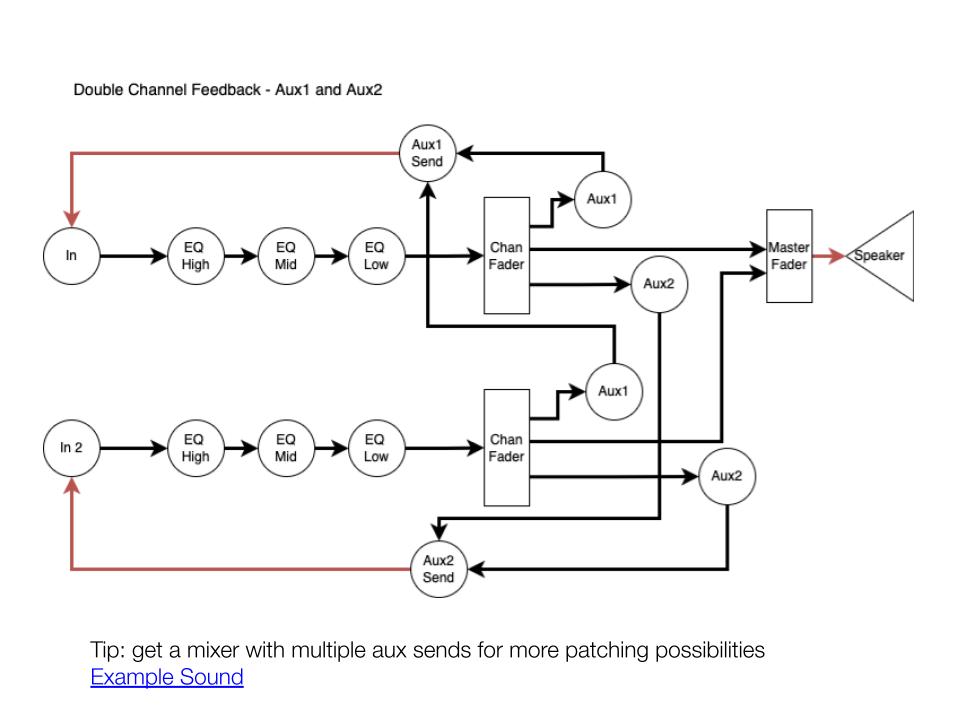
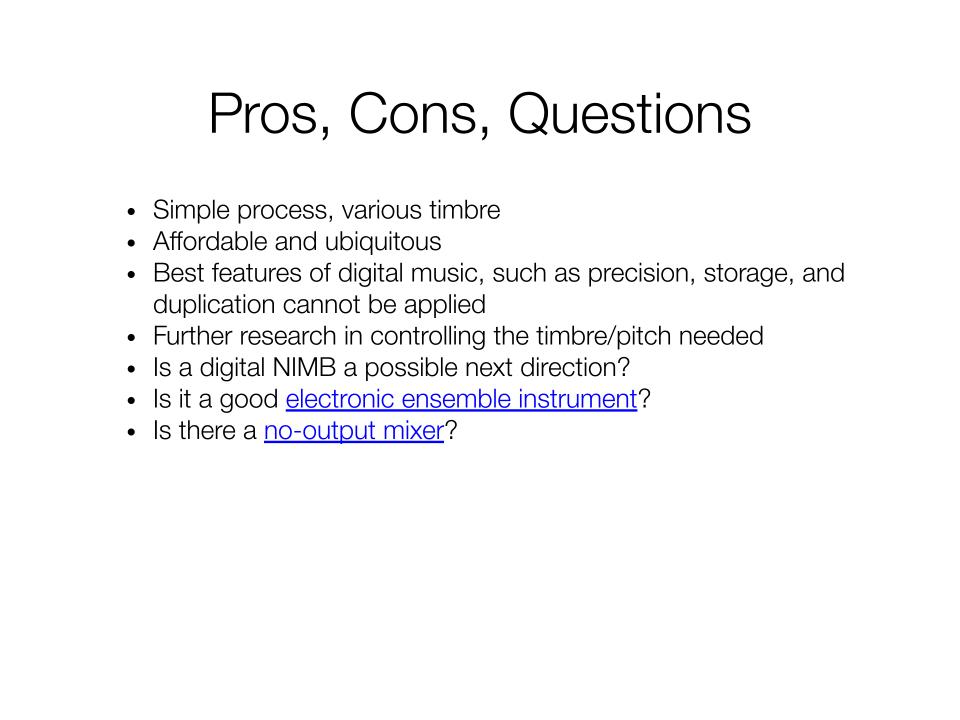
Here are the presentation materials I use for the no-input mixer workshops. A no-input mixer is a great introductory instrument for noise-based electronic music practice.

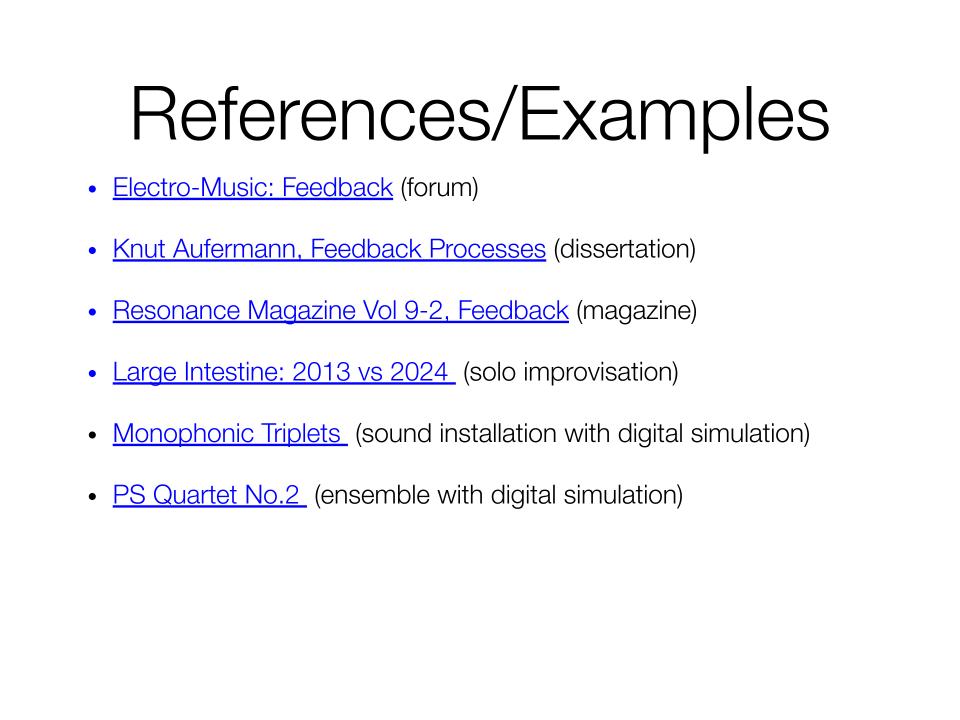
Google Slides: has links, audio samples, diagrams, etc.

Here’s another version of the tutorial with a bit of performance in the second half

Let me know if you want to invite me to run a workshop. I can bring the necessary gear for the hands-on experience!