Tag Archives: supercollider

Teaching Materials For Electronic Music

Here are some electronic music examples you can listen to, play, and analyze for college-level music classes. They are introductory, free, and have specific purposes. Disclaimer: These materials are from my repertoire and projects, not references to DAWs or plugins. 

CML Suite – Arpeggios (2020)

Score: Download a PDF or go to page 9 of Google Slides Score

Description: Use the circle of fifths to play an electronic ensemble piece. The entire class can participate as long as each student has access to Chrome Music Lab

Recommended Use: 

  • Introductory exercise for electronic music ensemble classes
  • Interactive material for music theory classes when learning the circle of fifths
  • Audience participation piece for a concert


Dot Zip (2024)

Codes: Download a .zip file containing SuperCollider files

Description: 22 music examples and downloadable code for SuperCollider, a free audio coding app. There are no secret techniques. What you see in the code is what you are hearing.

Recommended Use:


Singaporean Crosswalk (2016)

Codes and Score: use the embedded link in the title

Description: Become a human surround sound system mimicking the nature and traffic signals in Singapore. SuperCollider must be installed on the performer’s computer (minimum of 4 performers), but previous experience in SuperCollider or electronic ensemble is not necessary.

Recommended Use:

  • Introductory repertoire for laptop ensemble: 20+ electronic ensembles have performed it in their concerts
  • Interactive material for music technology classes when learning surround sound and multichannel systems
  • Complementary example when learning about Alvin Lucier and classic electronic music repertoire.


Academic Electronic Musician (2026)

Project Page: Web link to Zotero Group Library. Works better on computers than mobile devices. Click on the Items icon in the subfolder when using mobile devices.

Description: A comprehensive example of an electronic musician’s creative practice. Use the tags and built-in search engines to research topics on composition, performance, and career development.

Recommended Use:


Is this useful and interesting? If so, please support by sharing, listening, and attending concerts.

I am also available for in-person workshops and virtual guest talks. Feel free to contact me via @joowonmusic


Control Click – Brief Analysis

Control Click is a sound installation I made in 2016. It’s also the title of my recent album. This article is a short analysis detailing how I made the piece in terms of composition and technology.

Program

Control Click is a sound installation for a place with multiple computers, such as a computer lab or a game room. Using freeware, a typical computer lab turns into a multichannel audiovisual instrument that plays algorithmically generated parts. It sounds like a dream sequence at an arcade.

Listen to the tracks and watch the video before reading the next sections.

Form

Control Click is an electronic octet in which every player (i.e., the computer) plays a melody on the same type of instrument.  The instrument gets a specific instruction to choose rhythm, melody, and timbre. First, each player randomly chooses a melody pattern. The chosen pattern is repeated until the next cue.

The choice of rhythm is separated from that of melody. At a cue, the computer chooses a group of rhythmic values, randomly shuffles the order of the notes, and then repeats the newly-formed rhythmic pattern 4 or 8 times. 

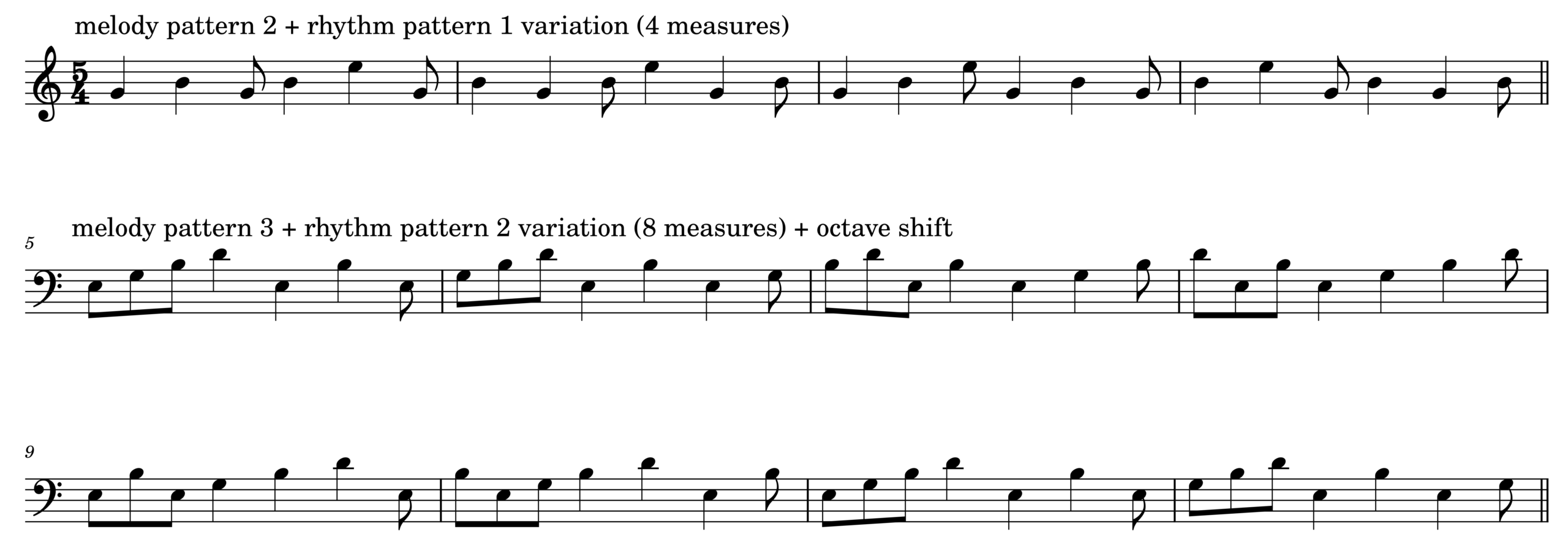
The sound is generated by combining a choice in melodic pattern and a choice in rhythmic pattern. The computer chooses another combination in the next cue. Below is one possible result of the algorithm described so far.

The cue is manually timed and recorded, like a placement of audio or MIDI data in a DAW. The cue also triggers changes in timbre, note duration, and octave transposition. The audio example below demonstrates the mentioned variations.

Finally, when 8 or more computers play and change instrument parameters in sync, the room with the computers can make sounds heard in the piece. Listen to 00:30-01:30 of the Bandcamp link for an example.

Code

The demo is formatted like the code examples in DotZip: there are three separate parts labeled SynthDef, Functions, and Performance. To read, modify, and evaluate the scd file, copy-paste-evaluate the code below in SuperCollider. You will hear sounds when evaluating the performance section after running the SynthDef and Functions sections.

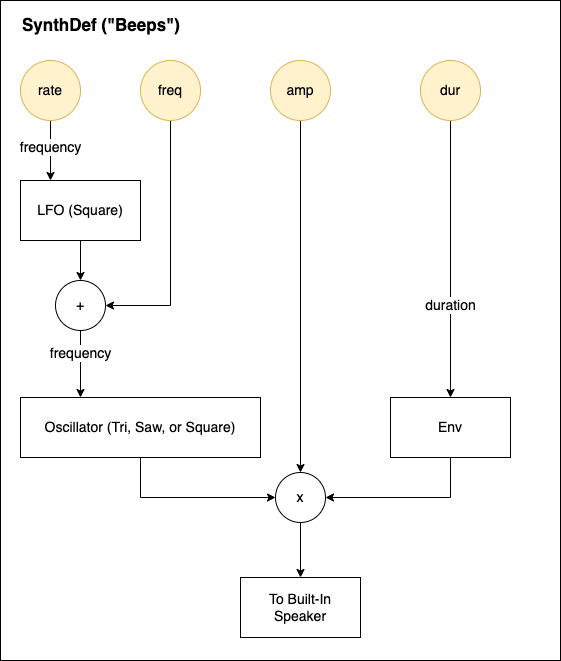
There are three SynthDefs in the linked scd file named Beep, Beep2, and Beep3. The design scheme is the same for all of them, but each uses different oscillators for timbral change. They are simple instruments with controllable frequency modulation rate and amplitude envelope durations.

//1. SynthDef
(

SynthDef("Beep", {
	arg freq =60, amp=0.5,dur=0.5,rate=4;
	var sound,lfo;

	lfo= LFPulse.ar(rate,0.5,mul:freq);
	sound = Saw.ar(freq+lfo);
	sound = sound*(XLine.ar(1,0.00001,dur,doneAction:2));

	Out.ar (0,sound.dup*amp);
}).load(s);

SynthDef("Beep2", {
	arg freq =60, amp=0.5,dur=0.5,rate=4;
	var sound,lfo;

	lfo= LFPulse.ar(rate,0.5,mul:freq);
	sound=LFTri.ar(freq+lfo);
	sound = sound*(XLine.ar(1,0.00001,dur,doneAction:2));

	Out.ar (0,sound.dup*amp);
}).load(s);

SynthDef("Beep3", {
	arg freq =60, amp=0.5,dur=0.5,rate=4;
	var sound,lfo;

	lfo= LFPulse.ar(rate,0.5,mul:freq);
	sound=Pulse.ar(freq+lfo);
	sound = sound*(XLine.ar(1,0.00001,dur,doneAction:2));

	Out.ar (0,sound.dup*amp);
}).load(s);


); //end of SynthDefs

The performance instruction is expressed using a Routine object in SuperCollider. 

//2. Functions
(
~key=63;
~sixteenth=0.2;
~dur=0.5;
~rate=18;
~octave=12*rrand(-2,2);
~rhythm=[[1,1,1,0.5,0.5,1],[1,1,0.5,0.5,0.5,0.5]].choose;
~motif=[[0,3,0,3,0],[3,7,3,7,12],[0,3,7,10,0,7]].choose;
~tempo=1;
~instru=["Beep","Beep2","Beep3"].choose.asString;

~melody=Routine({
	var rhythm;
	loop{
		//freq =60, amp=0.5,dur=0.5,rate=4;
		rhythm=~rhythm.scramble*~sixteenth;
		[4,8].choose.do{
			(rhythm.size).do{
				arg count;
				Synth(~instru,[\freq,(~key+~motif.wrapAt(count)+~octave).midicps,\amp,0.2,\dur,~dur,\rate,~rate]);
				(rhythm.at(count)*~tempo).wait;
			}//~rhythm.size.do
		}//[4,8].choose;
	}//loop

});
); //end of Functions

Once ~melody Routine runs and starts to make sound in the Performance section, one can vary the pattern and timbre by modifying and/or evaluating ~global variables.

//3.Performance
//Evaluate each line separately

~melody.reset;~melody.play;
~melody.stop;

(
~dur=rrand(0.3,3.4); // note duration in seconds
~rate=rrand(8,18); //vibrato rate in Hz
~octave=12*rrand(-2,2); //octave shift
~rhythm=[[1,1,1,0.5,0.5,1], [1,1,0.5,0.5,0.5,0.5,1]].choose; //choose a rhythm pattern 
~motif=[[0,3,0,3,7], [3,7,3,7,12], [0,3,7,10,0,7]].choose; //choose a note sequence
~tempo=[0.5,1,0.25,1.25].choose; //tempo (higher the number, slower the tempo)
~instru=["Beep","Beep2","Beep3"].choose.asString; //choose an instrument
)

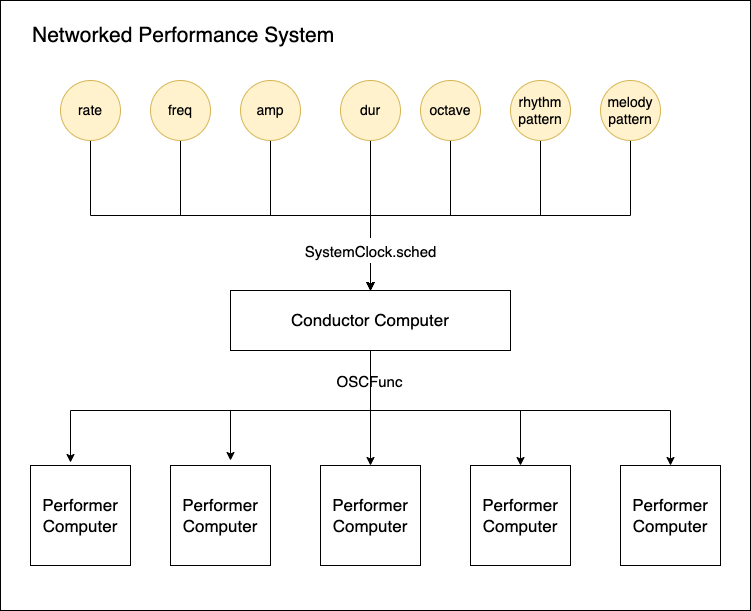
In the actual installation, each computer runs the above more SynthDefs for more variety. Instead of manually changing global variables, SystemClock.sched in SuperCollider creates a cue list of events and changes. The changes are generated by a central computer and sent to networked workstations using OSC.

Uniquely Electronic

I cannot think of a way to create a similar sound world to Control Click without using multiple computers. The recordings linked above are an approximation of the actual experience of the piece. The listeners are invited to walk around the computers that emit sounds and lights, which vary each time slightly due to the use of random numbers. Like many live electronic pieces, Control Click is best experienced live.

To learn more about Control Click, read the piece’s blog here. There are many versions of the piece.  To read more analysis of electroacoustic pieces, browse a keyword in Academic Electronic Musician.

Academic Electronic Musician: An Example

Academic Electronic Musician: An Example is a collection of short articles on electronic music composition, performance, and presentation. The collection is useful for the following purposes:

  • Learn what a teaching electronic musician does (besides teaching)
  • Examine audio and scores for electronic music
  • Find examples of electronic music analysis and composition techniques
  • Get insights on electronic music practice in presentation, documentation, and education 

Download and study SuperCollider compositions and tools

The articles and examples in the collection are my research outputs. There is a value in reviewing and connecting works by an individual, different from the value gained from comparing and analyzing works by many. Alvin Lucier’s Music 109: Notes on Experimental Music and Gordon Mumma’s Cybersonic Arts: Adventures in American New Music, for example, gave me insight into an aspiring artist’s electronic music practice spanning decades. I hope this collection of writings serves the same purpose, but from the perspective of a lesser-known yet currently practicing full-time artist. 

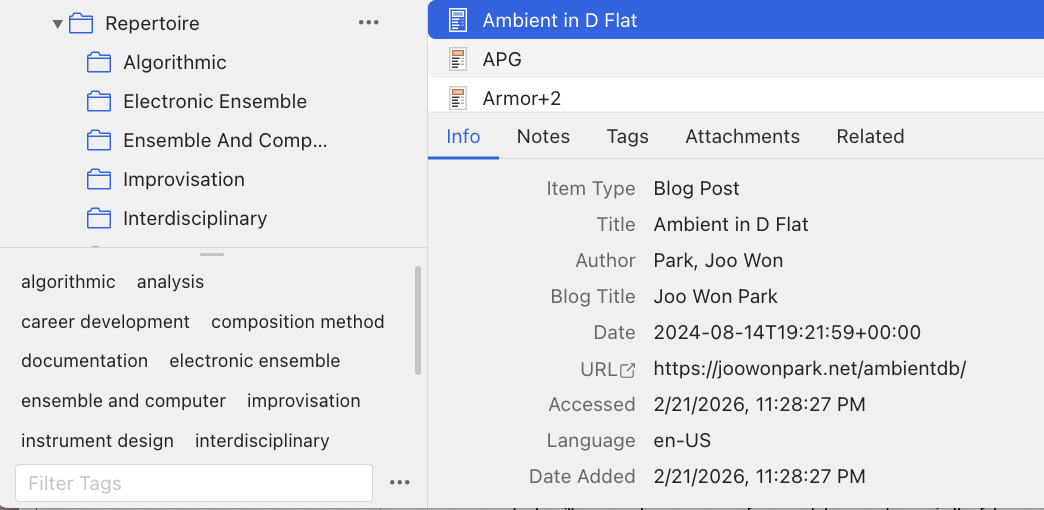
Academic Electronic Musician is hosted in Zotero, a multiplatform tool for organizing research data. The site allowed me to organize blog posts like a search engine tailored to my work. The site, pictured above, is most useful and effective when using tags and related links.  See the linked video for further explanation.


With its interactivity, Academic Electronic Musician may serve as supplementary material for electronic music classes and workshops. For example, if a class is learning about algorithmic composition, teachers can select the algorithmic and analysis tags to find examples with audio, code, and diagrams. Also note that the contents will grow as I compose, perform, and document more in the future. 

But on the site, you may not find typical information in other electronic music textbooks, such as

  • Tags linking to sources created by people other than me
  • Detailed Information about pieces written by other people
  • Instructions on using a specific audio app 

Numerous authors have written about these subjects with examples from well-known works. 

Electronic music researchers and practitioners find new theories and practices that could be useful to others. But those findings must be documented and shared. This, the sharing of knowledge, is what academic musicians do best. I hope the writings in the Academic Electronic Musician serve as an example for those who want to study and experiment with uniquely electronic sound in a musical context. 

Solo Electronic Improvisation

Since 2009, I have been presenting a solo set of live electronic music. Among the many electronic performance techniques, I specialize in creating electronic sounds on stage without pre-recorded samples. I use a combination of digital effect processors coded with SuperCollider to improvise a uniquely electronic soundscape in concerts and recordings. For more than a decade, I have marketed myself as an expert in that specific style. It is represented as a yellow rectangle in the diagram below. 

The categorization is not meaningful to anyone else, but it was a useful research goal for me in the 2010s. I share three representative pieces of my solo electronic improvisation for listening and analysis purposes.

Three Examples 

100 Strange Sounds (2012-2014) is a set of one hundred short video recordings featuring my live electronic music techniques. Each piece pairs a sound-making object with my SuperCollider code that processes its sound. I invite viewers to notice and enjoy the unexpected relationship between what they see and what they hear. For example, the sound of a cabbage becomes something else with a bunch of effect processors in 100 Strange Sounds #77

Large Intestine (2013) is a piece I made after 100 Strange Sounds #42. As described in the blog on style analysis, the no-input mixer improvisation enhanced with SuperCollider has been my favorite electronic instrument for more than a decade. Large Intestine, as the title suggests, epitomizes my interest in noise, digital signal processing, and improvisation. I plan to play this work in as many concerts as possible in the future.

Touch (2014) is my kitchen-sink piece that pairs multiple sound objects with multiple effects. It’s a summary of 100 Strange Sounds, in which I bring random objects on stage and improvise the combination and sequence of sounds. The piece opened many doors to career opportunities in the 2010s as an electronic music improviser. The techniques and technologies I learned in performing and refining Touch became a source for future non-improvisational compositions for electronic ensembles. 

Technology

All three pieces mentioned above use a variation of a single SuperCollider patch, available for download at this link. And this linked PDF explains the hardware and software setup to perform the pieces (warning: it is a little outdated). 

When I run the patch, it creates a GUI with multiple buttons that trigger customized effects. I control the number and timing of the effects’ on/off states with a mouse click – No MIDI controllers or control surfaces. A few clicks, probably unnoticed by the audience, are enough because I wanted the listeners to focus on the interaction I have with the non-electronic objects on the stage. 

As for the hardware,  I use a couple of microphones for Touch, one audio interface, and a laptop. This article explains the gear I used over the past 11 years.

Technique

Like other improvisations, the key technique in performing solo live electronic music is listening. I listen for variations that the computer part adds to the acoustic instruments, then respond with another instrument or effects. Because I cannot play a scale or harmony with the instrument (like cabbage), the listen-and-react decisions are often non-musical and raw. “The current sound is long, so I’ll play short sounds next.” “I will go from a simple to a complex texture.”  “The sound is very high in pitch. I’ll complement it with a very low rumble.” I also ask questions and try to come up with the best answer on stage. “What happens if I granularize the chattering teeth sound?” “The plastic block sounds harsh. Can I make it harsher?” “What is common between a slinky and a coin sound?”  

Free improvisation focusing on reactions and questions is fun, but it can quickly lose control of the length and form. So I plan a specific gesture or sound combination for transitions. The Extension and Connection blog linked earlier has such an example in Touch.  

Annecdote

More than fifteen years of experience in improvising with live electronics forms the foundation of my musicianship. I identified myself as a composer after earning a PhD in composition in 2008, but it did not lead to a gig or collaborations when I moved to Philadelphia for my first job as a music technology professor. The dire situation led me to develop a solo set I can prepare and present quickly in any situation. The strategic change, fortunately, worked, giving me ample opportunity to refine my performance and improvisation techniques. 

These days, I am comfortable identifying myself as a composer-performer of electronic music. My sound may not be fresh or cutting-edge at this point, but I think I have a bit more to contribute to the current solo setup. Perhaps the contribution is a documentation and theorization. Perhaps it is just one more new piece!

More electronic music composition/performance/practice articles are found at the Computer Music Practice project.

Scale – Computer Music Composition Method

Control and presentation of sound in different scales is a distinguishable feature of computer music. In this context, scale does not refer to a group of notes in different pitches, like a C major scale. It instead refers to proportions, as in big vs. small, long vs. short, and few vs. many. Music technology is capable of rendering a single musical idea in extreme proportions, and the collection of those sounds could become a composition.

I will demonstrate a scale-based electronic music composition process with Control Click, a sound installation composed in 2016. The piece is an 11-minute site-specific work for eight or more computers, creating an arcade-like environment with electronic blips and blinks. The computers are networked to play the same SuperCollider file, functioning as both a performer and a lighting device. The video below is a version of Control Click presented at the 2016 Third Practice Electroacoustic Music Festival.

Sound Design With Proportions

Featuring various scales/proportions in computer music means applying different values to a control parameter. If one can control the pitch of an electronic instrument, experiment with low Hz and high Hz. If the duration of a note in an electronic instrument could be programmed, make very short and very long sounds. The keyword here is extreme. A computer is capable of following laborious or precise instructions that are difficult or impossible for humans to execute. 

In Control Click, each computer algorithmically generates a melodic line based on a chord. I cannot control the exact sequence of pitches, but I could control the chord type, note duration, and tempo. The range of note duration and their playback pace is wider than that of acoustic instruments, thus capable of creating different timbres and moods. The audio example below plays the melodic line in normal, slightly longer, and very short note durations.

By playing the melodic line heard above with very long note duration and decelerating tempo, I could create the sound below. Note that the tremolo of individual notes reveals more as the note duration becomes longer. Longer and stacked notes with different tremolo rates create a sense of a chord with long reverb.

The sound heard above was inspired by the FFT time-stretching technique, which inspired composers to discover hidden sounds too short to be heard and appreciated in an audio file. The technique can also make a long audio phrase so short that one cannot identify the pitch. In other words, time-stretching scales the duration parameters in extreme proportions. But such an idea is applicable beyond FFT. The audio below is how I applied the duration/tempo scale to the percussion sound.

Composition With Proportions

The idea of applying different proportions can also be applied beyond parameter change. In Control Click, the example sounds in the previous section are meant to be played by multiple computers. But as a site-dependent piece with random number generators, each computer emits a distinguishable note sequence at different physical locations. My goal was to create a sonic environment of an arcade from my childhood – chaotic, overwhelming, and delightful. 

Links below point to the moment in the piece that uses previously mentioned scaling examples in an ensemble format. 

  • The normal melodic line with percussion (1:30)
  • Long note duration (2:30-2:50)
  • Short note duration (5:30-6:00)
  • Extreme extension of note duration and tempo (8:50-10:00)

In the third link, Long note duration, the melodic line is detuned by a random amount at synced timings. The effect of one computer doing so is not so noticeable. But when multiple computers are out of tune in a large space, it creates an impact that I cannot recreate in a concert hall.

Notation of Proportions

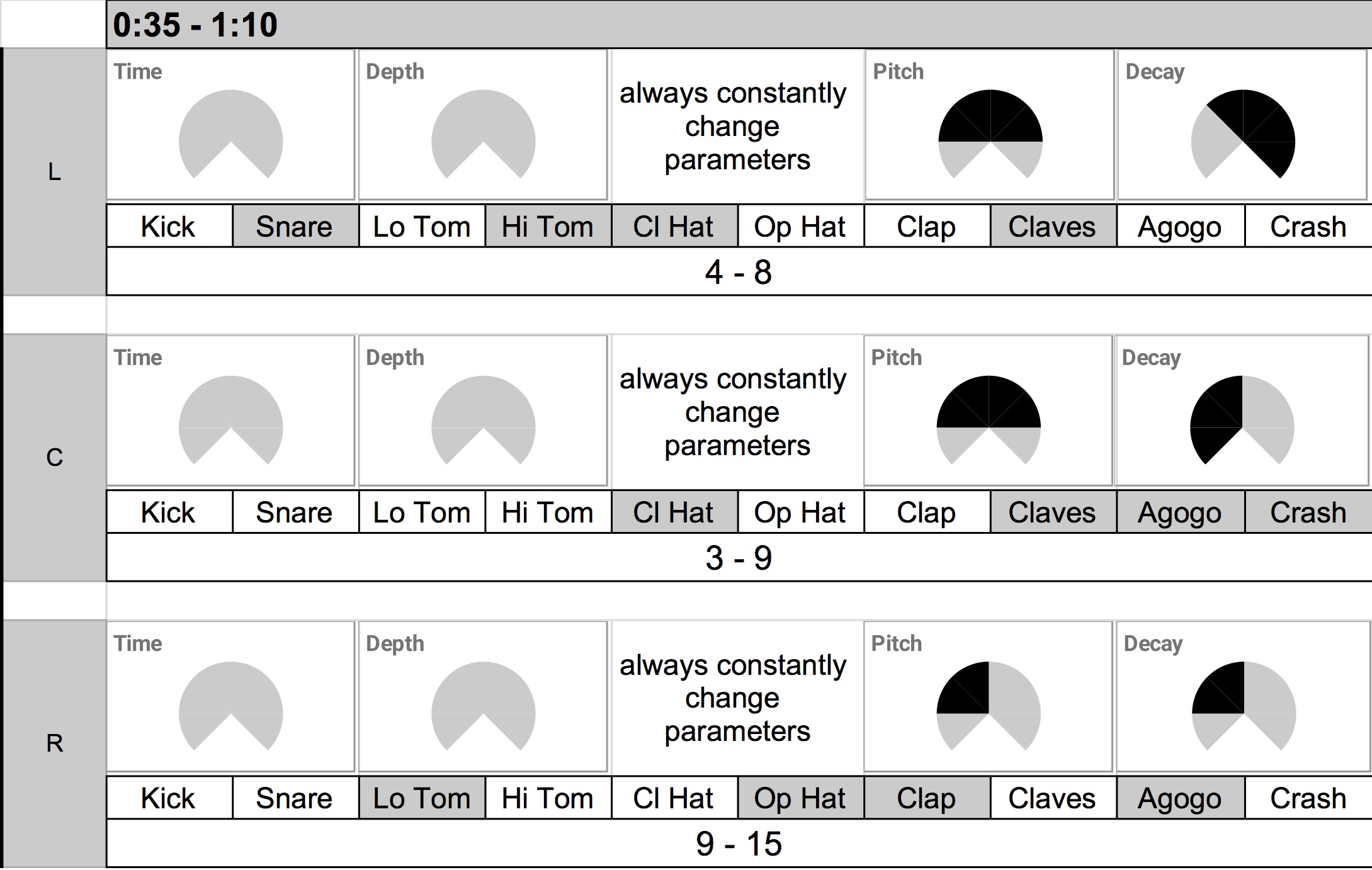
The concept of controlling a range and scope of musical parameters, rather than instructing specific notes to play, is transferable to human performance. A proper notation to play an electronic instrument within a limited range can be considered as proportional control of choices. Seven Bird Watchers (2019) for drum machine ensemble is an example.

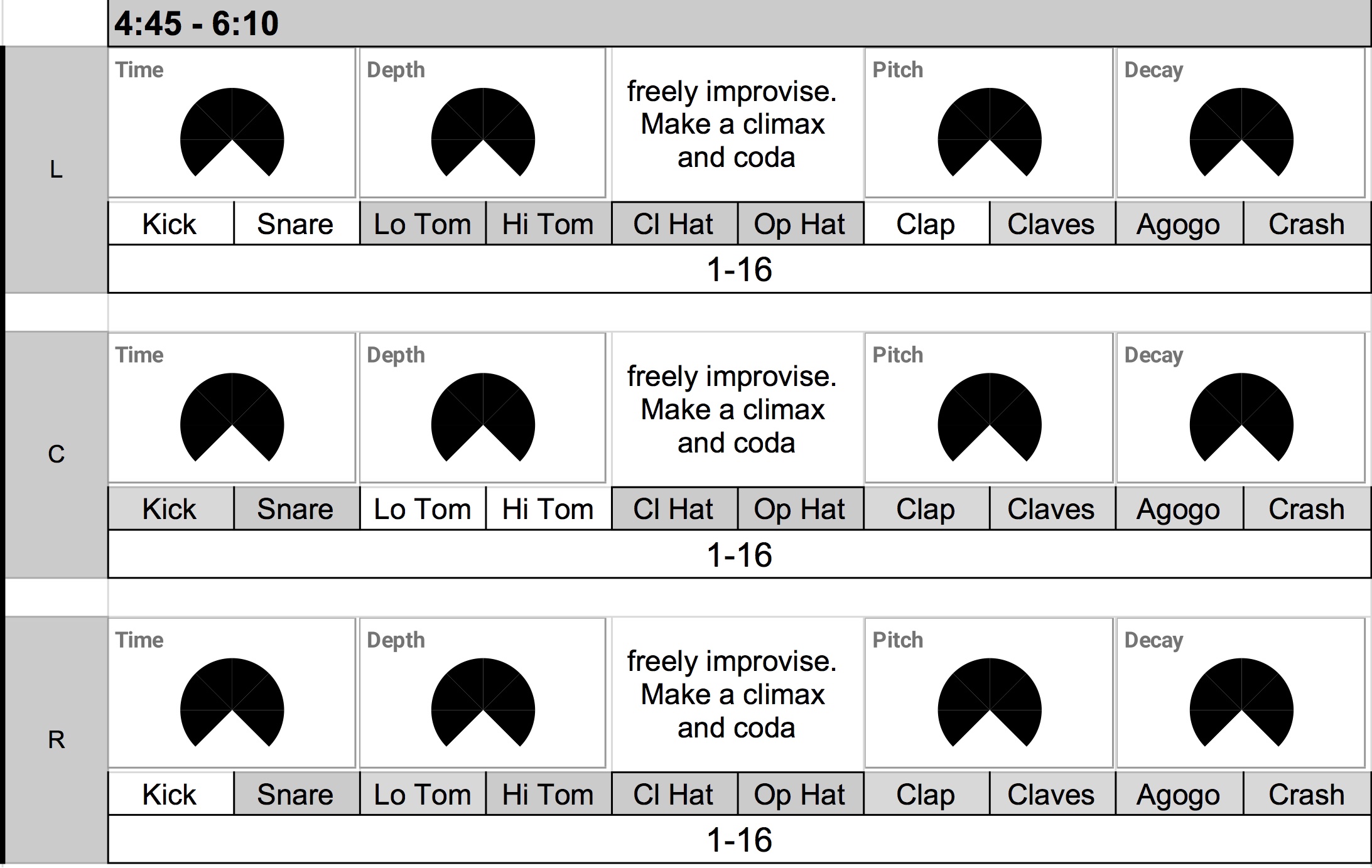
Seven Bird Watchers uses drum machines with customized sync tracks, and the sync track defines the form—the piece is simply seven sections with an increase in tempi and sonic range.  While the composed sync track holds Korg Volca Beats’ tempo together, the human performers change the drum machine’s parameters according to the score. The score depicts the range of parameters performers can improvise.


For example, the early section has limited parameter changes and choices. It lasts about 35 seconds with a moderate increase and decrease in tempo. The performers, as shown in the score above, have a very limited choice of parameter change – the dark area of the Time/Depth/Pitch/Decay knobs, as well as the dark areas in the instrument choice, are the areas in which the performers can move or use knobs and buttons in Volca Beats.

The latter section, in contrast, has a bigger range of tempo changes with an extended duration of 85 seconds. The performers are free to use the entire range of the knobs with almost all available sounds. The proportion of choices and resulting sounds is more varied. For example, the tempo gets so fast that the sixteenth-note run of some percussion instruments loses sense of rhythm. It starts to sound like a bird chirping.

References

For further study, read Curtis Road’s Microsound. I learned the musical application of scale and proportion from this book. Research the scale and proportion in visual art as well. There are ample examples of how different scales make ordinary events extraordinary. Watching a movie on a big screen feels different than watching it on a phone screen. A slow-motion video effect is fun. Similarly, a sound with varying time scales and contrasting parameter values fascinates me.

Computer Music Composition Method has other related entries. Read them if interested