Category Archives: Computer Music Practice

Tool and Variations – Computer Music Composition Method

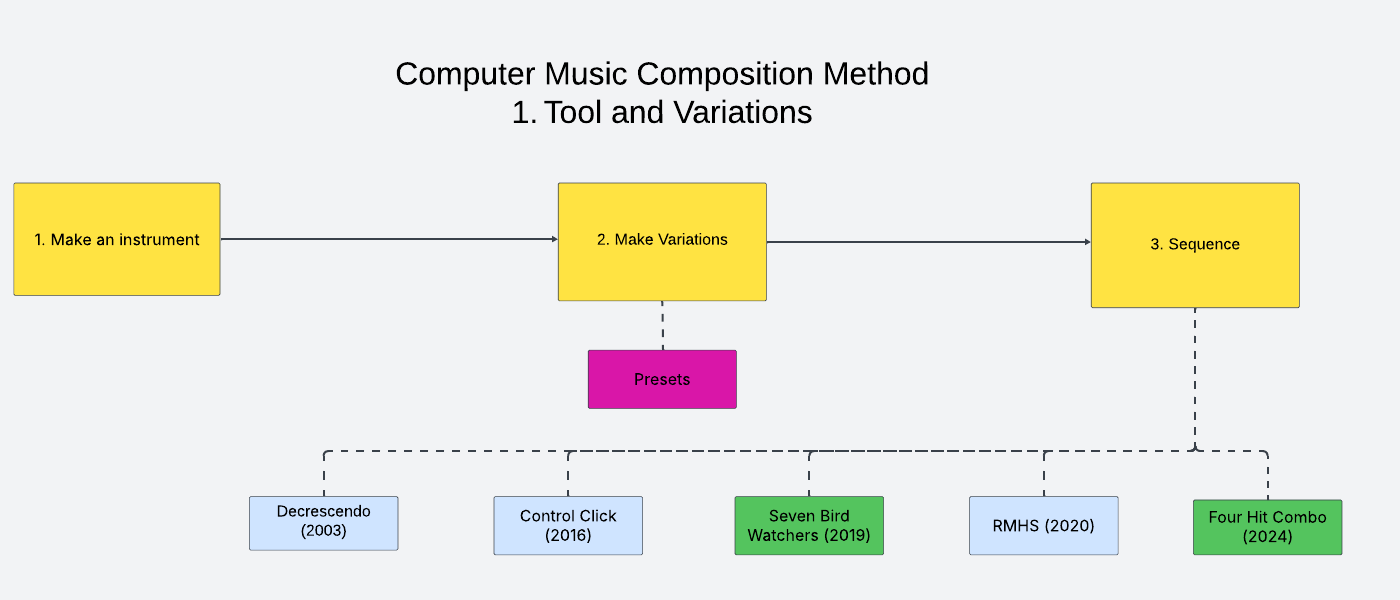
Create a patch, make different sounds with it, and arrange them in order. This is my go-to method for computer music composition. Instead of a theme in the theme and variations form, a computer musician begins a composition by making an electronic instrument or an audio app patch. Then, the composer explores different sonic possibilities of the instrument. The sounds created with the instrument are then presented in a particular order. The article demonstrates this process with my old composition. I will also provide more recent practices of the method with the entries in Computer Music Practice.

Tool and Variations in Decrescendo (2003)

Step 1. Make a software instrument

A computer music composer’s first job often is to design a digital instrument or a patch. A patch in this context is a specific connection of features/modules in an audio programming environment, such as Max, Csound, or SuperCollider.  In Decrescendo, a fixed-media piece published in 2003, I wrote a Csound patch that generates a series of sine tones according to an adjustable overtone series.  The formula to make a pitch series is as simple as the one below, but I could control tempo, note duration, and pan to my taste.

Note of a scale = fundamental frequency* (overtone number *detune value)

Here are two sound examples generated from the Decrescendo instrument.

Step 2. Make variations with the instrument 

A customized instrument has the potential to generate sounds of various timbres with different, sometimes randomized, settings of its parameters.  The second step in the tools and variations method is to experiment and document as many different parameter settings as possible that yield distinct sounds. In Decrescendo, I adjusted the fundamental frequency, note duration, scale direction, pan position, and detune value to create different, but related, sounds. Some variations are created with duplication and overlap (more on this in another article). Below are some audio examples.

Documented variations of parameter settings in a digital instrument are called presets. Featuring presets of an instrument is a distinct characteristic of electronic music compositions. Here’s an article about presets for further study.  

Step 3. Sequence the variations 

The next step after gathering a library of presets is to make decisions on when to play which sounds. The decision-making and its documentation involve selecting a few from many sounds in Step 2. The deciding factor depends on the context and personal taste. In the case of Decrescendo, the piece opens with an unaltered overtone series, followed by slightly detuned scales. The second section (00:30) contrasts the opening by presenting a few descending overtone series. The third section (00:50)  reminds the listener of the opening gesture with a further exploration of detuning and tempo variation. The preset choices for the rest of the piece are my answers to the question, “What makes sense based on what we have heard so far?”

The sequencing, an act of ordering events, of various sounds made with an instrument, is not formulaic. There is no right answer, but the choices are based on the context, experience, and taste of the creator. 

Computer Music Practice

Tool and variation is a method that could be applied to many digital music formats. Here are my recent applications of the method in installation, fixed media, and electronic ensemble works. The entries are part of the Computer Music Practice project.

Control Click (2016): In this installation for multiple desktops, every computer plays the same SuperCollider patch. The instrument is designed to generate a randomized rhythm and timbre at a pre-scored and fixed timing. In other words, the instrument randomly generates timbre at a fixed sequence of changes. I saved a surprising and best preset setting I found for the climax. 

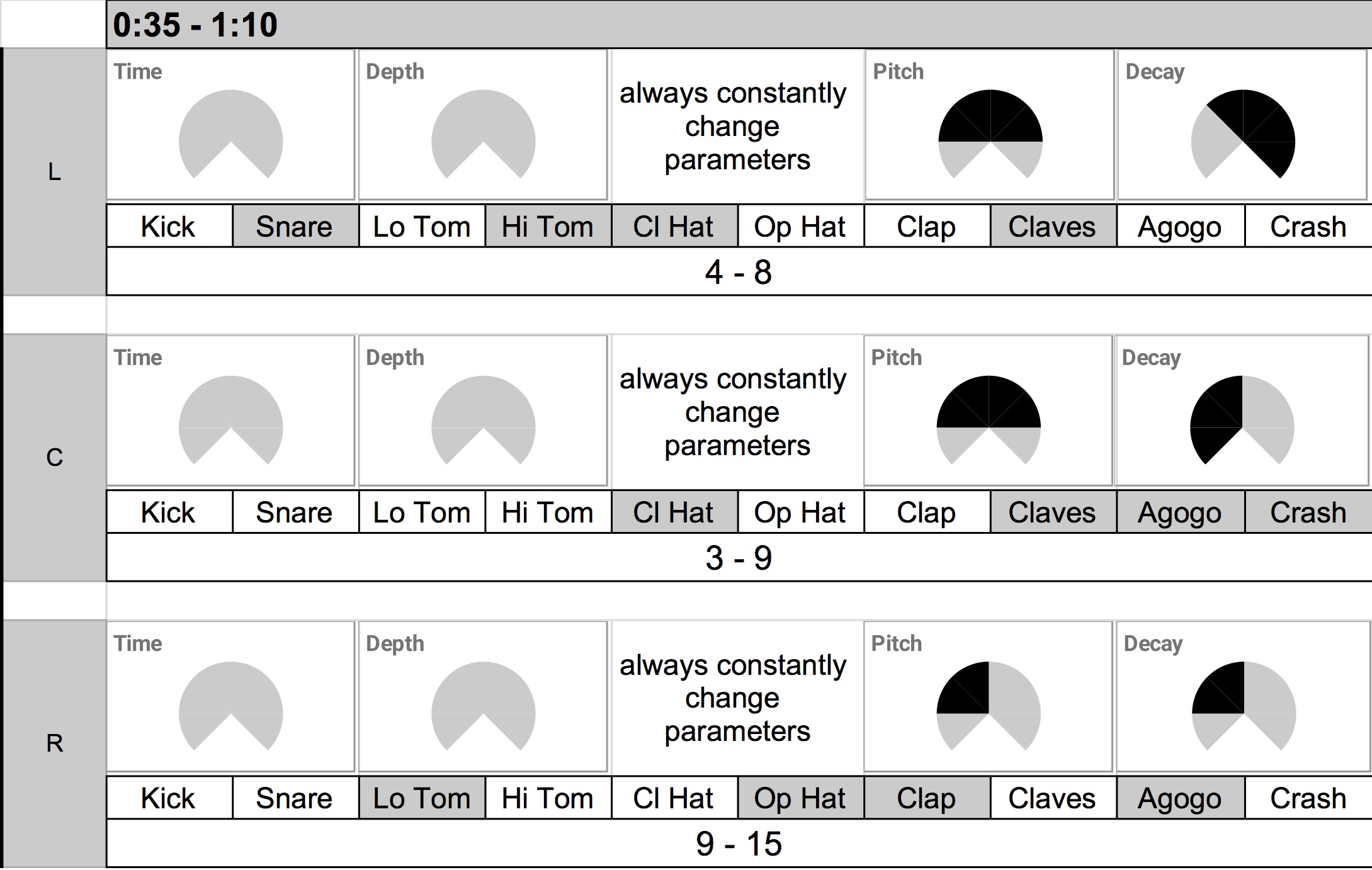
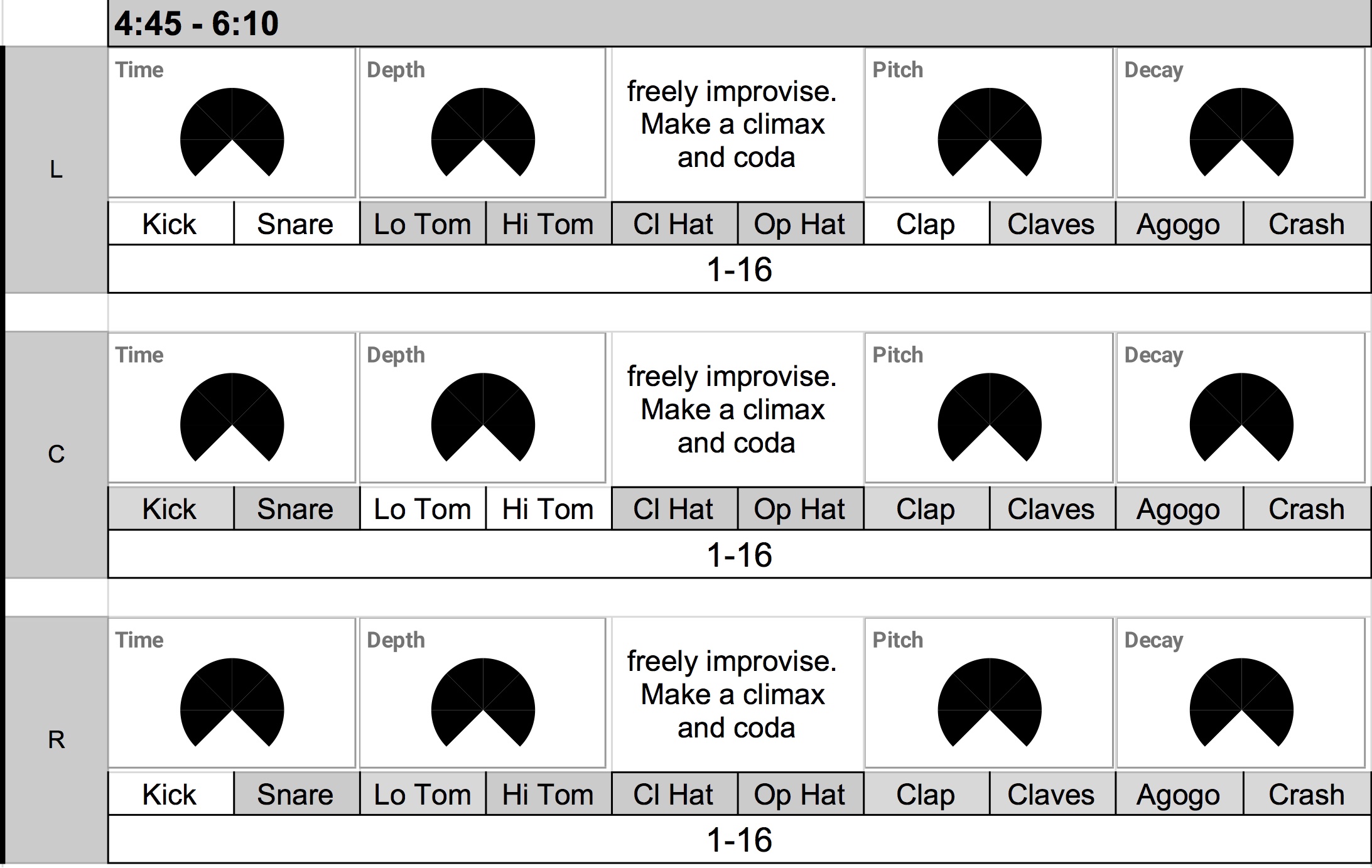
Seven Bird Watchers (2019): In this electronic ensemble piece, I did not design the instrument, but made a specific drum pattern for Korg Volca Beats. The score displays seven variations of button combinations and gestures that performers need to create with the said drum pattern at a specific timing. The variable tempo is composed/sequenced with SuperCollider.

RMHS (2020):  RMHS is a drone generator made with SuperCollider. A user can download the patch, set parameters, press a button, and create a drone of microtonal harmonies. The RMHS album consists of eight examples of such drones. The sequence portion of this project is the track order, which reflects my interpretation of consonant and dissonant harmonies.

Four Hit Combo (2024): The preset variation and sequence creation process is similar to that of Seven Bird Watchers – I notated different instances of presets for performers to interpret. But the instrument in Four Hit Combo does not have a set sound. Instead, it is a platform that processes any incoming audio files with a set of gestures based on granular synthesis. It is possible to create an instrument without sound in computer music!

Electronic Ensemble Workshop Examples

I have been running electronic ensemble workshops at recent festivals, concerts, and summer camps. At the workshop, participants from any musical background and level gather to make music together with sound-making devices, such as phones, computers, synthesizers, drum machines, and mixing consoles. I find that such a workshop is an effective activity to introduce the genre to audiences and colleagues. It provides benefits that concerts and recordings cannot.

First, an active participation in electronic music-making adds visual and tactile reference to the electronic sounds. People who have played a drum machine will have a better understanding of its sounds and operations than those who have only heard the sounds. They can imagine and admire the intriguing rhythmic patterns that artists create on stage. Active engagement in music-making adds an extra layer of context, appreciation, and understanding. 

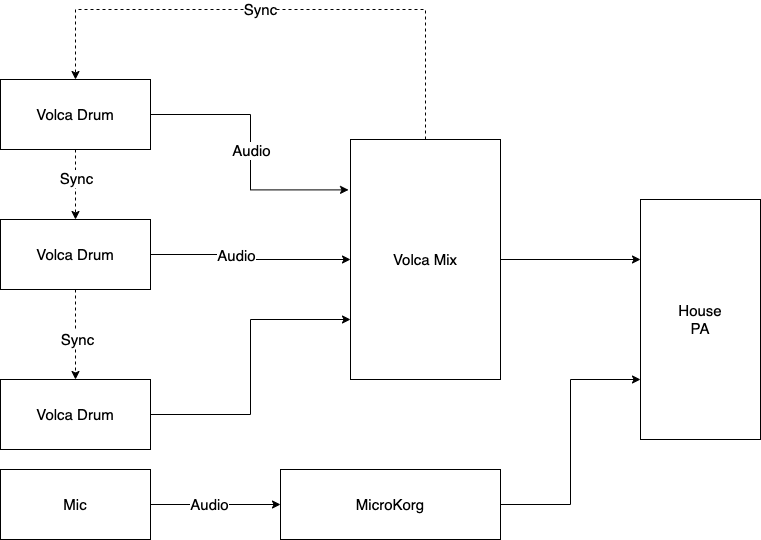
Learning becomes a part of entertainment when it occurs at concerts. The linked video of a drum machine trio was shot at Tec-Troit 2025. I set up three synced drum machines and one synthesizer for the festival attendants to play. When a person showed interest, I taught them basic operations of Volca Beats or MicroKORG. Many participants played electronic instruments for the first time. Most stayed more than 15 minutes performing music with friends and strangers. 

The accessible ensemble experience, such as one described above, is another benefit of electronic ensemble workshops. Playing music together is an irreplaceable human-to-human experience. Bands and orchestras provide such moments, but it often takes years of individual and group practice to be at a presentable level. Technology can shorten the time it takes to produce good sounds together, allowing participants more time to experience the ensembleness—a special and personal connection only possible when people create music together. It’s like singing our lungs out together at late-night karaoke, but with synthesizers.

In the drum machine ensemble video, the performers do not need to worry about keeping the tempo, as all drum machines were synced. It eliminated the need to learn to play music in tempo, allowing participants more time to explore patterns and their combinations. In May 2025, I did a laptop ensemble workshop with a group of volunteers in Saginaw, MI. I taught Singaporean Crosswalk and  Save Point By the Lake to local musicians, fans, and students of all ages. The group rehearsed two pieces in 1.5 hours and performed in a concert following the workshop. The participants did not need to learn to play scales or articulations. They had to rehearse some choreography and timings to press keys on the laptops during a short rehearsal. And then enjoy the sound while rehearsing and presenting. 

In addition to drum machines, synthesizers, and laptops, I have conducted electronic workshops featuring ensemble performances. In no-input mixer workshops, I teach students the basics of no-input mixing patching. There are often fewer mixers than the participants, so I ask students to team up. The workshop participants then proceed to perform Benjamin Damann’s The King of Nothing as a group. In a similar spirit, my workshop recently has included Piyawat Louilarpprasert’s Shrimp Raptors in the repertoire, in hopes of introducing DIY instruments and multimedia to the audience. 

The effect of running electronic ensemble workshops has been quite positive so far. I get energized sharing what I love about live electronic music. Participants of the workshop remember my music and concert as more than a sound – it is a great promotional activity. Hopefully, they would try performing as an electronic ensemble after the workshop. If readers are interested in running or attending a workshop,  please do not hesitate to contact me. My workshops require some planning, but they are portable and require minimal equipment from the hosts.

This article is a part of Computer Music Practice – Presenting.

Slump Recovery Project

I was unable to complete a single composition over the summer despite multiple attempts. Such unproductivity led to a chain of negative thoughts on the impact and relevance of my work and effort. I lost the will to create by July. The slump phase is not new for me or any creatives, but getting over it is never easy. To recover, I tried methods that worked in the past, but also did something new.

The usual remedy for a slump for me is working on related projects in small bites. My main project is music composition, and related projects are any other music activities. I focused on relearning and appreciating fundamental musicianship. 

  • I reread books that inspired me. When reading became tiring, I listened to audiobooks. 
  • I wrote blogs on the electronic music practice. It helped me to organize and reflect. 
  • I listened to all and any music. Summer is a great time to catch up on listening. I heard new things in old songs, and rediscovered time-tested techniques in new music. 
  • I practiced bass guitar, an instrument I wanted to play but did not have time to learn. You know, every other electroacoustic musician plays bass.

Engaging in musical activities kept me from completely letting go of being a musician. Unfortunately, this was not enough for me to get back to composing. I had to make a specific plan and task to get back to a creative routine.  

  • Write a 1-2-minute piece with the most familiar tool. In my case, it would be SuperCollider.
  • Start and finish a piece in one sitting. The goal is to remind myself of the joy and necessity of completing a piece.
  • Quality does not matter. Do not evaluate or self-critize the piece. 
  • Pieces do not have to have a new idea. An old idea presented in a different context is good enough.

This attempt worked, kind of. I finished a piece on July 22, but was not able to produce another piece until July 28. But from that day, I completed a 1-1.5-minute piece every day until July 31. It was a small win with an impact. Now, I am comfortable sitting on a computer for a few hours per day,  enduring the tedious or negative side of the creative process. 

As a record of this summer’s slump and post-slump, I share Slump Recovery Project, a 6-minute piece in 5 sections.

Lastly, here’s the log of my composition failures and successes in May-July 2025.

  • 5/19 Stopped working on a duet for plastic tube sqeakers and computer after two weeks. A simulation of the performance was disappointing, so I stopped.
  • 7/10 Attempted to write a new laptop ensemble piece. Again, a simulation of the performance sounded too much like a piece I wrote a few weeks ago.
  • 7/13 Jotted an idea for a no-input mixer duet. I thought writing for my favorite instrument would motivate me. It didn’t. I got more discouraged. 
  • 7/16-21 I could not do anything
  • 7/22 (check date): Made a 1.5-minute piece on SuperCollider titled I-IV-V-vi
  • 7/28 Made a 1.5-minute piece on SuperCollider and Logic Pro titled A Note of Happy
  • 7/29 Made a 1.5-minute piece on SuperCollider titled Decrescendo Revisited
  • 7/30 Made a 1-minute piece on SuperCollider and Logic Pro titled Riff
  • 7/31 Made a 50-second piece on SuperCollider and Logic Pro titled Elastic Drum

Computer Music Practice – Learning

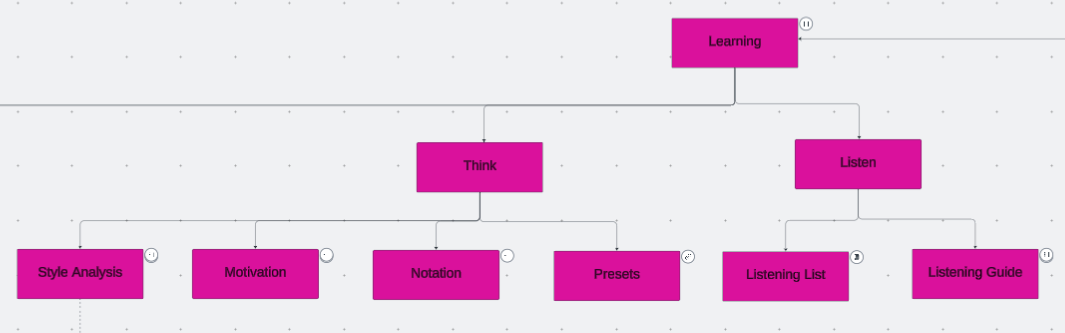
The articles in the Learning section of CMP cover computer musicianship. They are examples of a music technologist’s work and efforts that the audience does not see. But they are essential steps for artistic improvement. Every musician has routines to refine themselves, and the Learning section shares my version of thoughts, actions, and reflections on computer music practice.

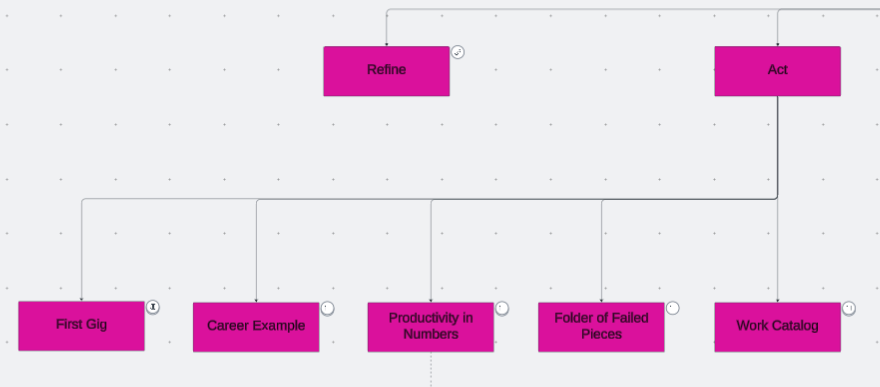
There are four subsections, and the first three are listen, think, and act. The first and most fundamental step in musicianship is learning to listen. Then, a conscious and analytical listening connects to thinking. Thinking means analyzing and imagining sounds and techniques to enhance a piece, organizing and comparing past compositions to identify creative patterns, and articulating those thoughts into words for reference. These thoughts become tangible results through actions. The results could be a composition, a concert, a career move, an idea, or another sound to circle back to the listen-think-act process. 

Listening, thinking, and acting are necessary steps in composing, coding, or improvising, as the repetition of those steps refines one’s skills. The refining process in music technology is essential but often overlooked. There are more instruments and techniques I can learn in music technology. I chose a few that interest me the most and spend time and energy to improve at them, rather than using the newest tools. Performers of non-electronic instruments have resources and historical references on the refinement process, such as etudes and method books for orchestral instruments. Computer music does not seem to (or rather, is not designed to) have a standard practice routine, but I can at least share my practice routine specific to computer musicianship. 


Computer Music Practice (CMP) is an interactive and personal example of computer musicianship. Click each entry in the chart to read and listen to Joo Won Park’s computer music research.

Computer Music Practice – Presenting

Finishing a composition means the beginning of other work. Posting the audio files on the web is the first step in sharing my music, but it is not the only way to showcase the piece’s best aspects. Music for human performers is meant to be experienced in live concerts. Some generative music’s value is in creating and hearing multiple versions. As an electronic music researcher and teacher, presenting the algorithms, codes, and other relevant findings may be as important as sharing the music.

I do the above to present my work to reach a wider audience. In the Presenting section of Computer Music Practice, I provide more concrete examples of my efforts to do so. Electroacoustic performers interested in promoting their works, as well as curators interested in adding electronic music to their events, may benefit from reading the articles in this section.

  • Solo Performance: Solo performances account for the largest portion of my stage appearances. Performing solo electronic music needs specific preparations. The practice of preparing and presenting electroacoustic solo works changes over time, and I share a record of these changes spanning more than a decade. 
  • Electronic Ensemble: Practice and presentation methods for electronic ensembles vary widely, and there are few records about them. Proper documentation of the creative process helps the evaluation of the genre.  I share my approach to running an electronic ensemble so that those interested can use it as a reference.
  • Tools: Some of my pieces are written as a demo of computer music techniques. Those compositions feature research that could be applied to other people’s works. The articles in this section introduce tools and technologies that can be used and modified. Please credit the creator if sounds and codes made with the tools provided here are applied to a piece.  
  • Workshops: I enjoy providing opportunities to learn about tips and techniques of electronic music production and performance. I share teaching materials for in-person or virtual workshops on electronic ensemble and SuperCollider.

Live electroacoustic music, the genre of music in which I excel, is not well-known. It has relatively little historical context and resources for evaluation, or I am asking people I don’t know to attend a concert where they may not see the relationship between the performer’s actions and the sound. One way to mitigate this inherent challenge is to provide as many opportunities as possible to listen, create, and play electronic music. It requires more effort, such as running workshops and sharing tools. The entries in the Presenting section are my version of such efforts. 


Computer Music Practice (CMP) is an interactive and personal example of computer musicianship. Click each entry in the chart to read and listen to Joo Won Park’s computer music research.