
Cobalt Vase is a solo piece for a drum machine. The drum machine (and other electronic instruments) is a musical instrument, and therefore one gets better at playing it with more practice. I did not want to operate Korg Volca Beats to record a drum track in a DAW. Instead, I wanted to become good enough to improvise, adapt, and perform with features unique to the instrument. I think I can “play the scales without looking at my fingers” on Volca Beat at this point. Jeff Mills’ TR-909 Workout, which demonstrated that how to use counts more than what you use, is a direct inspiration for Cobalt Vase.
Category Archives: Performances
Dubious Toppings – for piano and electronic ensemble
A pizza-themed piece for piano and large electronic ensemble.
Performance by EMEWS (April 2019)
Joo Won Park – piano, composer
Gavin Langley – audio engineer
Sean MacKillop – video
Andy Garcia, Ebony Swain, Jacob Joslin, James Stanulet, Jessica Cory, Martin Davis, Samuel Sprague, Thane Hall, Tyler Smith, Alex MacColl-Artrip, Benjamin Schornack, Hunter Desjarlais, Gavin Langley, Josh West, Justin Carrier, Nicholas Schnorberger, Trent Nedbal, Patrick Norton, and Taylor Vaughan – laptops
Click the link below for Dubious Toppings Score and SuperCollider File
Hungry – for voice, guitar, and electronics (2018)
Jenifer DeBellis, text
Elena Hensel, voice
Joo Won Park, composer
Bianca Pokrzywa, guitar
This is an intimate conversation between the guitar and the voice on being hungry and poor. The electronic part in the piece represents the hunger: it influences the person’s thoughts, emotions, and actions, however subtle or disruptive it is.
The piece was commissioned by The Oakland University Guitar Ensemble (Bret Hoag, director) as a part of the Bridging the Gaps: Guitars for Social Justice project.
PDF Score and necessary electronics part can be found at the following link
https://app.box.com/s/zt44c58oqpk98ru9k25azptfo6y0mrm6
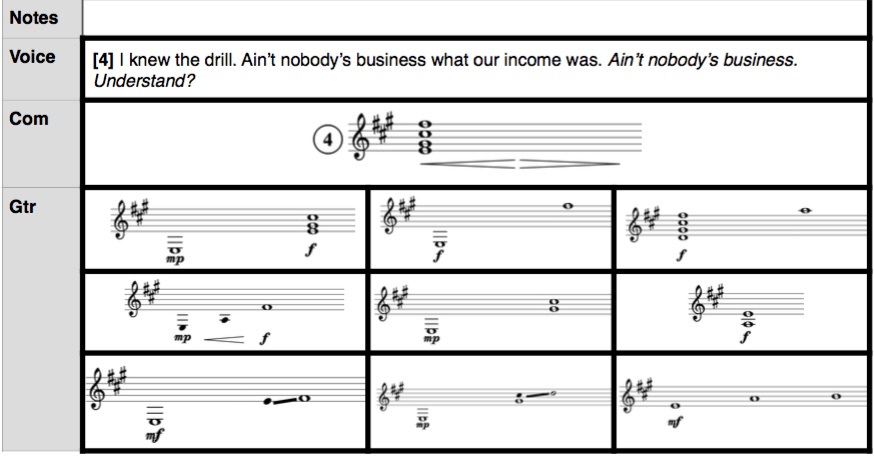
an excerpt of the score
Singaporean Crosswalk (2016) – for laptop ensemble
Singaporean Crosswalk was inspired by my trip to Singapore in 2010. The sound of the traffic light in the city was quite different from that of the United States and Korea.
It was fun, effective, and musically intriguing. During the day, this sound was a theme song for the people in a metropolis. During the night, the traffic lights became part of a flora and fauna surrounding the city. I thank SPLICE Ensemble for commissioning and premiering this piece. I also thank Oberlin College’s Center for Information and Technology for renting me multiple computers.
Singaporean Crosswalk requires four laptops and four players. It uses the internal speaker and microphone of the laptop, so there is no additional equipment needed. The essence of the piece is in the creation of unique spatialization through physical movement of the laptop players on and off the stage. The recording of the premiere thus does not demonstrate the most interesting part of the piece, but you can at least hear the general atmosphere.
All materials needed to play the piece is uploaded on the top folder of this page. Let me know if you have any questions or need different versions (i.e. for trio, octet, etc).
Hallelujah – for vibraphone and computer
Program Notes
This piece is a praise on things and events that are beyond my comprehension and control. Effect of subtle sonic changes on my mind, body, and soul is an example of such things.
Hardware Setup and Instruments
- One vibraphone with a working motor
- Soft mallets and a bow
- A computer with SuperCollider : Setup the computer near the vibraphone so that you may see the screen. A Macintosh is preferred but not necessary. The SuperCollider application can be downloaded for free at www.audiosynth.com
- Hallelujah.scd file: The file can be downloaded from here
- One audio interface and one microphone : Connect a condenser microphone into the input 1 of the interface. Connect the interface to the computer. Alternatively, you can use a USB microphone and no interface.
- A sound reinforcement system: connect the stereo output of the interface to the speaker(s). The speakers should be located in close distance to the vibraphone. Putting the speaker right behind the performer should work in small-medium sized venue.
Performance Notes
- Volume : The overall volume of the piece should not be loud. The computer part should be just loud enough to hear the pulsing between the vibraphone and the sine tone parts.
- Pedal : Pedal is always on. Muffle notes with the mallet on mm 51 (notated with ‘x’ ).
- Motor : Set to slow. Motor is on from mm 53 to 79.
- Bowing : There are three notes in the vibraphone part that needs to be bowed (mm 65, 74, and 76).
- Pedal : Setup the vibraphone so that the pedal is always on.
- Count-In : Measure 1 starts after four beats of count in. Refer to the Visual Click Track window on the computer screen. The performer may interpret the timing of the notes.
- Notation of Computer Part : The computer part has three odd-shaped note heads. The rectangle represents a sine tone that changes its frequency when a vibraphone notes are played. The triangle represents a wobbly tone with rhythmic variation. And the diamond represents a note with rich overtones. All computer parts are long and gradual. You may start to notice the computer part about a measure or two after they are triggered at the notated measures. For example. the rectangular note in measure 5 will start to have a audible volume at around measure 6.
How to Run the Computer Part
- Make sure that your audio interface is set as the default input and output device for the computer.
- Open Haellelujah.scd file in SuperCollider
- Go to Menu and select Language->Evaluate File.
- Measure 1 starts after four beats count in.
- Press command+period (.) or select Language->Stop to stop the computer part
- Repeat steps 2-5 for rehearsal and practice.