Category Archives: Research

Electronic Ensemble Workshop Examples

I have been running electronic ensemble workshops at recent festivals, concerts, and summer camps. At the workshop, participants from any musical background and level gather to make music together with sound-making devices, such as phones, computers, synthesizers, drum machines, and mixing consoles. I find that such a workshop is an effective activity to introduce the genre to audiences and colleagues. It provides benefits that concerts and recordings cannot.

First, an active participation in electronic music-making adds visual and tactile reference to the electronic sounds. People who have played a drum machine will have a better understanding of its sounds and operations than those who have only heard the sounds. They can imagine and admire the intriguing rhythmic patterns that artists create on stage. Active engagement in music-making adds an extra layer of context, appreciation, and understanding. 

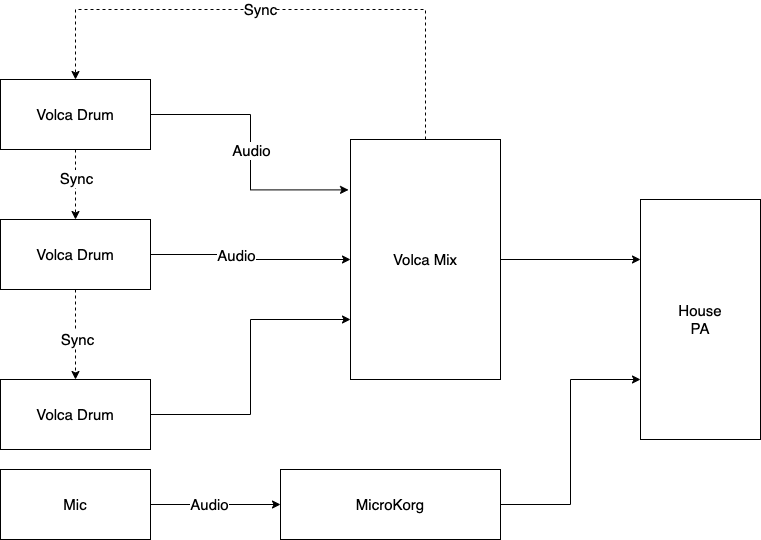
Learning becomes a part of entertainment when it occurs at concerts. The linked video of a drum machine trio was shot at Tec-Troit 2025. I set up three synced drum machines and one synthesizer for the festival attendants to play. When a person showed interest, I taught them basic operations of Volca Beats or MicroKORG. Many participants played electronic instruments for the first time. Most stayed more than 15 minutes performing music with friends and strangers. 

The accessible ensemble experience, such as one described above, is another benefit of electronic ensemble workshops. Playing music together is an irreplaceable human-to-human experience. Bands and orchestras provide such moments, but it often takes years of individual and group practice to be at a presentable level. Technology can shorten the time it takes to produce good sounds together, allowing participants more time to experience the ensembleness—a special and personal connection only possible when people create music together. It’s like singing our lungs out together at late-night karaoke, but with synthesizers.

In the drum machine ensemble video, the performers do not need to worry about keeping the tempo, as all drum machines were synced. It eliminated the need to learn to play music in tempo, allowing participants more time to explore patterns and their combinations. In May 2025, I did a laptop ensemble workshop with a group of volunteers in Saginaw, MI. I taught Singaporean Crosswalk and  Save Point By the Lake to local musicians, fans, and students of all ages. The group rehearsed two pieces in 1.5 hours and performed in a concert following the workshop. The participants did not need to learn to play scales or articulations. They had to rehearse some choreography and timings to press keys on the laptops during a short rehearsal. And then enjoy the sound while rehearsing and presenting. 

In addition to drum machines, synthesizers, and laptops, I have conducted electronic workshops featuring ensemble performances. In no-input mixer workshops, I teach students the basics of no-input mixing patching. There are often fewer mixers than the participants, so I ask students to team up. The workshop participants then proceed to perform Benjamin Damann’s The King of Nothing as a group. In a similar spirit, my workshop recently has included Piyawat Louilarpprasert’s Shrimp Raptors in the repertoire, in hopes of introducing DIY instruments and multimedia to the audience. 

The effect of running electronic ensemble workshops has been quite positive so far. I get energized sharing what I love about live electronic music. Participants of the workshop remember my music and concert as more than a sound – it is a great promotional activity. Hopefully, they would try performing as an electronic ensemble after the workshop. If readers are interested in running or attending a workshop,  please do not hesitate to contact me. My workshops require some planning, but they are portable and require minimal equipment from the hosts.
This article is a part of Computer Music Practice – Presenting.
Presets and Compositions

A preset is a parameter configuration of a digital electronic instrument. A preset can make one synthesizer sound like a drum, string, or anything else. It also makes one reverb unit imitate the acoustics of a stadium, bathroom, or any other environment. Compared to an analog instrument’s patch, a preset can be saved and loaded. I can accurately recreate and use favorite or project-specific sounds instantly in a digital modular synth.  And there could be thousands of presets for one instrument. The ability to access a large quantity of presets instantly and accurately is, in my opinion, the digital instruments’ most distinguishing advantage over analog or acoustic instruments.

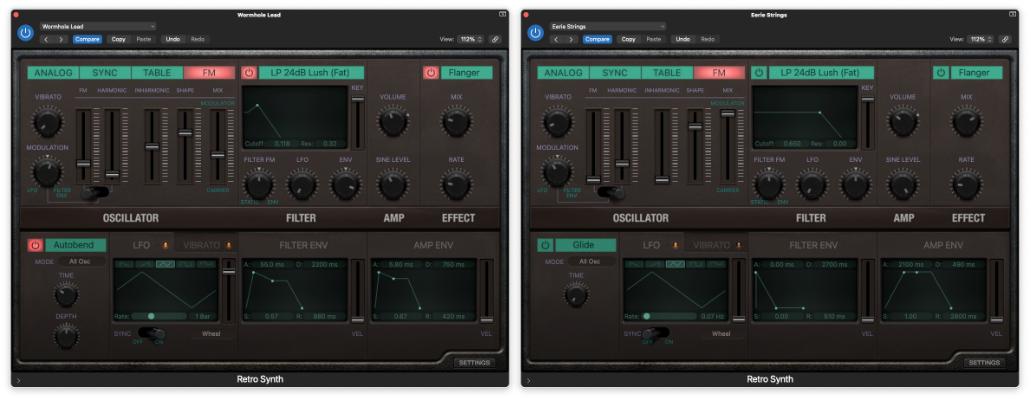
Many electronic music production starts with browsing through presets. A Logic Pro user can choose and play a sound, such as Eerie Strings or Wormhole Lead. These two sound different, but both are made with the same Retro Synth software instrument. In other words, Eerie Strings and Wormhole Lead are presets of Retro Synth. 

A producer could complete a piece with 100 different sounds using a  DAW, but that does not mean there were 100 different instruments. There could have been 10 instruments with 100 saved variations/presets.  Of those 100 presets, some could also be the creator’s original or modification. Some presets could change their parameters within a piece via automation. 

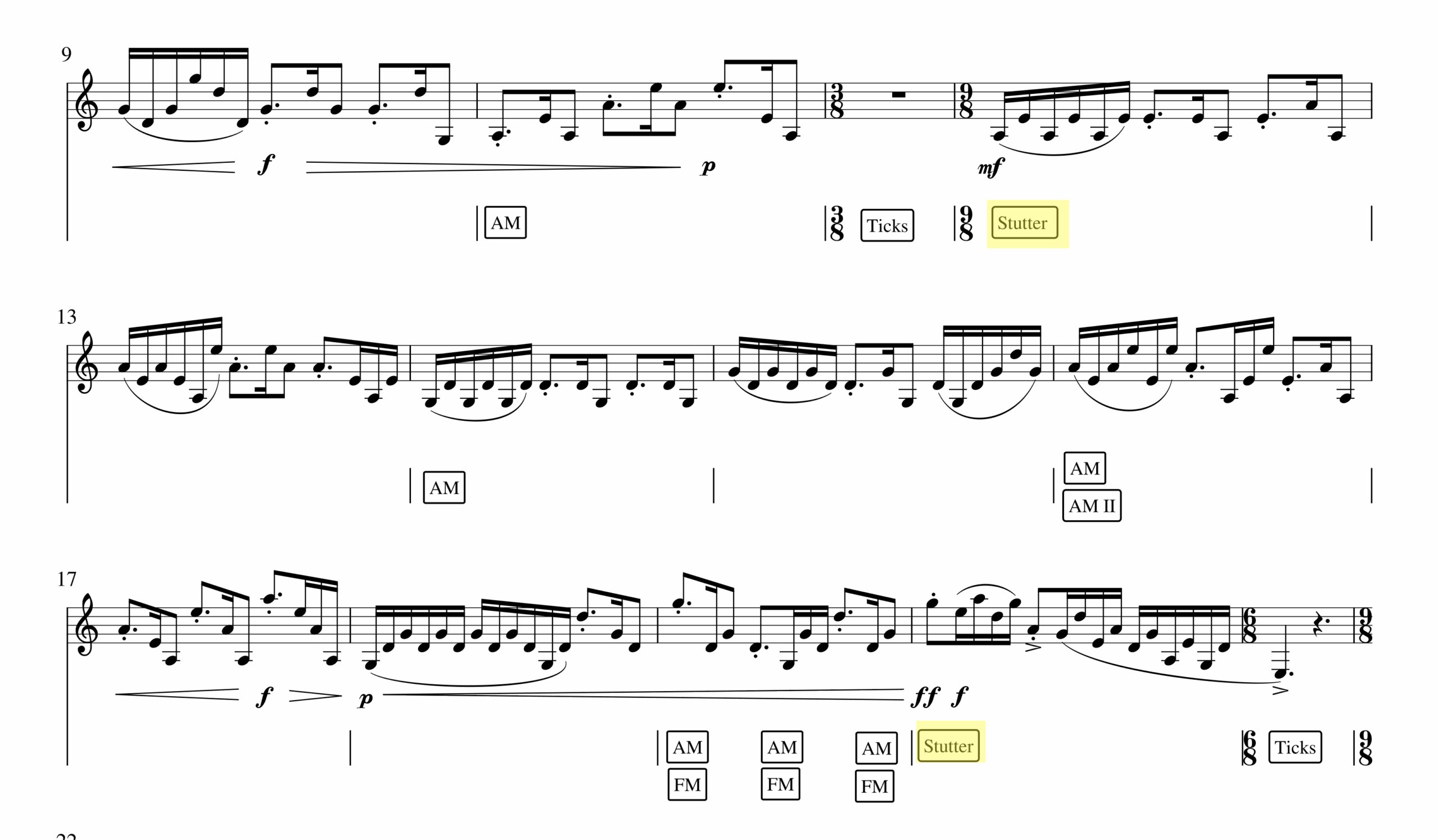
The idea of using multiple configurations of an instrument and then dynamically changing them applies beyond presets. Preset-changing is a uniquely electronic composition technique, as some electroacoustic compositions feature one or two electronic instruments with sequenced presets. For example, in  Armor+2 (2015), I cue digital instruments’ parameter changes according to the score.  I used SuperCollider to achieve this, but any apps with cue features could do the same.

In Armor+2, the computer randomizes parameters of a digital instrument where a boxed word is notated in the score (FM, AM, Stutter, Ticks). I think of this process as a random preset change that yields expected but different effects at every performance. For example, one can hear a stuttering effect in different rhythmic patterns in measures 12 (0:30 in the recording) and 20 (0:50 in the recording). The same randomization happens with FM and AM effects throughout the piece. The dynamically changing, yet well-timed change makes the computer part function like a jazz accompanist. A jazz pianist plays the notated chord progression but improvises how those chords are presented. Similarly, the computer part of Armor+2 changes the clarinetist’s sound as notated, but the resulting sounds are varied at every performance. 

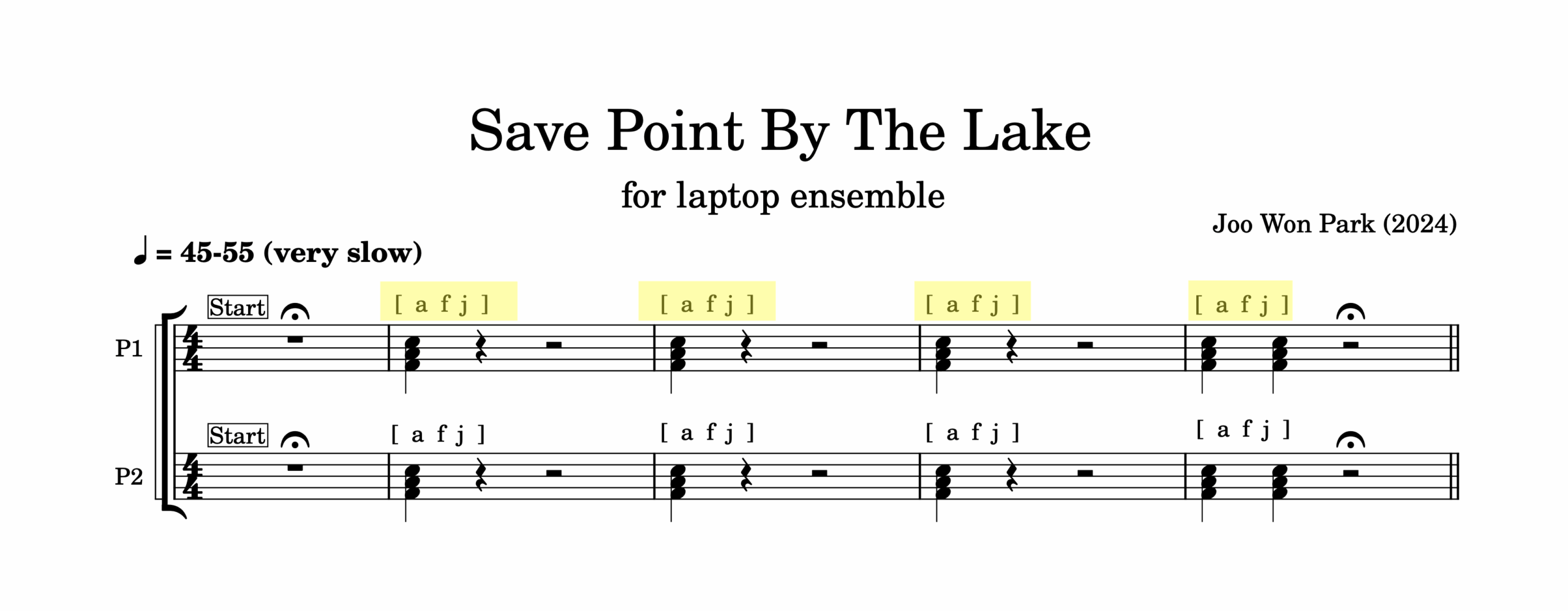
Another example is in Save Point By The Lake (2024) for a laptop ensemble. Every performer in this piece plays piano samples according to the score. For example, performers press keys A, F, and J on the computer keyboard in measures 2,3, and 4 with notated rhythm.

But unlike an acoustic piano, the laptop will not always play a F major chord. I designed the instrument so that at every stroke of a key, SuperCollider randomizes pitch, dynamics, and detuning amount. Pressing an F key at measure 1 and doing the same action in measure 2 yields a different note. This way,  the ensemble can play the piece in notated rhythm with computer-assisted interpretations.

A preset is a recordable and recollectable variation of a digital instrument. It is an equivalent of a save or a snapshot of an app, and it is a powerful tool to express originality and creativity. Anyone can use Logic Pro’s Retro Synth or SuperCollider, but a customized preset can sound unique. If those original sounds are put together in order or layered with other sounds, the result could be a composition. Lastly, if we expand the definition of an instrument, other creative processes could be thought of as a preset change. If a recording studio is an instrument, what are its presets? If an orchestra is an instrument, what are its preset changes and randomization? These wonderings are delightful and provocative.

This article is a part of Computer Music Practice – Learning.

Computer Music Practice – Learning

The articles in the Learning section of CMP cover computer musicianship. They are examples of a music technologist’s work and efforts that the audience does not see. But they are essential steps for artistic improvement. Every musician has routines to refine themselves, and the Learning section shares my version of thoughts, actions, and reflections on computer music practice.

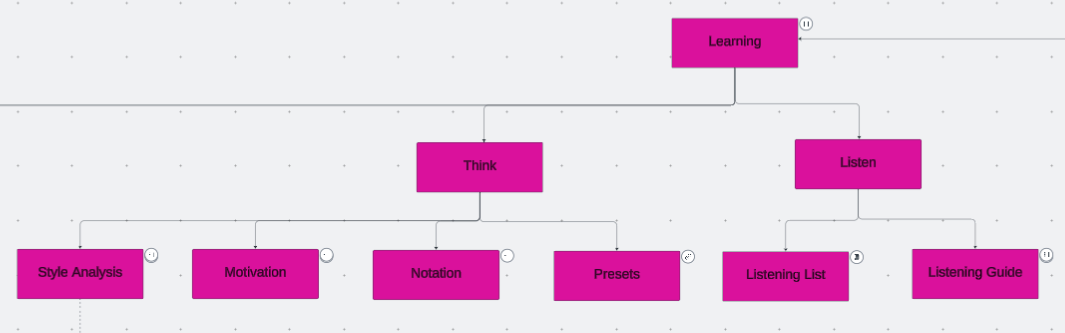
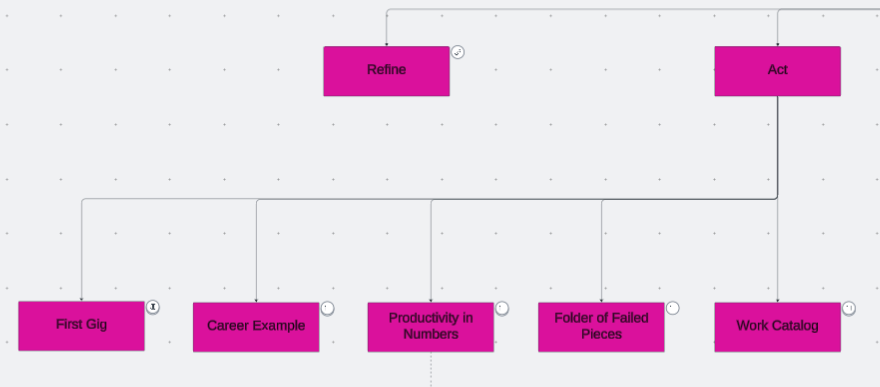
There are four subsections, and the first three are listen, think, and act. The first and most fundamental step in musicianship is learning to listen. Then, a conscious and analytical listening connects to thinking. Thinking means analyzing and imagining sounds and techniques to enhance a piece, organizing and comparing past compositions to identify creative patterns, and articulating those thoughts into words for reference. These thoughts become tangible results through actions. The results could be a composition, a concert, a career move, an idea, or another sound to circle back to the listen-think-act process. 

Listening, thinking, and acting are necessary steps in composing, coding, or improvising, as the repetition of those steps refines one’s skills. The refining process in music technology is essential but often overlooked. There are more instruments and techniques I can learn in music technology. I chose a few that interest me the most and spend time and energy to improve at them, rather than using the newest tools. Performers of non-electronic instruments have resources and historical references on the refinement process, such as etudes and method books for orchestral instruments. Computer music does not seem to (or rather, is not designed to) have a standard practice routine, but I can at least share my practice routine specific to computer musicianship. 


Computer Music Practice (CMP) is an interactive and personal example of computer musicianship. Click each entry in the chart to read and listen to Joo Won Park’s computer music research.

Computer Music Practice – Presenting

Finishing a composition means the beginning of other work. Posting the audio files on the web is the first step in sharing my music, but it is not the only way to showcase the piece’s best aspects. Music for human performers is meant to be experienced in live concerts. Some generative music’s value is in creating and hearing multiple versions. As an electronic music researcher and teacher, presenting the algorithms, codes, and other relevant findings may be as important as sharing the music.

I do the above to present my work to reach a wider audience. In the Presenting section of Computer Music Practice, I provide more concrete examples of my efforts to do so. Electroacoustic performers interested in promoting their works, as well as curators interested in adding electronic music to their events, may benefit from reading the articles in this section.

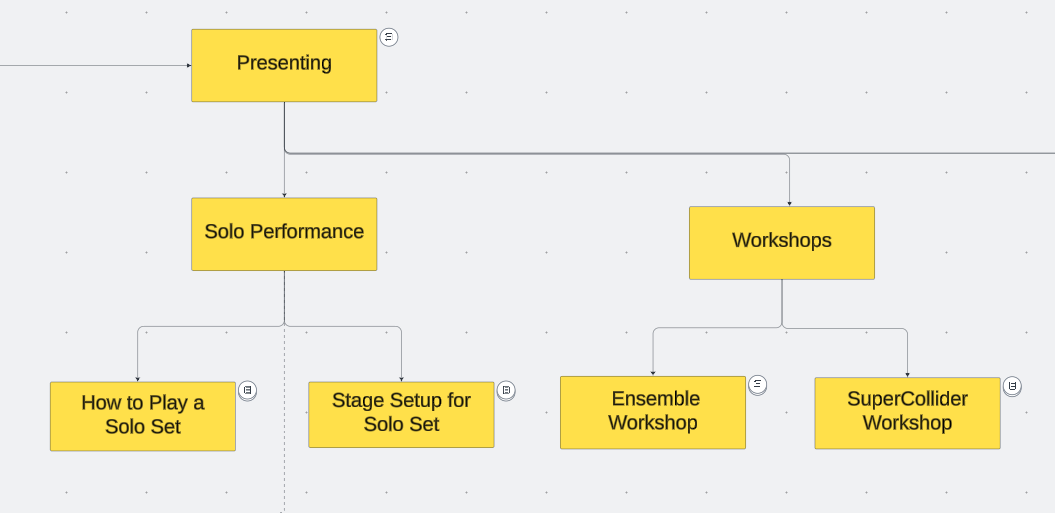
  • Solo Performance: Solo performances account for the largest portion of my stage appearances. Performing solo electronic music needs specific preparations. The practice of preparing and presenting electroacoustic solo works changes over time, and I share a record of these changes spanning more than a decade. 
  • Electronic Ensemble: Practice and presentation methods for electronic ensembles vary widely, and there are few records about them. Proper documentation of the creative process helps the evaluation of the genre.  I share my approach to running an electronic ensemble so that those interested can use it as a reference.
  • Tools: Some of my pieces are written as a demo of computer music techniques. Those compositions feature research that could be applied to other people’s works. The articles in this section introduce tools and technologies that can be used and modified. Please credit the creator if sounds and codes made with the tools provided here are applied to a piece.  
  • Workshops: I enjoy providing opportunities to learn about tips and techniques of electronic music production and performance. I share teaching materials for in-person or virtual workshops on electronic ensemble and SuperCollider.

Live electroacoustic music, the genre of music in which I excel, is not well-known. It has relatively little historical context and resources for evaluation, or I am asking people I don’t know to attend a concert where they may not see the relationship between the performer’s actions and the sound. One way to mitigate this inherent challenge is to provide as many opportunities as possible to listen, create, and play electronic music. It requires more effort, such as running workshops and sharing tools. The entries in the Presenting section are my version of such efforts. 


Computer Music Practice (CMP) is an interactive and personal example of computer musicianship. Click each entry in the chart to read and listen to Joo Won Park’s computer music research.

Save Point By the Lake (2024)

For laptop ensemble (2024)
Commissioned by Peabody Laptop Ensemble

Program Notes

In RPG games, we make sure to stop by the save point to rest and recover before entering the
boss stage. If the boss defeats us, we come back to the save point. From there on, we
restrategize, level up, or regain the courage to face the challenge. We need to have a save spot
in our lives as well. I invite performers and audiences to pause, listen to the quiet part, and rest
when experiencing Save Point By The Lake.

Download scores and SuperCollider files here

Save Point By The Lake was commissioned and premiered by Peabody Laptop Ensemble. The world premiere was on April 4th, 2025. The recording below is a demo version made by the composer. The premiere version should be available soon to listen.

Setup

  1. Download and install SuperCollider 
  2. Download and uncompress the performance files from www.joowonpark.net/savepointbythelake
  3. Put the SavePoint folder on the Desktop (important step)
  4. Open SavePointBytTheLake_OSX.scd or SavePointByTheLake_Windows.scd in SuperCollider
  5. In SuperCollider Menu, select Language -> Evaluate File 
  6. Follow the instructions in the score
  7. Hardware Setup
    1. Each performer needs a laptop
    2. If there are few performers, the audio output of the laptop should be connected to an amp or PA. If there are many performers, audio output from laptops’ built-in speakers may be loud enough
    3. Performers can fullscreen the GUI and increase the brightness for a visual effect
    4. A PC user may need to adjust the keyboard repeat rate if the CPU is overloading

Score Interpretation

  1. Divide the ensemble into two groups, P1 and P2. 
  2. Boxed words indicate specific buttons to press on the SuperCollider patch.
  3. The traditionally-notated part shows the rhythm and number of voicings. Play all quarter notes as staccato.  For example, in measure 2 above, press keys a, f, and j simultaneously on the downbeat. 
  4. [bracketted letters] indicate which keys to press, including the [space] bar. Note that low-case letters and upper-case letters make different sounds. 
  5. Improvise at slash notation. Perform according to the written instructions.