Tag Archives: composition

Computer Music Practice – Composing

Composing, an act of making original music, is my main artistic skill. I make concrete and shareable products that represent personal thoughts and experiences. The product is sound, and the material I use is electronics. Since 2002, I have composed and shared over 130 compositions online and offline.  Electronic musicians can have various titles, such as a researcher, educator, developer, performer, etc.  The specialty I’ve focused on is that of a computer-based music composer. 

In CMP, I organized my compositions from 2014 to 2026 in two main categories and six subsections. The main categories are defined by the presence or absence of human performers. The first category, For Computers, has fixed media and algorithmically generated music. They do not require human performers to make sound. They are either listened to as is (without images) or are used in multidisciplinary shows. The pieces in this category are further grouped by albums (Overundertone, DotZip, and Forms to Ponder) or functions (Sound Installation or Dance).
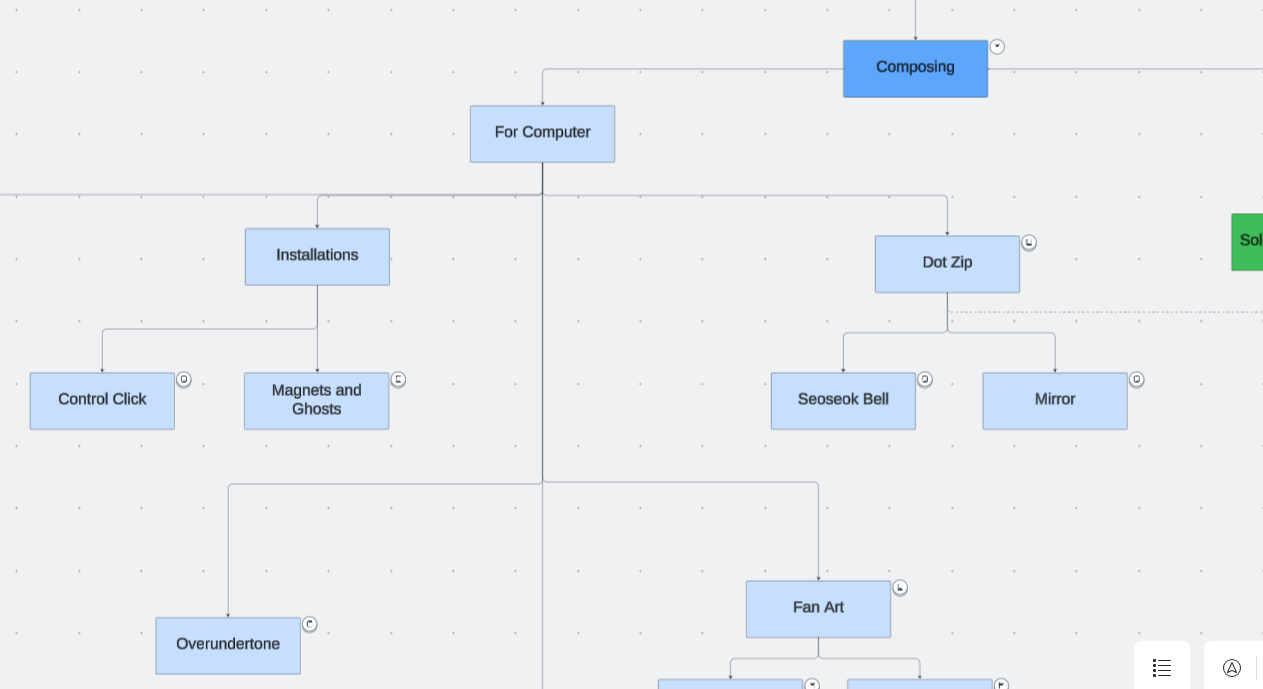
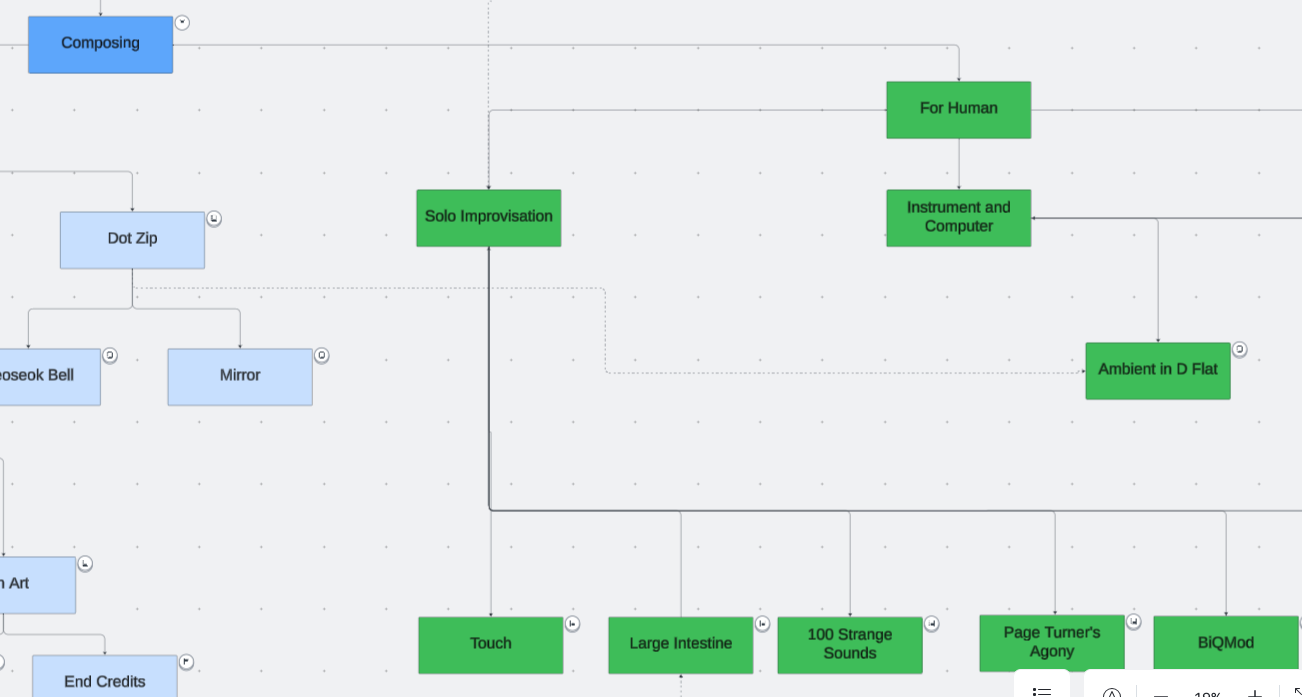
The second category, For Humans, involves pieces for human performers. Unlike the For Computers pieces, they are best experienced in live concerts. The For Humans category is further organized by instrumentation. The Solo Performance section has works written for me to play on stage. Most of them are improvisational and were written to show my performance skills. The music under Instrument and Computer needs performers other than myself. They are written for one or two classically trained instrumentalists and a computer-generated part. The last subcategory, Electronic Ensemble, differs from the others, as they are written for an ensemble of electronic instrument performers. The performers are not necessarily traditionally trained musicians. The number of performers ranges from 4 to 20 or more.
Some compositions were successful in leading me to new or better opportunities. Some pieces did not make it beyond a premiere.  But all compositions led to improvements in technique, time and energy management, human interactions, and getting inspirations.

  • Technique: Writing and editing SuperCollider codes for more than 100 pieces gave me plenty of time to get good at expressing musical ideas in numbers and instructions. The repetition and refinement in composition also form a musical style. I think there is a “Joo Won sound” at this point.
  • Time and Energy Management: With improved technique, I spend a fraction of the time and energy to create music of equal quality compared to decades ago.  The extra time and energy leave room to experiment and explore. 
  • Human Interactions: Working with others is not my natural talent, but it has gotten easier as I write and present more pieces for performers. Meeting, interacting, listening, arguing, and all other activities need practice. Writing and sharing compositions gave me plenty of time for trial and error. 
  • Getting Inspirations: noticing things worth sharing and writing music about them needs practice. Art is about sharing unusual or memorable experiences in life, and artists actively search for them. I learned to notice and observe delightful sounds, experiences, and memories so I can compose. Perhaps more importantly, I also learned to make music when the inspiration is nonexistent. A deadline is the best inspiration. 

Please click on the objects in the CMP diagram to listen and read about the works featuring unique electronic sounds. Most articles also have links to the SuperCollider code for readers to see and run. The purpose of the articles in the Composing section of CMP is to share composing techniques and tips with specific examples from one composer’s work catalog. Compare how I thought, wrote, and executed pieces with other electroacoustic composers. If willing, compare how the pieces in the Composing section are similar or different by album, instrumentation, or functions.


Computer Music Practice (CMP) is an interactive and personal example of computer musicianship. Click each entry in the chart to read and listen to Joo Won Park’s computer music research.
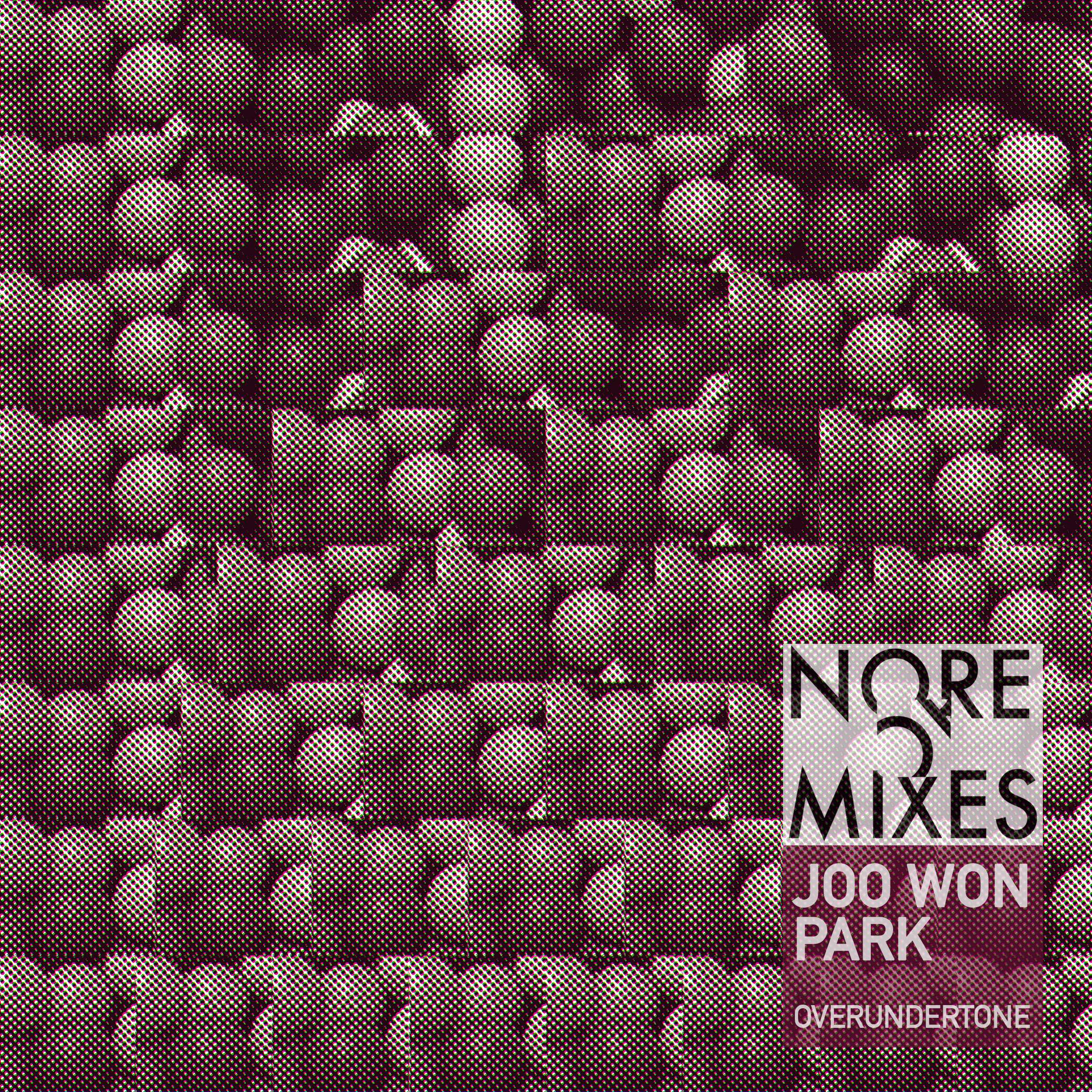
Overundertone (2015)

All compositions contain aspects of the creator’s thoughts and life at a particular time.  Overundertone, a 2015 album consisting of eight electroacoustic tracks, is a reflection of me a decade ago.  Listening to the album feels like reading an old diary.  The me in 2015 is unfamiliar to the me in 2025 – he is passionate and curious about the world and people. He had the thoughts and emotions I wish to have now. Below are what I learn about myself when I listened to the tracks.

  • Eyelid Spasm: I liked high frequencies, so I made a piece using them. I played with my (then) 5-year-old and 1-year-old sons, all the time, so the playfulness is in the piece. I even used a picture of me mimicking an animal (I think, I hope) for the kids as a cover photo. I don’t think I can hear many frequencies featured in this piece anymore.
  • Cross Rhythms: I wrote it as a class project example. I asked Oberlin’s TIMARA students to pick a page in Tom Johnson’s Imaginary Music and make an electroacoustic piece about it.  I chose Cross Rhythms and composed a scene where two different rhythms overlap. The teacher-composer identity is in the piece. 
  • Three Corn Punch: It’s a recording of a live performance. It is probably my last piece that does not involve electronic sound. It uses a Disklavier, though.  There are no new techniques here. I learned to accept that I don’t have to develop a new concept for every composition. A good idea from others and myself needs repetition, reinterpretation, and refinement.
  • Cornfields and Cicadas: This is one of the soundscape works using original field recordings and synthesized sounds. I have been creating a series using this instrumentation since my graduate student years. I remember writing it with less struggle and stress, but the quality was about the same. It is a sonic diary of a vacation to a farm in Pennsylvania, where I went with my family and friends. 
  • Beft: I wrote it because I was a dad reading Dr. Seuss to the kids. Beft is a creature in Things You Can Think that only moves to the left. It contains sounds and techniques I loved then – Shepard tone, 8-channel spatialization, overtones, etc. It was also a part of a class project example, like Cross Rhythms. My teacher-composer-dad is all represented in Beft. 
  • Snake and Ox: It is a recording of an improvisation using instruments I used in solo shows. They are a no-input mixer, SuperCollider, and a custom synth. The no-input mixer sound was the most exciting thing to me. I remember dancing along with the no-input mixer noises while practicing. 
  • 10M to Fairmount: It is a sonic diary of a park in Philadelphia, where I lived for six years. Philly feels like a hometown since I started my family there. I must have been interested in visuals in addition to field recordings and synthesizers then. The piece has a video version. Like Cornfields and Cicadas, it is a diary-like piece.  
  • Sky Blue Waves: It’s a piece from 100 Strange Sounds, a project I thought would be my magnum opus. The track has a simple instrumentation (celesta and a field recording of a beach), but has the not-so-happy aspects of my life at that time. As a contrast to Eyelid Spasm, it worked well as a closing piece of the album.

These songs are forgotten, but are still significant to me. Overundertone is an archive of emotions, efforts, and life in audio, the format I love the most. The album reminds me to strive (용써라) like 2015. The jaded, slumped me of 2025 needs that. 

jwp in 2015

JNNJ (2016) – for percussion duo and computer

Program Notes

JNNJ was commissioned and premiered by Hunter Brown and Louis Pino in 2016. The piece is inspired by the life and dynamics of my family. The title is a combination of the first letters of mom, dad, and two sons. 

Technical Needs

  • One computer with a DAW or Max. A Logic Pro X session is provided, but any DAW will work. The tape part can also be played with the provided Max patch. 
  • Stereo sound system 
  • Two headphones for click tracks 
  • An audio Interface with four separate outputs 
  • TapeL.aif should be routed to output 1, connected to the left speaker 
  • TapeR.aif should be routed to output 2, connected to the right speaker 
  • ClickTrackL.aif should be routed to output 3, connected to Perc1’s click track 
  • ClickTrackR.aif should be routed to output 4, connected to Perc2’s click track 

Performance Needs

  • Two percussionists with a snare drum and a large cymbal for each performer. 
  • Both performers use brushes for the entire piece. 
  • Perc1 stands close to the left speaker, and Perc2 stands close to the right speaker

Performance Instruction

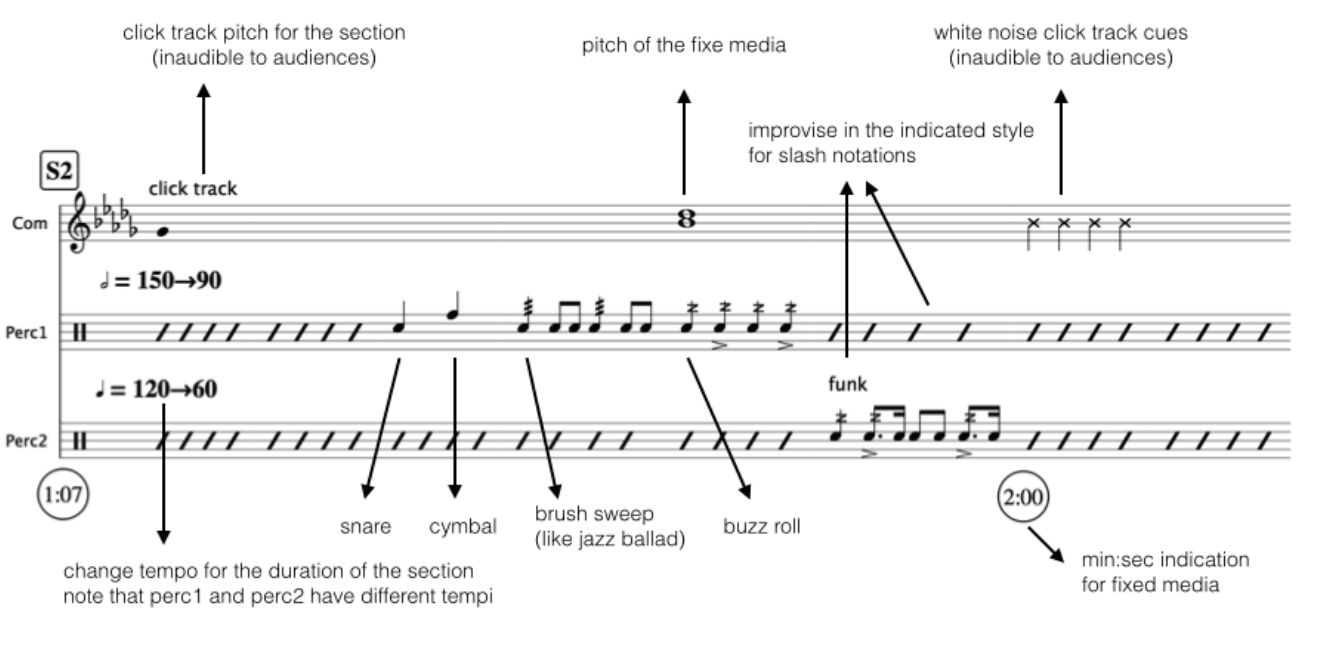
  • Each performer gets his/her own click track. The click tracks run in various tempi and over the entire piece. Each performer should follow his/her own click track. 
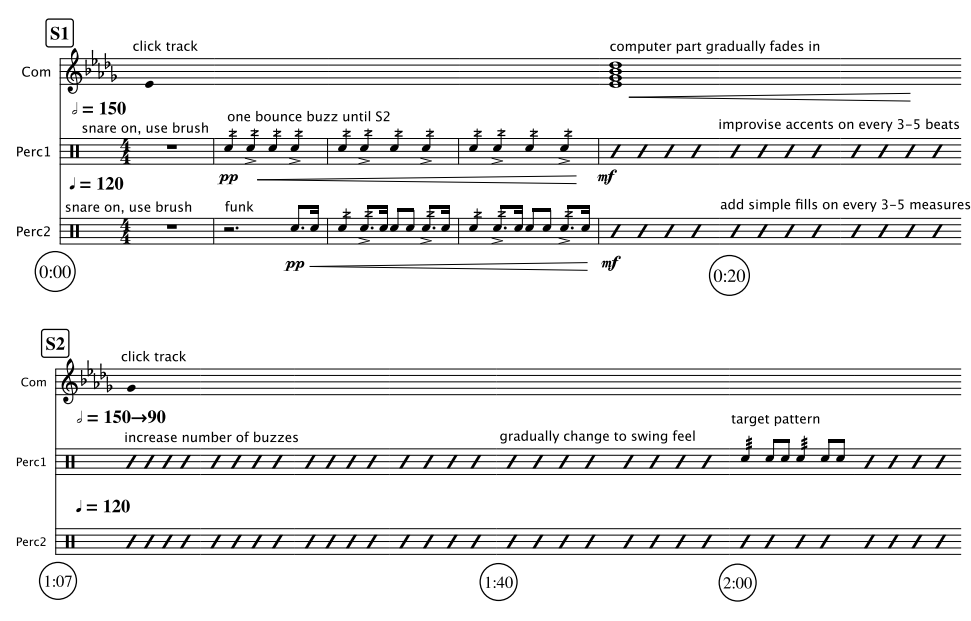
  • Interpret the score like a jazz chart. Improvise in the notated style (funk and swing). 
  • Pay attention to the pitch of the click track to hear the section changes. 
  • Section-specific notes: 
    • S1: The tape part will fade in at around the 20-second mark.
    • S2: Perc1 transforms the rhythmic pattern to a swing (indicated as “target rhythm”) while slowing down. 
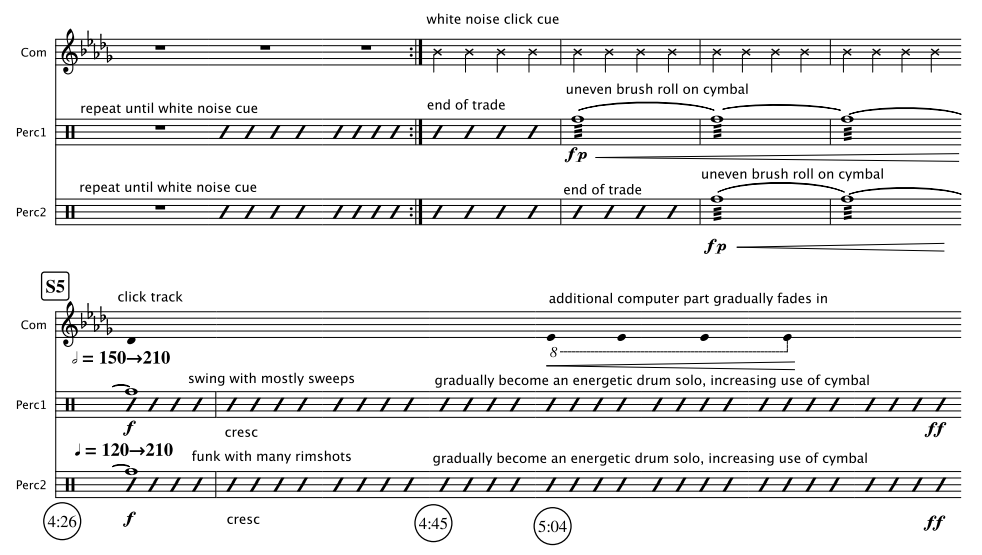
    • S3: Perc2 transforms the rhythmic pattern to a more energetic and busy funk rhythm while slowing down. Listen for the white noise cue for the next section. 
    • S4: Both Perc1 and Perc2 trade off solo while speeding up. The trade offs will gradually overlap with each other. Listen for the white noise cues to play uneven brush sweep on cymbals. 
    • S5: Both parts will get significantly faster. When the tempo becomes too fast, freely improvise with great energy. Increase the use of cymbals throughout the section. 
    • S6: Both Perc1 and Perc2 play energetic cymbal improvisation while slowing down. Accompany the tape part after the click track stops. At the end of the fixed part (7:00), create a quiet, windy sound by swinging the brush in the air.

Composing Click Track

A computer is excellent at doing precise tasks. It is a good tool for creating music that needs precise control. I can ask a computer to make a click track from 120BPM to 150BPM in 2 minutes, and it will do so without a hitch. In JNNJ, I used the precision of a computer to create a percussion duet featuring continuously changing tempo.

JNNJ requires each percussionist to follow their assigned click track. The tempi of the click tracks change constantly, asynchronously with each other. The performers are asked to follow the click track while improvising according to the score. To realize this idea, I made a click track with distinct features.

  • The click track gradually but precisely changes at a given duration. The performers listening to the click track should feel comfortable adjusting the tempo while reading the score.
  • To aurally cue the section changes, the pitch of the click changes in the click track. The notes are in harmony with the fixed media part.
  • The click tracks play unpitched count-in beats for the parts where a sudden or fast change is needed. 
  • The performers also read the click tracks in their score. The unstemmed quarter notes in the computer part indicate the pitch of the click tracks. Most of the fixed media part is described in words in the score.

The click tracks and fixed media parts are coded and rendered in SuperCollider. The audience does not get to hear it, but I think the most distinguishing feature of JNNJ is the click track. The fixed media part is simple in terms of timbre, so that the audience can focus on the duel of percussionists marching in different beats.

Refinement

The palindromic approach to tempo change (one part goes from X BPM to Y BPM while others go from Y BPM to X BPM at the same time) was previously explored in a fixed media piece called Cross Rhythms. Prior to that piece, I also explored palindromic timbre in a few other fixed media pieces. The third movement of Sound Mobile sounds exactly the same when played forward and backward.  Multiple and varied attempts at expressing an idea through sound are necessary for refining and redefining.

Four Hit Combo (2024)

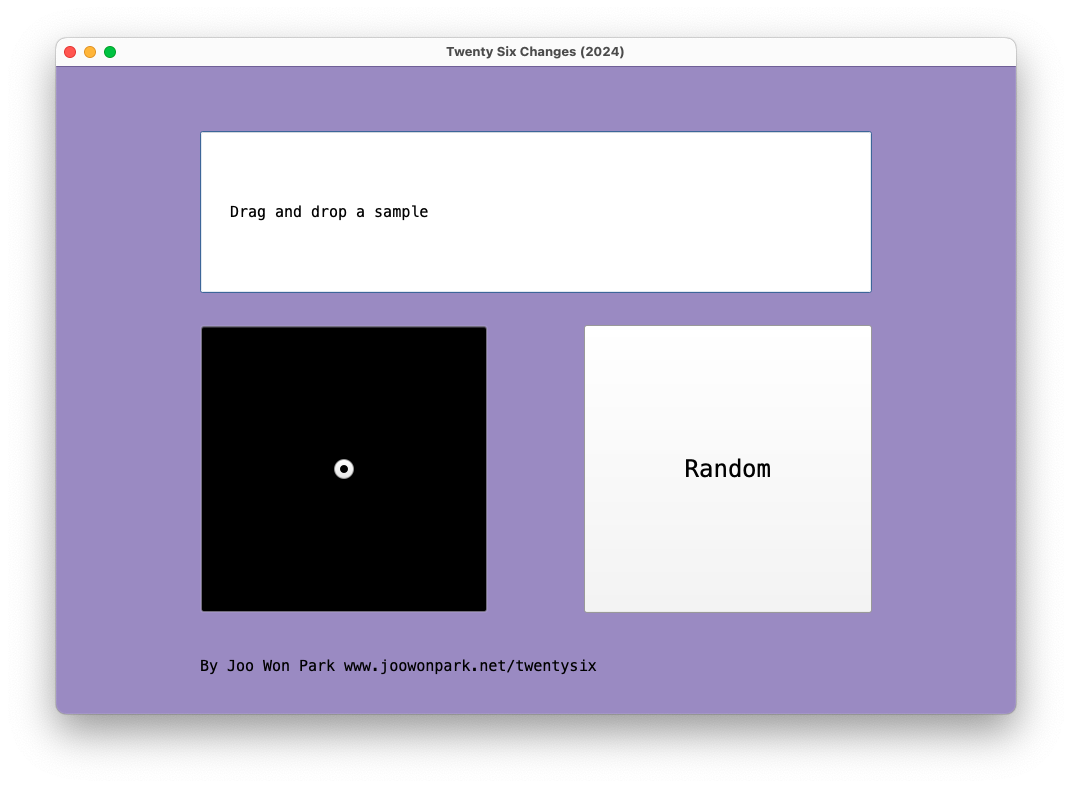
In Four Hit Combo, each laptop ensemble member uses four audio files to create twenty-six flavors. Musical patterns arise from repetitions (loops), and different combinations mark forms in music. The laptop ensemble members prepare their own samples before the performance, and they control loop start points and duration according to the score and the conductor’s cue. Because there are no specific audio files attached to the piece, each performance could give a unique sonic experience.

Instrument Needed

  1. Laptop: each performer needs a computer with SuperCollider installed
  2. Amp: connect the laptop to a sound reinforcement system. If the performance space is small, it is possible to use the laptop’s built-in speaker.

Pre-Performance Preparation

  1. Determine a conductor and at least three performers. If there are more than three performers, parts can be doubled
  2. Each performer prepares three audio files (wav, aif, or mp3). The first file should contain a voice. The second file should contain a pitched instrument sound. The third file should contain a percussion sound. All files should not be too short (less than a second) or too long (more than a minute). The [voice], [instrument], and [percussion] files should be different for all performers.
  3. While the voice, instrument, and percussion files are different for all performers, they should share one common sound file. This file will be used in the [finale].  
  4. The conductor prepares one audio about 10-30 seconds long. It could be any sound with noticeable changes. For example, a musical passage would work well, while an unchanged white noise would not. 
  5. Download FourHitCombo_Score.pdf, FourHitCombo_Performer.scd, and FourHitCombo_Conductor.scd from www.joowonpark.net/fourhitcombo
  6. Open the .scd files in SuperCollider. Follow the instructions on the.scd file to load the GUI screen.

Score Interpretation

  1. Proceed to the next measure only at the conductor’s cue. The conductor should give a cue to move on to the next measure every 10-20 seconds.
  2. In [voice], [instrument], [percussion], and [finale] rectangle, the performers drag-and-drop the audio file accordingly.
  3. In [random] square, performers press the random button in the GUI.
  4. In the square with a dot, quickly move the cursor in the 2D slider to the notated location.
  5. In the square with a dot and arrow, slowly move the cursor from the beginning point to the end point of the arrow. It is OK to finish moving the cursor before the conductor’s cue.
  6. In a measure with no symbol, leave the sound as is. Do not silence the sound.
  7. In measure 27, all performers freely improvise. Use any sounds except the commonly shared sound reserved for [finale]. 

Large Intestine 2013 vs 2024 – Brief Analysis

I am at the age where I can make a “How It Started vs. How It’s Going” analysis of my music. Comparing performance practice change over a decade or so is valuable for my growth, especially when the piece involves improvisation and no score. I can see where I came from, where I am now, and where I should go next. Large Intestine for no-input mixer and computer premiered in 2013, and I still present it in concerts. Watching the August 2013 version and the recent June 2024 version in sequence gives me a chance to contemplate my electronic performance practice. Did the technology and style change over 11 years? 

Technology

I took the “if it ain’t broke, don’t fix it” approach for Large Intestine in terms of the hardware and the software. The SuperCollider patch I coded 11 years ago is almost identical to the 2024 version. There were maintenance updates, such as replacing a deprecated UGen with a current one, but the signal-processing algorithm is untouched.  The hardware signal flow is also unchanged, although I upgraded the mixer for increased possibility and flexibility. 

I perform the piece by changing the mixer settings and SuperCollider patch. The SuperCollider patch consists of eight effect processors, and I turn on and off those effects in different combinations. It is much like playing a guitar with a pedal board. Over the past 11 years, I have bought a “new guitar” but am using the “same pedal.” The sonic possibilities remain the same, but how I play the instrument, the style in other words, has changed.  

Download and run the SuerColider patch for Large Intestine as a reference. You can test it using a mic or any other instrument.

Style

I observed the following differences in the 2013 and 2024 versions of Large Intestine

20132024
Mostly slow and gradual parameter changes Mostly fast and abrupt parameter changes
I discover things on stageI present previously experienced sounds
The mixer supports computer soundsThe computer supports mixer sounds
Long duration (10+ minutes)Short duration (less than 8 minutes)

When I was a no-input beginner, I could not make quick transitions and variations. In the 2013 version, I treated the mixer as one of many sound sources that could pass through signal processors. Like its umbrella project, 100 Strange Sounds, Large Intestine featured my SuperCollider capacity. The 2024 version shows that I reduced the dependency on the computer part. I also learned to say more within less time.

Gained confidence also changed the performance goal. I make a one-sentence goal when I am improvising solo. My goal for Large Intestine used to be “Let me figure out what no-input mixer can do on stage,” as it delighted me to discover the mixer’s unique sound and its augmentation by the computer. 11 years later, there are much less delightful discoveries in the piece. But I can now expect the sound I can create. The current  motto is, “Let me show you my favorite no-input mixer moments I learned previously on stage.” 

Evaluation

I am my work’s biggest supporter and critic, but that does not help my career development. The audience ultimately decides the longevity of the work. Large Intestine was fortunate to be liked by the audience on many occasions. It received some honors, such as being included in the SEAMUS CD series (2015), a peer-reviewed annual album released by the Society for Electroacoustic Music in the United States. There were multiple invitations to perform at different venues, and it became an integral part of my solo performance practice. The positive feedback from presentations motivated me to delve further into the no-input mixer world. I composed the following pieces based on the learnings from Large Intestine.

There are also clear limits to Large Intestine and my solo electroacoustic improvisation. I don’t expect other performers to play Large Intestine as it lacks score or instruction. The experience and joy I had with the piece are not transferable to other performers. This bothered me. I tackled this issue by teaching others how to play no-input mixers. I currently enjoy organizing no-input mixer workshops and no-input ensemble sessions. The mixer is a great introductory instrument for electronic music performance.