Seokseok Bell is a track in Dot Zip, an album of 22 generative music. The album’s purpose is to demo a uniquely electronic sound rendered with codes. Each track has a downloadable SuperCollider code that a listener can render and modify. Listen to SeoSeok Bell at Bandcamp and download the SuperCollider code from here.
The following paragraphs analyze the form, code, and musical aspirations in making Seokseok Bell. It teaches how to start and progress a composition from a single synthesized sound. The learning is most effective if the reader has a SuperCollider installed on their computer. Please watch a tutorial video on how to run SuperCollider codes written for Dot Zip.
Program
Seoseok (서석) is a small town in the mountainous region of Korea. The sound of the bell in a chapel in the town reminds me of peace and love. The piece recreates (or interprets) the bell sound using an additive synthesis-like process and then presents it in an ambient-like style.
Form
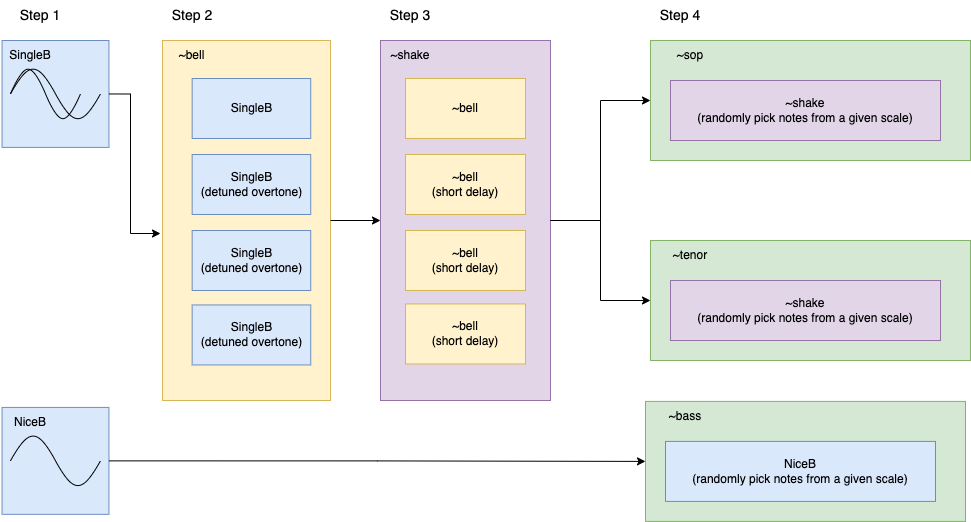
Seoseok Bell creates a bell-like tone by adding multiple sine waves. The bell tones and a simple bass line then make a three-part contrapuntal music. The resulting music has many variations due to the randomization in overtone frequencies, note sequence, and rhythms. The SuperCollider code SeoSeokBell_DotZip.scd does this through the following steps.
Step 1: Make two sine waves detuned to each other with a randomized frequency difference, creating a single tone with a pulse.
Step 2: Create an overtone series. The notes in the overtone series are randomly detuned.
Step 3: Play the sound multiple times with short, randomized time intervals.
Step 4: Generate soprano and tenor parts by randomly choosing a note in a scale. At the same time, generate a bass part with simpler overtones in tune.
SeoSeokBell_DotZip.scd has the following sections. Watch a tutorial video on how to use the code.
SynthDef(“SingleB”): synthesizes sound described in Step 1
~bell: makes sound described in Step 2
~shake: make sound described in Step 3
~sop, ~tenor, and ~bass: make sound described in Step 4
SynthDef(“NiceB”): synthesizes bass tone described in Step4
SystemClock.sched: schedules start and stop time of ~sop, ~tenor, and ~bass
SynthDef(“SingleB”) and SynthDef(“NiceB”)
The two SynthDefs use simple waveform generators (SinOsc.ar and LFPulse.ar) as audio sources. SynthDef(“SingleB”) uses a percussive amplitude envelope with randomized attack and release times. The envelope also includes a transient generated with LFNoise2.ar. The SynthDef(“NiceB”) has an envelope on the filter frequency of RLPF.ar.
~bell
In ~bell function, SynthDef(“SingleB”) is duplicated using Routine. The below formulas determine the frequencies of the duplicated Synths.
Where argument count is increasing by 1 at every iteration of a .do loop
Once defined, ~bell function generates a sound using the following arguments:
~bell.(fumdamental frequency, amplitude, duration, pan position, interval value of overtones)
~shake
~shake duplicates function ~bell with a Routine with randomized .wait, creating a slight delay between the instances of Synths. Once defined, the ~shake function generates a sound using the following artumdnts:
~shake.(fumdamental frequency, amplitude, duration, interval value of overtones, delay time)
~sop, ~tenor, and ~bass
The three functions ~sop, ~tenor, and ~bass are Routines that play ~shake or Synth(“NiceB”) with frequencies picked from the array ~scale or ~scalebass. The global variables ~bpm and ~beat determine the wait time. The three Routines receive .play and .stop messages according to the timings set by SystemClock.sched.
Uniquely Electronic
In electronic music, a sound design process is often the starting point of a composition. Seoseok Bell began as an exercise inspired by the Risset Bell. I wanted to create a bell sound using additive synthesis. However, such an exercise should not end as a sound design only. The composer or researcher should present the findings in a musical context.
Dot Zip consists of 22 short electronic compositions. The tracks feature a synthesis technique or a compositional structure best realizable with code-based audio programs. They are examples of what one does after learning an audio coding programs like MaxMSP and SuperCollider.
Dot Zip is a pedagogical project. Each track is an unedited render of a SuperCollider file. Download and try the .scd files from the link below.
Relevant Tones, a contemporary classical music podcast, produced an episode about my music and teaching career. It also features seven pieces ranging from my very first YouTube performance to the most recent electronic ensemble piece. The host, Austin Williams, and I had a pleasant talk.
Use your laptop as a versatile and expressive musical instrument. We are going to learn three pieces written for the laptop ensemble and will perform them in the evening concert. Learn electronic music repertoire that is easy to assemble and fun to play together. Previous experience in electronic music performance is not required. The ability to read simple music notation is a plus but is not necessary.