
Control Click is a sound installation I made in 2016. It’s also the title of my recent album. This article is a short analysis detailing how I made the piece in terms of composition and technology.
Program
Control Click is a sound installation for a place with multiple computers, such as a computer lab or a game room. Using freeware, a typical computer lab turns into a multichannel audiovisual instrument that plays algorithmically generated parts. It sounds like a dream sequence at an arcade.
Listen to the tracks and watch the video before reading the next sections.
Form
Control Click is an electronic octet in which every player (i.e., the computer) plays a melody on the same type of instrument. The instrument gets a specific instruction to choose rhythm, melody, and timbre. First, each player randomly chooses a melody pattern. The chosen pattern is repeated until the next cue.

The choice of rhythm is separated from that of melody. At a cue, the computer chooses a group of rhythmic values, randomly shuffles the order of the notes, and then repeats the newly-formed rhythmic pattern 4 or 8 times.

The sound is generated by combining a choice in melodic pattern and a choice in rhythmic pattern. The computer chooses another combination in the next cue. Below is one possible result of the algorithm described so far.
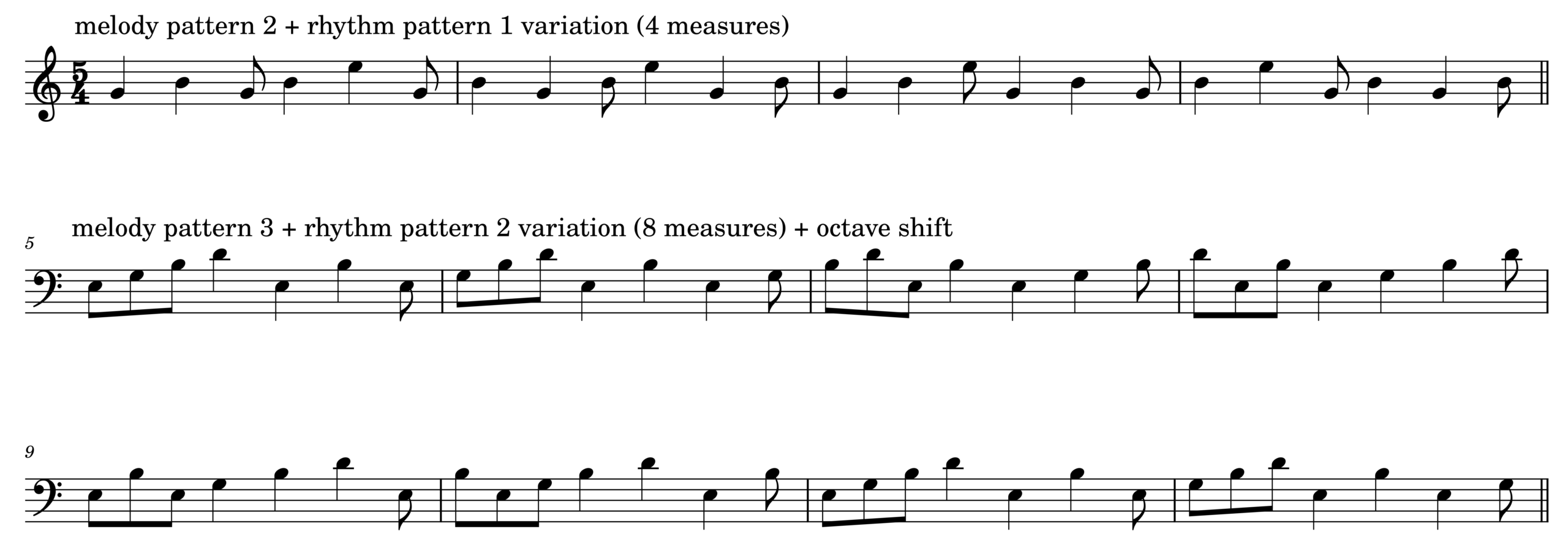
The cue is manually timed and recorded, like a placement of audio or MIDI data in a DAW. The cue also triggers changes in timbre, note duration, and octave transposition. The audio example below demonstrates the mentioned variations.
Finally, when 8 or more computers play and change instrument parameters in sync, the room with the computers can make sounds heard in the piece. Listen to 00:30-01:30 of the Bandcamp link for an example.
Code
The demo is formatted like the code examples in DotZip: there are three separate parts labeled SynthDef, Functions, and Performance. To read, modify, and evaluate the scd file, copy-paste-evaluate the code below in SuperCollider. You will hear sounds when evaluating the performance section after running the SynthDef and Functions sections.
There are three SynthDefs in the linked scd file named Beep, Beep2, and Beep3. The design scheme is the same for all of them, but each uses different oscillators for timbral change. They are simple instruments with controllable frequency modulation rate and amplitude envelope durations.
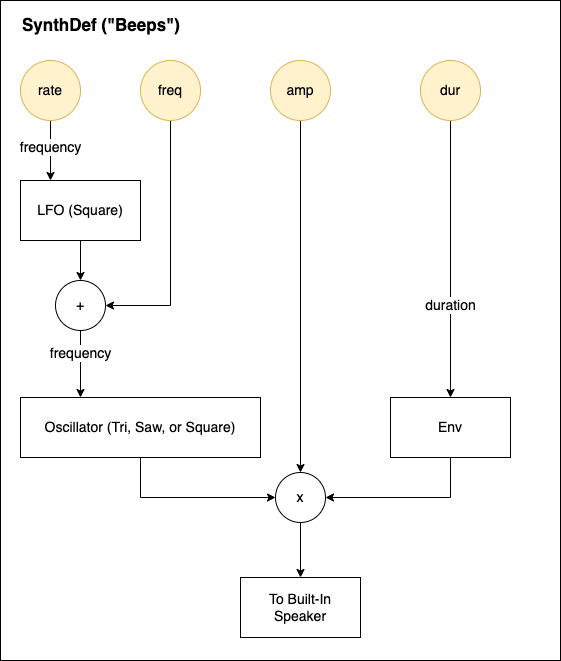
//1. SynthDef
(

SynthDef("Beep", {
	arg freq =60, amp=0.5,dur=0.5,rate=4;
	var sound,lfo;

	lfo= LFPulse.ar(rate,0.5,mul:freq);
	sound = Saw.ar(freq+lfo);
	sound = sound*(XLine.ar(1,0.00001,dur,doneAction:2));

	Out.ar (0,sound.dup*amp);
}).load(s);

SynthDef("Beep2", {
	arg freq =60, amp=0.5,dur=0.5,rate=4;
	var sound,lfo;

	lfo= LFPulse.ar(rate,0.5,mul:freq);
	sound=LFTri.ar(freq+lfo);
	sound = sound*(XLine.ar(1,0.00001,dur,doneAction:2));

	Out.ar (0,sound.dup*amp);
}).load(s);

SynthDef("Beep3", {
	arg freq =60, amp=0.5,dur=0.5,rate=4;
	var sound,lfo;

	lfo= LFPulse.ar(rate,0.5,mul:freq);
	sound=Pulse.ar(freq+lfo);
	sound = sound*(XLine.ar(1,0.00001,dur,doneAction:2));

	Out.ar (0,sound.dup*amp);
}).load(s);


); //end of SynthDefs
The performance instruction is expressed using a Routine object in SuperCollider.
//2. Functions
(
~key=63;
~sixteenth=0.2;
~dur=0.5;
~rate=18;
~octave=12*rrand(-2,2);
~rhythm=[[1,1,1,0.5,0.5,1],[1,1,0.5,0.5,0.5,0.5]].choose;
~motif=[[0,3,0,3,0],[3,7,3,7,12],[0,3,7,10,0,7]].choose;
~tempo=1;
~instru=["Beep","Beep2","Beep3"].choose.asString;

~melody=Routine({
	var rhythm;
	loop{
		//freq =60, amp=0.5,dur=0.5,rate=4;
		rhythm=~rhythm.scramble*~sixteenth;
		[4,8].choose.do{
			(rhythm.size).do{
				arg count;
				Synth(~instru,[\freq,(~key+~motif.wrapAt(count)+~octave).midicps,\amp,0.2,\dur,~dur,\rate,~rate]);
				(rhythm.at(count)*~tempo).wait;
			}//~rhythm.size.do
		}//[4,8].choose;
	}//loop

});
); //end of Functions
Once ~melody Routine runs and starts to make sound in the Performance section, one can vary the pattern and timbre by modifying and/or evaluating ~global variables.
//3.Performance
//Evaluate each line separately

~melody.reset;~melody.play;
~melody.stop;

(
~dur=rrand(0.3,3.4); // note duration in seconds
~rate=rrand(8,18); //vibrato rate in Hz
~octave=12*rrand(-2,2); //octave shift
~rhythm=[[1,1,1,0.5,0.5,1], [1,1,0.5,0.5,0.5,0.5,1]].choose; //choose a rhythm pattern
~motif=[[0,3,0,3,7], [3,7,3,7,12], [0,3,7,10,0,7]].choose; //choose a note sequence
~tempo=[0.5,1,0.25,1.25].choose; //tempo (higher the number, slower the tempo)
~instru=["Beep","Beep2","Beep3"].choose.asString; //choose an instrument
)
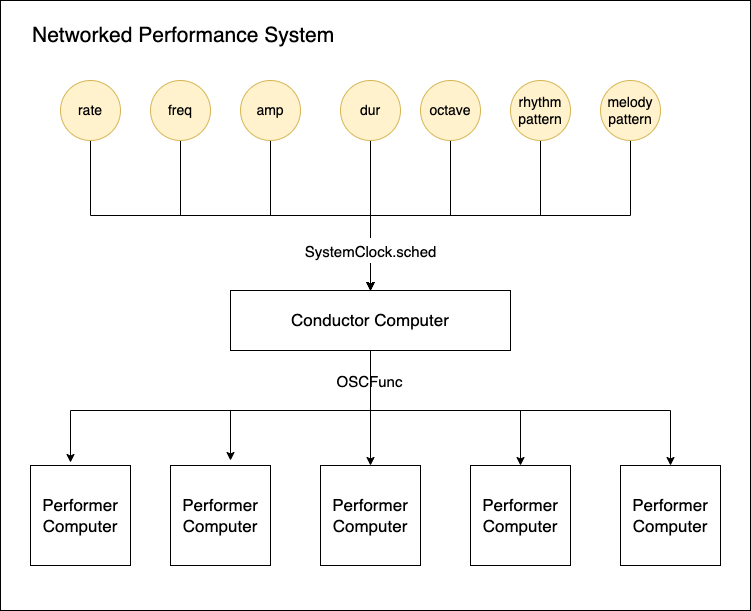
In the actual installation, each computer runs the above more SynthDefs for more variety. Instead of manually changing global variables, SystemClock.sched in SuperCollider creates a cue list of events and changes. The changes are generated by a central computer and sent to networked workstations using OSC.
Uniquely Electronic
I cannot think of a way to create a similar sound world to Control Click without using multiple computers. The recordings linked above are an approximation of the actual experience of the piece. The listeners are invited to walk around the computers that emit sounds and lights, which vary each time slightly due to the use of random numbers. Like many live electronic pieces, Control Click is best experienced live.
To learn more about Control Click, read the piece’s blog here. There are many versions of the piece. To read more analysis of electroacoustic pieces, browse a keyword in Academic Electronic Musician.