Tag Archives: computer music

Solo Electronic Improvisation

Since 2009, I have been presenting a solo set of live electronic music. Among the many electronic performance techniques, I specialize in creating electronic sounds on stage without pre-recorded samples. I use a combination of digital effect processors coded with SuperCollider to improvise a uniquely electronic soundscape in concerts and recordings. For more than a decade, I have marketed myself as an expert in that specific style. It is represented as a yellow rectangle in the diagram below. 

The categorization is not meaningful to anyone else, but it was a useful research goal for me in the 2010s. I share three representative pieces of my solo electronic improvisation for listening and analysis purposes.

Three Examples 

100 Strange Sounds (2012-2014) is a set of one hundred short video recordings featuring my live electronic music techniques. Each piece pairs a sound-making object with my SuperCollider code that processes its sound. I invite viewers to notice and enjoy the unexpected relationship between what they see and what they hear. For example, the sound of a cabbage becomes something else with a bunch of effect processors in 100 Strange Sounds #77

Large Intestine (2013) is a piece I made after 100 Strange Sounds #42. As described in the blog on style analysis, the no-input mixer improvisation enhanced with SuperCollider has been my favorite electronic instrument for more than a decade. Large Intestine, as the title suggests, epitomizes my interest in noise, digital signal processing, and improvisation. I plan to play this work in as many concerts as possible in the future.

Touch (2014) is my kitchen-sink piece that pairs multiple sound objects with multiple effects. It’s a summary of 100 Strange Sounds, in which I bring random objects on stage and improvise the combination and sequence of sounds. The piece opened many doors to career opportunities in the 2010s as an electronic music improviser. The techniques and technologies I learned in performing and refining Touch became a source for future non-improvisational compositions for electronic ensembles. 

Technology

All three pieces mentioned above use a variation of a single SuperCollider patch, available for download at this link. And this linked PDF explains the hardware and software setup to perform the pieces (warning: it is a little outdated). 

When I run the patch, it creates a GUI with multiple buttons that trigger customized effects. I control the number and timing of the effects’ on/off states with a mouse click – No MIDI controllers or control surfaces. A few clicks, probably unnoticed by the audience, are enough because I wanted the listeners to focus on the interaction I have with the non-electronic objects on the stage. 

As for the hardware,  I use a couple of microphones for Touch, one audio interface, and a laptop. This article explains the gear I used over the past 11 years.

Technique

Like other improvisations, the key technique in performing solo live electronic music is listening. I listen for variations that the computer part adds to the acoustic instruments, then respond with another instrument or effects. Because I cannot play a scale or harmony with the instrument (like cabbage), the listen-and-react decisions are often non-musical and raw. “The current sound is long, so I’ll play short sounds next.” “I will go from a simple to a complex texture.”  “The sound is very high in pitch. I’ll complement it with a very low rumble.” I also ask questions and try to come up with the best answer on stage. “What happens if I granularize the chattering teeth sound?” “The plastic block sounds harsh. Can I make it harsher?” “What is common between a slinky and a coin sound?”  

Free improvisation focusing on reactions and questions is fun, but it can quickly lose control of the length and form. So I plan a specific gesture or sound combination for transitions. The Extension and Connection blog linked earlier has such an example in Touch.  

Annecdote

More than fifteen years of experience in improvising with live electronics forms the foundation of my musicianship. I identified myself as a composer after earning a PhD in composition in 2008, but it did not lead to a gig or collaborations when I moved to Philadelphia for my first job as a music technology professor. The dire situation led me to develop a solo set I can prepare and present quickly in any situation. The strategic change, fortunately, worked, giving me ample opportunity to refine my performance and improvisation techniques. 

These days, I am comfortable identifying myself as a composer-performer of electronic music. My sound may not be fresh or cutting-edge at this point, but I think I have a bit more to contribute to the current solo setup. Perhaps the contribution is a documentation and theorization. Perhaps it is just one more new piece!

More electronic music composition/performance/practice articles are found at the Computer Music Practice project.
Scale – Computer Music Composition Method

Control and presentation of sound in different scales is a distinguishable feature of computer music. In this context, scale does not refer to a group of notes in different pitches, like a C major scale. It instead refers to proportions, as in big vs. small, long vs. short, and few vs. many. Music technology is capable of rendering a single musical idea in extreme proportions, and the collection of those sounds could become a composition.

I will demonstrate a scale-based electronic music composition process with Control Click, a sound installation composed in 2016. The piece is an 11-minute site-specific work for eight or more computers, creating an arcade-like environment with electronic blips and blinks. The computers are networked to play the same SuperCollider file, functioning as both a performer and a lighting device. The video below is a version of Control Click presented at the 2016 Third Practice Electroacoustic Music Festival.

Sound Design With Proportions

Featuring various scales/proportions in computer music means applying different values to a control parameter. If one can control the pitch of an electronic instrument, experiment with low Hz and high Hz. If the duration of a note in an electronic instrument could be programmed, make very short and very long sounds. The keyword here is extreme. A computer is capable of following laborious or precise instructions that are difficult or impossible for humans to execute. 

In Control Click, each computer algorithmically generates a melodic line based on a chord. I cannot control the exact sequence of pitches, but I could control the chord type, note duration, and tempo. The range of note duration and their playback pace is wider than that of acoustic instruments, thus capable of creating different timbres and moods. The audio example below plays the melodic line in normal, slightly longer, and very short note durations.

By playing the melodic line heard above with very long note duration and decelerating tempo, I could create the sound below. Note that the tremolo of individual notes reveals more as the note duration becomes longer. Longer and stacked notes with different tremolo rates create a sense of a chord with long reverb.

The sound heard above was inspired by the FFT time-stretching technique, which inspired composers to discover hidden sounds too short to be heard and appreciated in an audio file. The technique can also make a long audio phrase so short that one cannot identify the pitch. In other words, time-stretching scales the duration parameters in extreme proportions. But such an idea is applicable beyond FFT. The audio below is how I applied the duration/tempo scale to the percussion sound.

Composition With Proportions

The idea of applying different proportions can also be applied beyond parameter change. In Control Click, the example sounds in the previous section are meant to be played by multiple computers. But as a site-dependent piece with random number generators, each computer emits a distinguishable note sequence at different physical locations. My goal was to create a sonic environment of an arcade from my childhood – chaotic, overwhelming, and delightful. 

Links below point to the moment in the piece that uses previously mentioned scaling examples in an ensemble format. 

  • The normal melodic line with percussion (1:30)
  • Long note duration (2:30-2:50)
  • Short note duration (5:30-6:00)
  • Extreme extension of note duration and tempo (8:50-10:00)

In the third link, Long note duration, the melodic line is detuned by a random amount at synced timings. The effect of one computer doing so is not so noticeable. But when multiple computers are out of tune in a large space, it creates an impact that I cannot recreate in a concert hall.

Notation of Proportions

The concept of controlling a range and scope of musical parameters, rather than instructing specific notes to play, is transferable to human performance. A proper notation to play an electronic instrument within a limited range can be considered as proportional control of choices. Seven Bird Watchers (2019) for drum machine ensemble is an example.

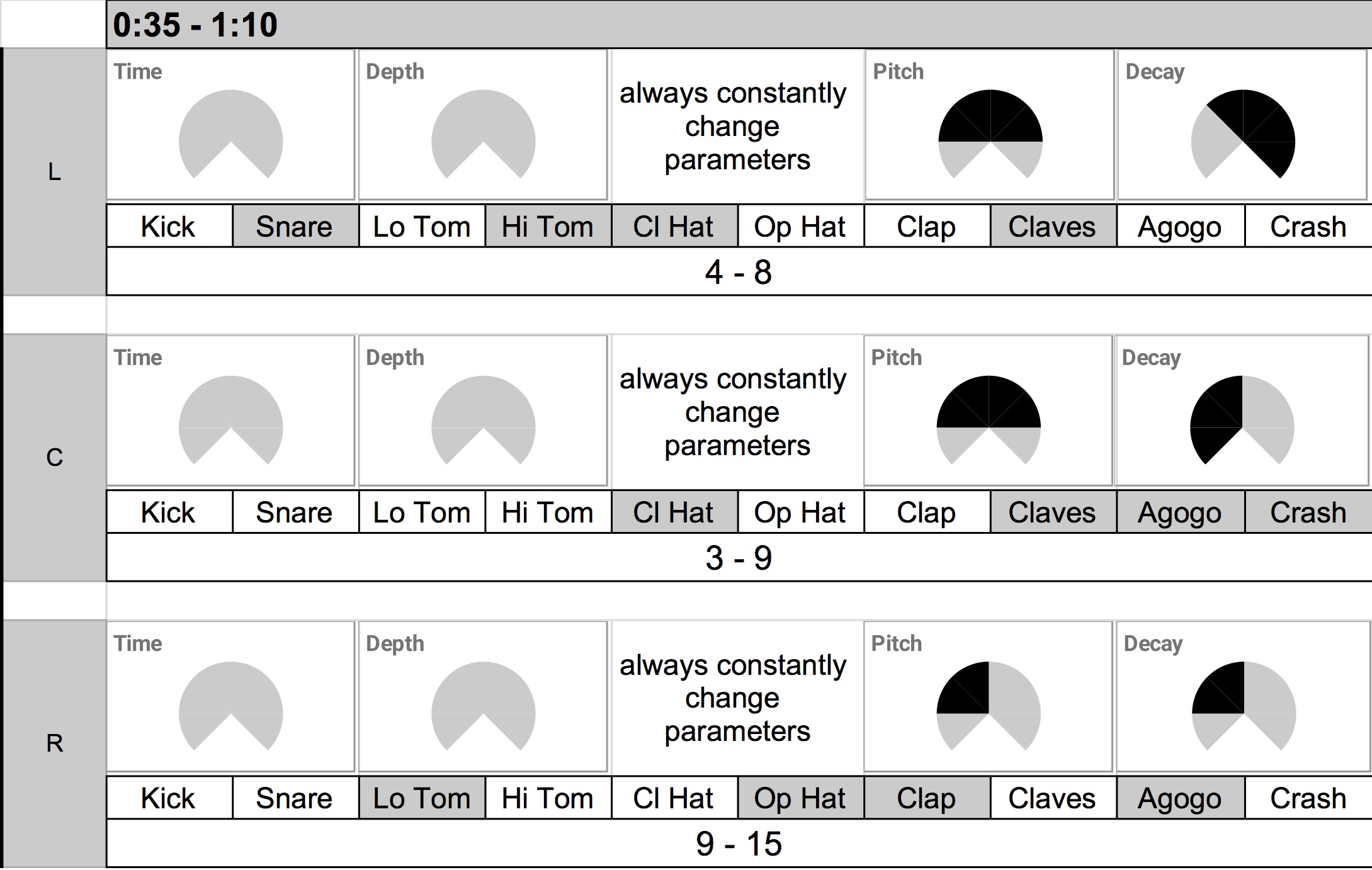
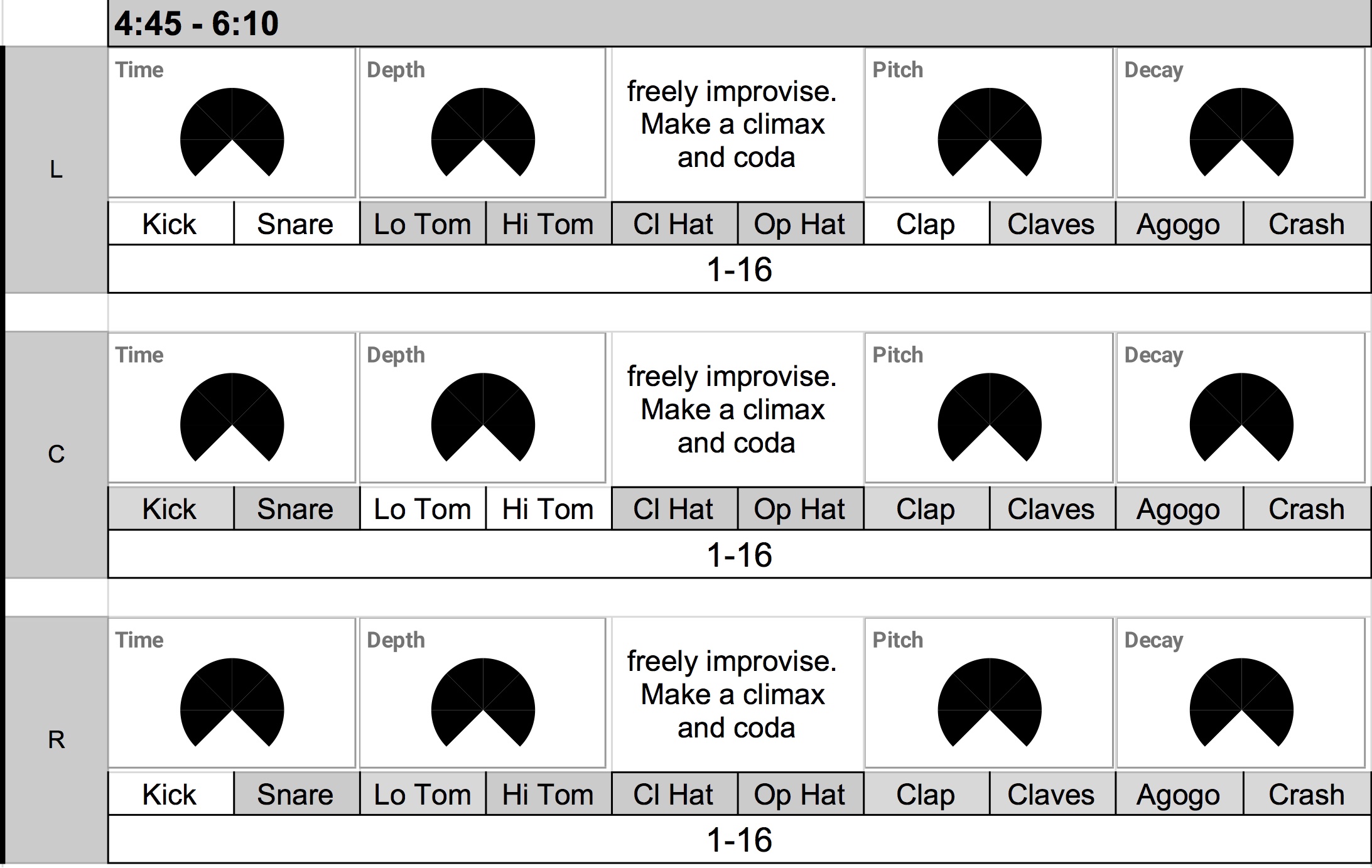
Seven Bird Watchers uses drum machines with customized sync tracks, and the sync track defines the form—the piece is simply seven sections with an increase in tempi and sonic range.  While the composed sync track holds Korg Volca Beats’ tempo together, the human performers change the drum machine’s parameters according to the score. The score depicts the range of parameters performers can improvise.


For example, the early section has limited parameter changes and choices. It lasts about 35 seconds with a moderate increase and decrease in tempo. The performers, as shown in the score above, have a very limited choice of parameter change – the dark area of the Time/Depth/Pitch/Decay knobs, as well as the dark areas in the instrument choice, are the areas in which the performers can move or use knobs and buttons in Volca Beats.

The latter section, in contrast, has a bigger range of tempo changes with an extended duration of 85 seconds. The performers are free to use the entire range of the knobs with almost all available sounds. The proportion of choices and resulting sounds is more varied. For example, the tempo gets so fast that the sixteenth-note run of some percussion instruments loses sense of rhythm. It starts to sound like a bird chirping.

References

For further study, read Curtis Road’s Microsound. I learned the musical application of scale and proportion from this book. Research the scale and proportion in visual art as well. There are ample examples of how different scales make ordinary events extraordinary. Watching a movie on a big screen feels different than watching it on a phone screen. A slow-motion video effect is fun. Similarly, a sound with varying time scales and contrasting parameter values fascinates me.

Computer Music Composition Method has other related entries. Read them if interested


Tool and Variations – Computer Music Composition Method

Create a patch, make different sounds with it, and arrange them in order. This is my go-to method for computer music composition. Instead of a theme in the theme and variations form, a computer musician begins a composition by making an electronic instrument or an audio app patch. Then, the composer explores different sonic possibilities of the instrument. The sounds created with the instrument are then presented in a particular order. The article demonstrates this process with my old composition. I will also provide more recent practices of the method with the entries in Computer Music Practice.

Tool and Variations in Decrescendo (2003)

Step 1. Make a software instrument

A computer music composer’s first job often is to design a digital instrument or a patch. A patch in this context is a specific connection of features/modules in an audio programming environment, such as Max, Csound, or SuperCollider.  In Decrescendo, a fixed-media piece published in 2003, I wrote a Csound patch that generates a series of sine tones according to an adjustable overtone series.  The formula to make a pitch series is as simple as the one below, but I could control tempo, note duration, and pan to my taste.

Note of a scale = fundamental frequency* (overtone number *detune value)

Here are two sound examples generated from the Decrescendo instrument.

Step 2. Make variations with the instrument 

A customized instrument has the potential to generate sounds of various timbres with different, sometimes randomized, settings of its parameters.  The second step in the tools and variations method is to experiment and document as many different parameter settings as possible that yield distinct sounds. In Decrescendo, I adjusted the fundamental frequency, note duration, scale direction, pan position, and detune value to create different, but related, sounds. Some variations are created with duplication and overlap (more on this in another article). Below are some audio examples.

Documented variations of parameter settings in a digital instrument are called presets. Featuring presets of an instrument is a distinct characteristic of electronic music compositions. Here’s an article about presets for further study.  

Step 3. Sequence the variations 

The next step after gathering a library of presets is to make decisions on when to play which sounds. The decision-making and its documentation involve selecting a few from many sounds in Step 2. The deciding factor depends on the context and personal taste. In the case of Decrescendo, the piece opens with an unaltered overtone series, followed by slightly detuned scales. The second section (00:30) contrasts the opening by presenting a few descending overtone series. The third section (00:50)  reminds the listener of the opening gesture with a further exploration of detuning and tempo variation. The preset choices for the rest of the piece are my answers to the question, “What makes sense based on what we have heard so far?”

The sequencing, an act of ordering events, of various sounds made with an instrument, is not formulaic. There is no right answer, but the choices are based on the context, experience, and taste of the creator. 

Computer Music Practice

Tool and variation is a method that could be applied to many digital music formats. Here are my recent applications of the method in installation, fixed media, and electronic ensemble works. The entries are part of the Computer Music Practice project.
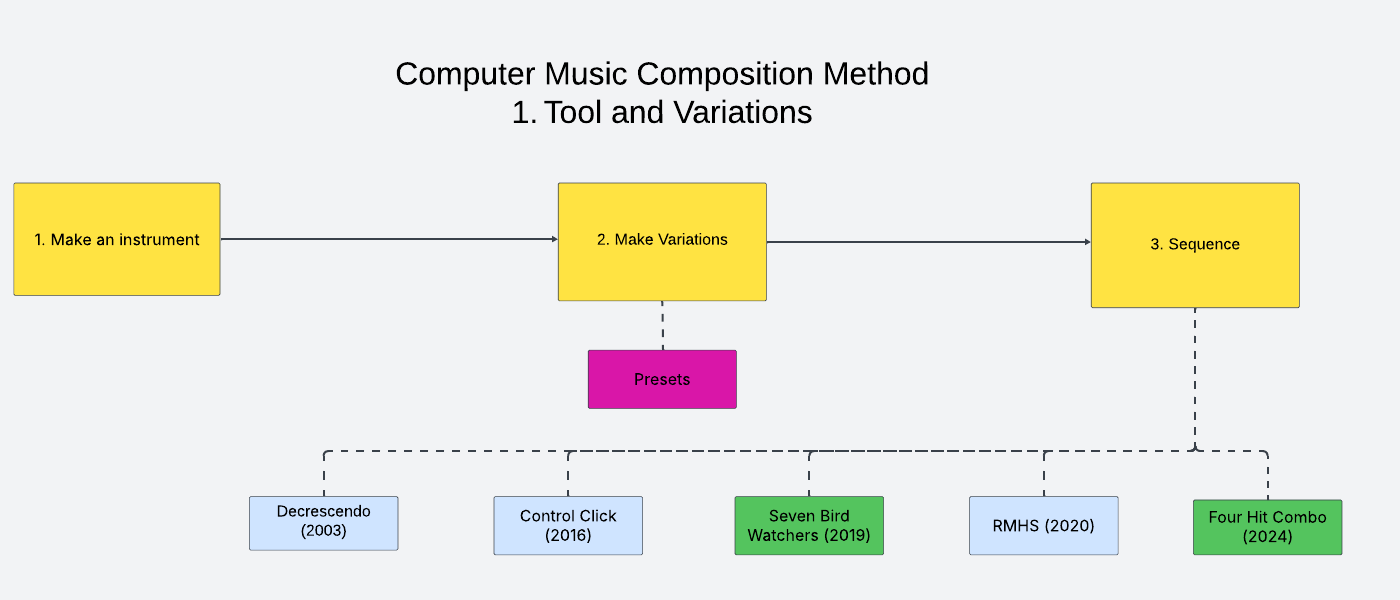
Control Click (2016): In this installation for multiple desktops, every computer plays the same SuperCollider patch. The instrument is designed to generate a randomized rhythm and timbre at a pre-scored and fixed timing. In other words, the instrument randomly generates timbre at a fixed sequence of changes. I saved a surprising and best preset setting I found for the climax. 

Seven Bird Watchers (2019): In this electronic ensemble piece, I did not design the instrument, but made a specific drum pattern for Korg Volca Beats. The score displays seven variations of button combinations and gestures that performers need to create with the said drum pattern at a specific timing. The variable tempo is composed/sequenced with SuperCollider.

RMHS (2020):  RMHS is a drone generator made with SuperCollider. A user can download the patch, set parameters, press a button, and create a drone of microtonal harmonies. The RMHS album consists of eight examples of such drones. The sequence portion of this project is the track order, which reflects my interpretation of consonant and dissonant harmonies.

Four Hit Combo (2024): The preset variation and sequence creation process is similar to that of Seven Bird Watchers – I notated different instances of presets for performers to interpret. But the instrument in Four Hit Combo does not have a set sound. Instead, it is a platform that processes any incoming audio files with a set of gestures based on granular synthesis. It is possible to create an instrument without sound in computer music!

Computer Music Practice – Learning

The articles in the Learning section of CMP cover computer musicianship. They are examples of a music technologist’s work and efforts that the audience does not see. But they are essential steps for artistic improvement. Every musician has routines to refine themselves, and the Learning section shares my version of thoughts, actions, and reflections on computer music practice.

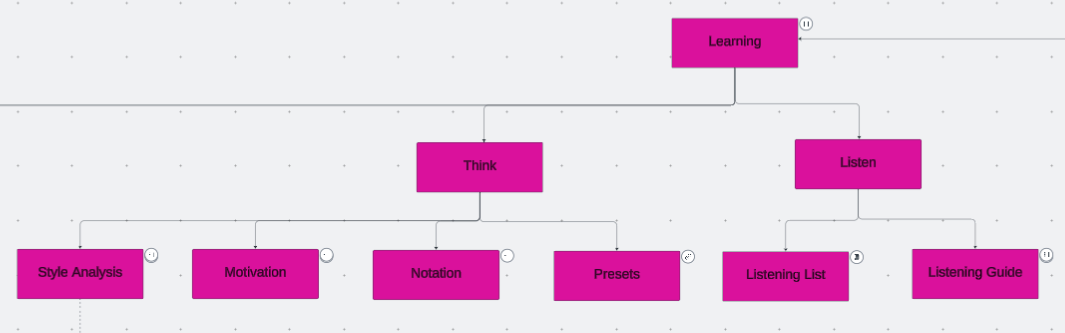
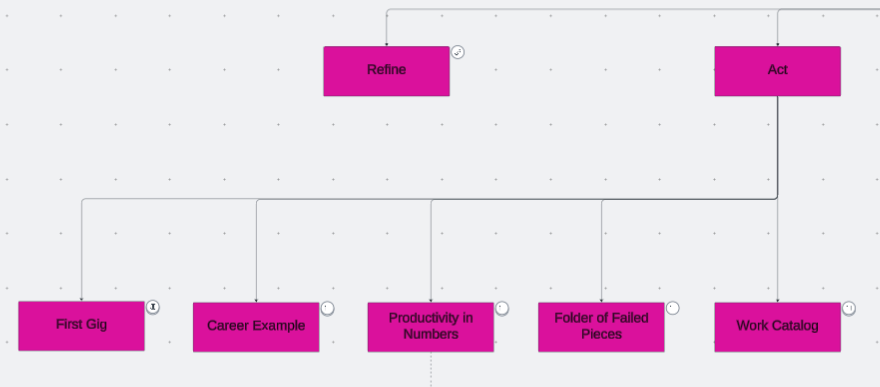
There are four subsections, and the first three are listen, think, and act. The first and most fundamental step in musicianship is learning to listen. Then, a conscious and analytical listening connects to thinking. Thinking means analyzing and imagining sounds and techniques to enhance a piece, organizing and comparing past compositions to identify creative patterns, and articulating those thoughts into words for reference. These thoughts become tangible results through actions. The results could be a composition, a concert, a career move, an idea, or another sound to circle back to the listen-think-act process. 

Listening, thinking, and acting are necessary steps in composing, coding, or improvising, as the repetition of those steps refines one’s skills. The refining process in music technology is essential but often overlooked. There are more instruments and techniques I can learn in music technology. I chose a few that interest me the most and spend time and energy to improve at them, rather than using the newest tools. Performers of non-electronic instruments have resources and historical references on the refinement process, such as etudes and method books for orchestral instruments. Computer music does not seem to (or rather, is not designed to) have a standard practice routine, but I can at least share my practice routine specific to computer musicianship. 


Computer Music Practice (CMP) is an interactive and personal example of computer musicianship. Click each entry in the chart to read and listen to Joo Won Park’s computer music research.

Computer Music Practice – Presenting

Finishing a composition means the beginning of other work. Posting the audio files on the web is the first step in sharing my music, but it is not the only way to showcase the piece’s best aspects. Music for human performers is meant to be experienced in live concerts. Some generative music’s value is in creating and hearing multiple versions. As an electronic music researcher and teacher, presenting the algorithms, codes, and other relevant findings may be as important as sharing the music.

I do the above to present my work to reach a wider audience. In the Presenting section of Computer Music Practice, I provide more concrete examples of my efforts to do so. Electroacoustic performers interested in promoting their works, as well as curators interested in adding electronic music to their events, may benefit from reading the articles in this section.

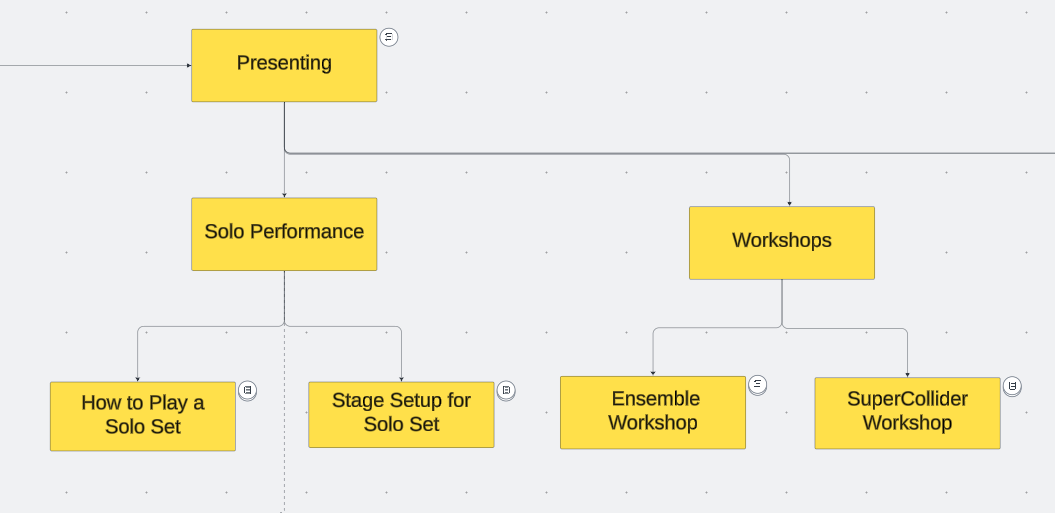
  • Solo Performance: Solo performances account for the largest portion of my stage appearances. Performing solo electronic music needs specific preparations. The practice of preparing and presenting electroacoustic solo works changes over time, and I share a record of these changes spanning more than a decade. 
  • Electronic Ensemble: Practice and presentation methods for electronic ensembles vary widely, and there are few records about them. Proper documentation of the creative process helps the evaluation of the genre.  I share my approach to running an electronic ensemble so that those interested can use it as a reference.
  • Tools: Some of my pieces are written as a demo of computer music techniques. Those compositions feature research that could be applied to other people’s works. The articles in this section introduce tools and technologies that can be used and modified. Please credit the creator if sounds and codes made with the tools provided here are applied to a piece.  
  • Workshops: I enjoy providing opportunities to learn about tips and techniques of electronic music production and performance. I share teaching materials for in-person or virtual workshops on electronic ensemble and SuperCollider.

Live electroacoustic music, the genre of music in which I excel, is not well-known. It has relatively little historical context and resources for evaluation, or I am asking people I don’t know to attend a concert where they may not see the relationship between the performer’s actions and the sound. One way to mitigate this inherent challenge is to provide as many opportunities as possible to listen, create, and play electronic music. It requires more effort, such as running workshops and sharing tools. The entries in the Presenting section are my version of such efforts. 


Computer Music Practice (CMP) is an interactive and personal example of computer musicianship. Click each entry in the chart to read and listen to Joo Won Park’s computer music research.