Tag Archives: computer music practice

Presets and Compositions

A preset is a parameter configuration of a digital electronic instrument. A preset can make one synthesizer sound like a drum, string, or anything else. It also makes one reverb unit imitate the acoustics of a stadium, bathroom, or any other environment. Compared to an analog instrument’s patch, a preset can be saved and loaded. I can accurately recreate and use favorite or project-specific sounds instantly in a digital modular synth.  And there could be thousands of presets for one instrument. The ability to access a large quantity of presets instantly and accurately is, in my opinion, the digital instruments’ most distinguishing advantage over analog or acoustic instruments.

Many electronic music production starts with browsing through presets. A Logic Pro user can choose and play a sound, such as Eerie Strings or Wormhole Lead. These two sound different, but both are made with the same Retro Synth software instrument. In other words, Eerie Strings and Wormhole Lead are presets of Retro Synth. 
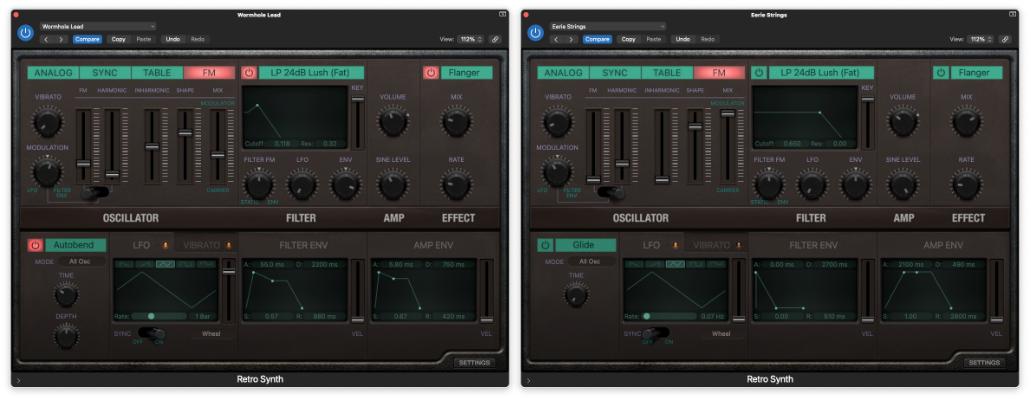
A producer could complete a piece with 100 different sounds using a  DAW, but that does not mean there were 100 different instruments. There could have been 10 instruments with 100 saved variations/presets.  Of those 100 presets, some could also be the creator’s original or modification. Some presets could change their parameters within a piece via automation. 

The idea of using multiple configurations of an instrument and then dynamically changing them applies beyond presets. Preset-changing is a uniquely electronic composition technique, as some electroacoustic compositions feature one or two electronic instruments with sequenced presets. For example, in  Armor+2 (2015), I cue digital instruments’ parameter changes according to the score.  I used SuperCollider to achieve this, but any apps with cue features could do the same.
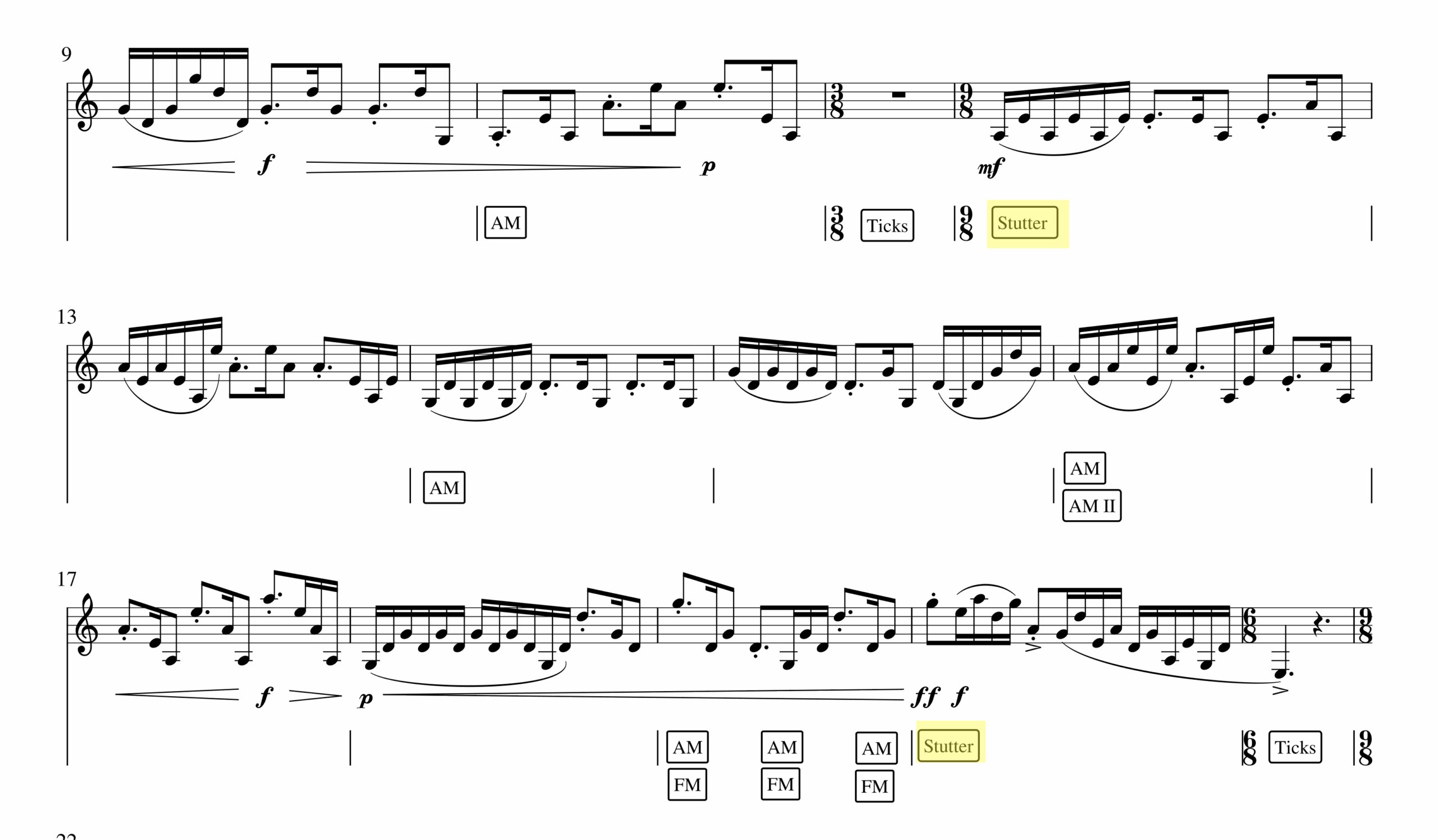
In Armor+2, the computer randomizes parameters of a digital instrument where a boxed word is notated in the score (FM, AM, Stutter, Ticks). I think of this process as a random preset change that yields expected but different effects at every performance. For example, one can hear a stuttering effect in different rhythmic patterns in measures 12 (0:30 in the recording) and 20 (0:50 in the recording). The same randomization happens with FM and AM effects throughout the piece. The dynamically changing, yet well-timed change makes the computer part function like a jazz accompanist. A jazz pianist plays the notated chord progression but improvises how those chords are presented. Similarly, the computer part of Armor+2 changes the clarinetist’s sound as notated, but the resulting sounds are varied at every performance. 

Another example is in Save Point By The Lake (2024) for a laptop ensemble. Every performer in this piece plays piano samples according to the score. For example, performers press keys A, F, and J on the computer keyboard in measures 2,3, and 4 with notated rhythm.
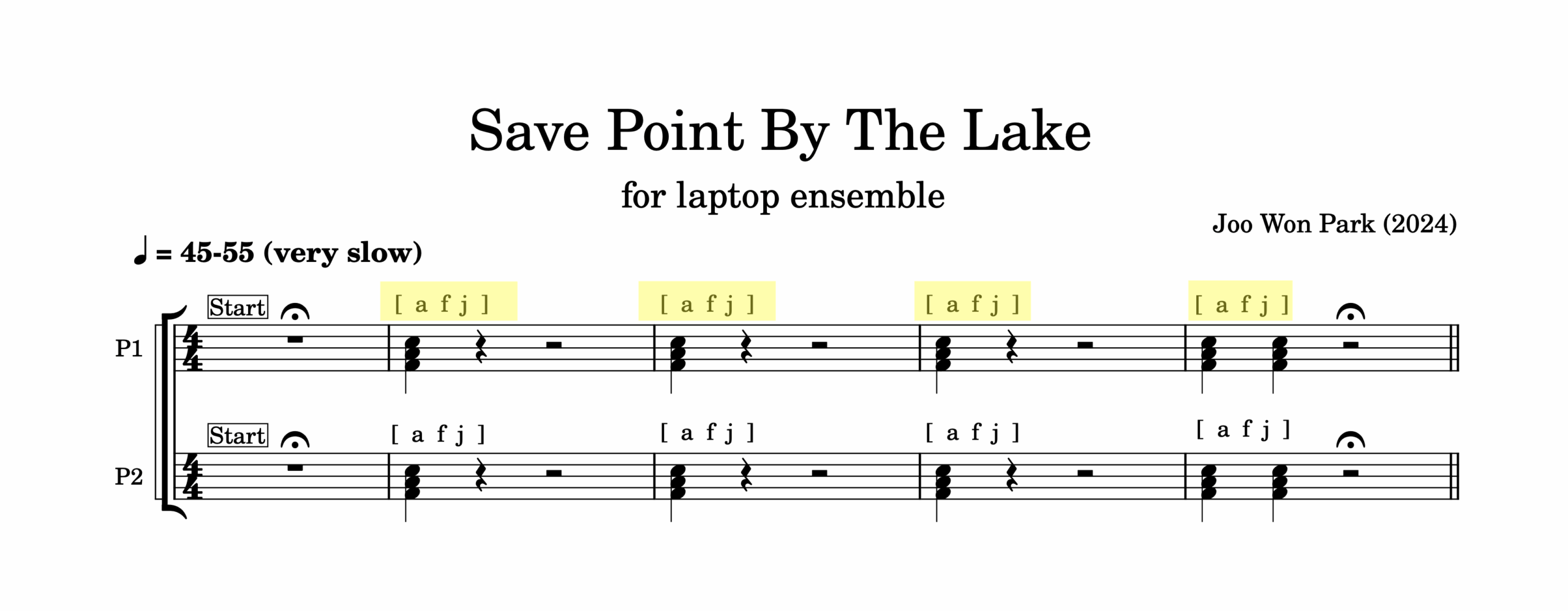
But unlike an acoustic piano, the laptop will not always play a F major chord. I designed the instrument so that at every stroke of a key, SuperCollider randomizes pitch, dynamics, and detuning amount. Pressing an F key at measure 1 and doing the same action in measure 2 yields a different note. This way,  the ensemble can play the piece in notated rhythm with computer-assisted interpretations.

A preset is a recordable and recollectable variation of a digital instrument. It is an equivalent of a save or a snapshot of an app, and it is a powerful tool to express originality and creativity. Anyone can use Logic Pro’s Retro Synth or SuperCollider, but a customized preset can sound unique. If those original sounds are put together in order or layered with other sounds, the result could be a composition. Lastly, if we expand the definition of an instrument, other creative processes could be thought of as a preset change. If a recording studio is an instrument, what are its presets? If an orchestra is an instrument, what are its preset changes and randomization? These wonderings are delightful and provocative.

This article is a part of Computer Music Practice – Learning.
Computer Music Practice – Learning

The articles in the Learning section of CMP cover computer musicianship. They are examples of a music technologist’s work and efforts that the audience does not see. But they are essential steps for artistic improvement. Every musician has routines to refine themselves, and the Learning section shares my version of thoughts, actions, and reflections on computer music practice.

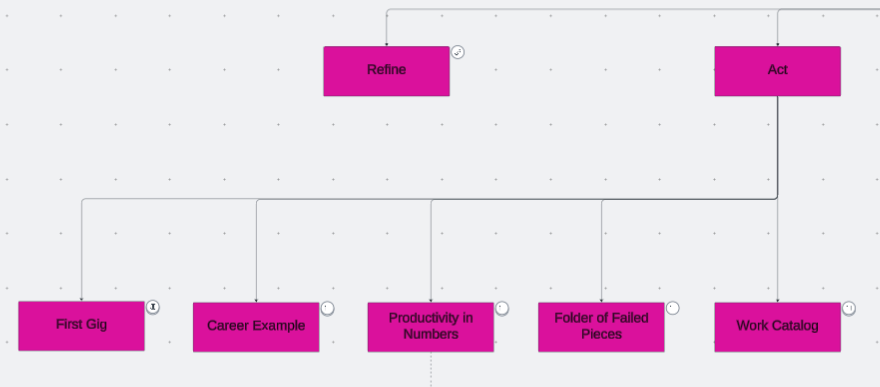
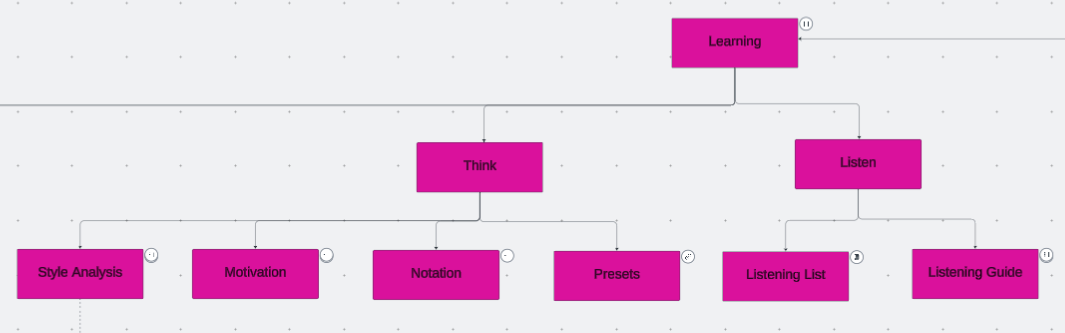
There are four subsections, and the first three are listen, think, and act. The first and most fundamental step in musicianship is learning to listen. Then, a conscious and analytical listening connects to thinking. Thinking means analyzing and imagining sounds and techniques to enhance a piece, organizing and comparing past compositions to identify creative patterns, and articulating those thoughts into words for reference. These thoughts become tangible results through actions. The results could be a composition, a concert, a career move, an idea, or another sound to circle back to the listen-think-act process. 

Listening, thinking, and acting are necessary steps in composing, coding, or improvising, as the repetition of those steps refines one’s skills. The refining process in music technology is essential but often overlooked. There are more instruments and techniques I can learn in music technology. I chose a few that interest me the most and spend time and energy to improve at them, rather than using the newest tools. Performers of non-electronic instruments have resources and historical references on the refinement process, such as etudes and method books for orchestral instruments. Computer music does not seem to (or rather, is not designed to) have a standard practice routine, but I can at least share my practice routine specific to computer musicianship. 


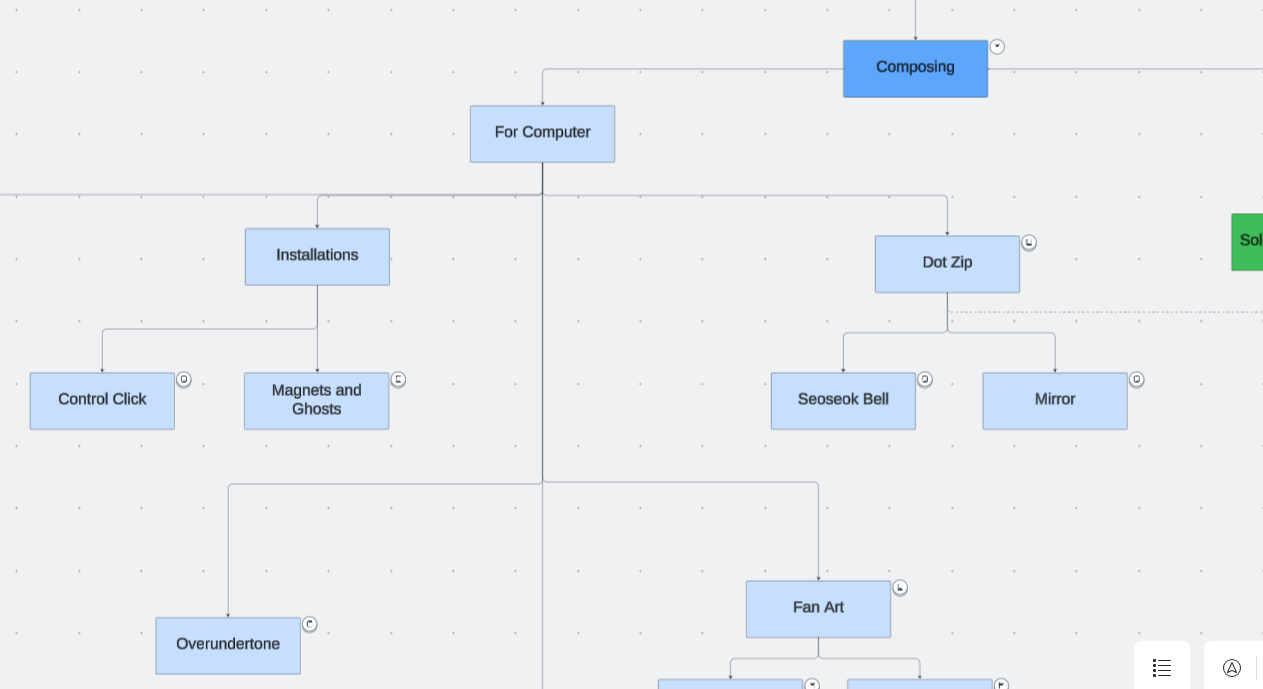
Computer Music Practice (CMP) is an interactive and personal example of computer musicianship. Click each entry in the chart to read and listen to Joo Won Park’s computer music research.

Computer Music Practice – Composing

Composing, an act of making original music, is my main artistic skill. I make concrete and shareable products that represent personal thoughts and experiences. The product is sound, and the material I use is electronics. Since 2002, I have composed and shared over 130 compositions online and offline.  Electronic musicians can have various titles, such as a researcher, educator, developer, performer, etc.  The specialty I’ve focused on is that of a computer-based music composer. 

In CMP, I organized my compositions from 2014 to 2026 in two main categories and six subsections. The main categories are defined by the presence or absence of human performers. The first category, For Computers, has fixed media and algorithmically generated music. They do not require human performers to make sound. They are either listened to as is (without images) or are used in multidisciplinary shows. The pieces in this category are further grouped by albums (Overundertone, DotZip, and Forms to Ponder) or functions (Sound Installation or Dance).

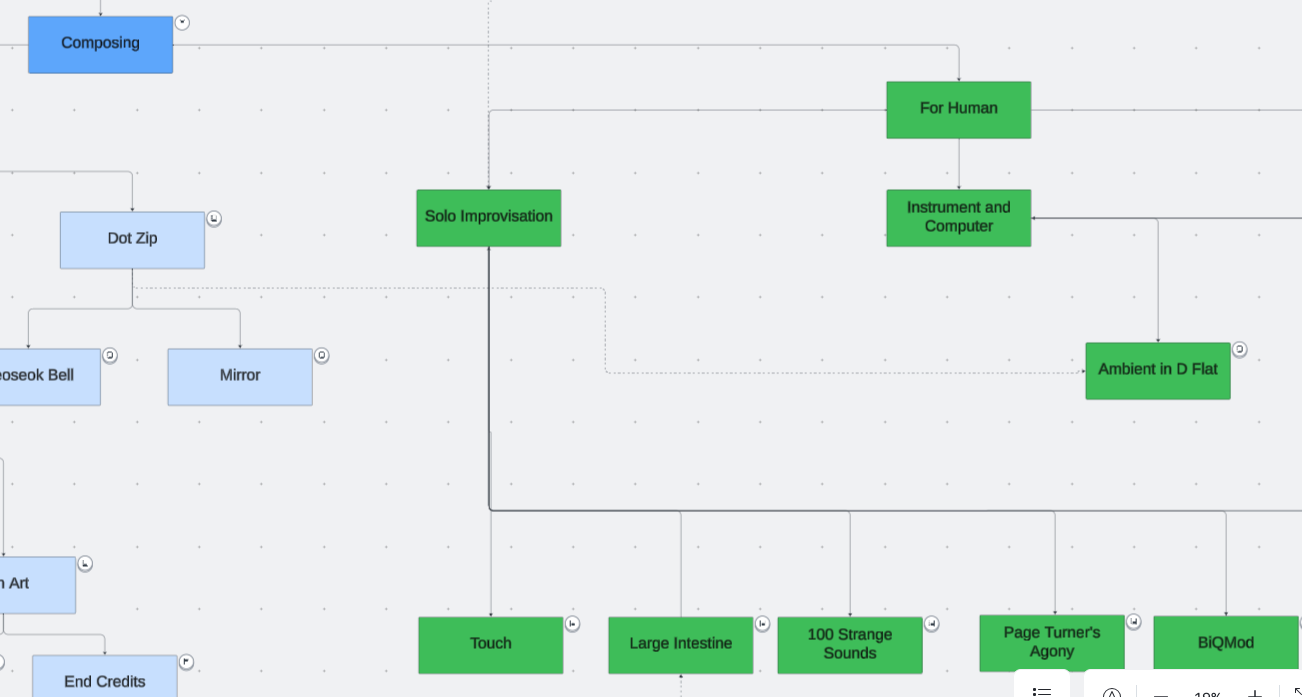
The second category, For Humans, involves pieces for human performers. Unlike the For Computers pieces, they are best experienced in live concerts. The For Humans category is further organized by instrumentation. The Solo Performance section has works written for me to play on stage. Most of them are improvisational and were written to show my performance skills. The music under Instrument and Computer needs performers other than myself. They are written for one or two classically trained instrumentalists and a computer-generated part. The last subcategory, Electronic Ensemble, differs from the others, as they are written for an ensemble of electronic instrument performers. The performers are not necessarily traditionally trained musicians. The number of performers ranges from 4 to 20 or more.

Some compositions were successful in leading me to new or better opportunities. Some pieces did not make it beyond a premiere.  But all compositions led to improvements in technique, time and energy management, human interactions, and getting inspirations.

  • Technique: Writing and editing SuperCollider codes for more than 100 pieces gave me plenty of time to get good at expressing musical ideas in numbers and instructions. The repetition and refinement in composition also form a musical style. I think there is a “Joo Won sound” at this point.
  • Time and Energy Management: With improved technique, I spend a fraction of the time and energy to create music of equal quality compared to decades ago.  The extra time and energy leave room to experiment and explore. 
  • Human Interactions: Working with others is not my natural talent, but it has gotten easier as I write and present more pieces for performers. Meeting, interacting, listening, arguing, and all other activities need practice. Writing and sharing compositions gave me plenty of time for trial and error. 
  • Getting Inspirations: noticing things worth sharing and writing music about them needs practice. Art is about sharing unusual or memorable experiences in life, and artists actively search for them. I learned to notice and observe delightful sounds, experiences, and memories so I can compose. Perhaps more importantly, I also learned to make music when the inspiration is nonexistent. A deadline is the best inspiration. 

Please click on the objects in the CMP diagram to listen and read about the works featuring unique electronic sounds. Most articles also have links to the SuperCollider code for readers to see and run. The purpose of the articles in the Composing section of CMP is to share composing techniques and tips with specific examples from one composer’s work catalog. Compare how I thought, wrote, and executed pieces with other electroacoustic composers. If willing, compare how the pieces in the Composing section are similar or different by album, instrumentation, or functions.


Computer Music Practice (CMP) is an interactive and personal example of computer musicianship. Click each entry in the chart to read and listen to Joo Won Park’s computer music research.

Computer Music Practice Examples

Computer Music Practice Examples is a new series featuring the application of computer music technology to instrument design, composition, performance, and presentation. 

Introduction

RMHS: Drone Generator

ISJS: Granular Processor

SIOE: Audio Supercut Generator

APG: Audio Palindrome Generator

Many: Reverb Ambient Generator

Forms to Ponder

CMPE Variety Pack

Youtube Playlist